
大家好,欢迎来到IT知识分享网。
一、介绍
1、概念
加密中的另一个概念是哈希。哈希与传统加密不同。前面的对称加密和非对称加密都可以从密文再回到原文。哈希是一种单向算法,无法轻易撤消。又称消息摘要( Message Digest )或数字摘要 Digital Digest )。
2、特点
- 它是一个唯一对应一个消息或文本的固定长度的值,它由一个单向Hash加密函数对消息进行作用而产生
- 使用数字摘要生成的值是不可以篡改的,为了保证文件或者值的安全
- 消息摘要是单向、不可逆的
3、常见算法
无论输入的消息有多长,计算出来的消息摘要的长度总是固定的。例如应用MD5算法摘要的消息有128个比特位,用SHA-1算法摘要的消息最终有160比特位的输出。
只要输入的消息不同,对其进行摘要以后产生的摘要消息也必不相同;但相同的输入必会产生相同的输出。
(1)MD5
摘要结果16个字节, 转16进制后32个字节
(2)SHA1
摘要结果20个字节, 转16进制后40个字节
(3)SHA256
摘要结果32个字节, 转16进制后64个字节
(4) SHA512
摘要结果64个字节, 转16进制后128个字节
4、通用方法
这几种算法的实现方法都差不多,有三种方法可以实现
(1)MessageDigest
这种方法要复杂一点,需要手动转成16进制,其他几种不需要手动转
MessageDigest digest = MessageDigest.getInstance(algorithm); byte[] bytes = input.getBytes(); digest.update(bytes); byte[] hashedBytes = digest.digest(); System.out.println("密文的字节长度:"+hashedBytes.length); StringBuilder hexString = new StringBuilder(); for (byte b : hashedBytes) { String hex = Integer.toHexString(0xFF & b); if (hex.length() == 1) { hexString.append('0'); } hexString.append(hex); } String hashedData = hexString.toString();(2) DigestUtils
String hashedData = new DigestUtils(algorithm).digestAsHex(input);(3) HashFunction
HashFunction hashFunc = Hashing.xxx(); HashCode hash = hashFunc.hashString(input, StandardCharsets.UTF_8); String hashData= hash.toString();5、示例
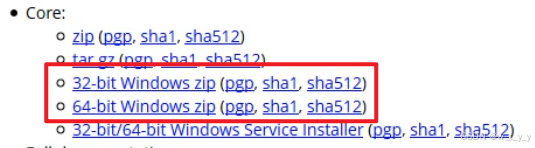
百度搜索 tomcat ,进入官网下载 ,会经常发现有 sha1,sha512 , 这些都是数字摘要。

二、MD5
1、实现方法
方法一:MessageDigest
使用MessageDigest
/ * getMD5 * @param message message * @param code code * @return MD5 */ public static String getMD5(String message,String code) { String md5str = ""; try { //1 创建一个提供信息摘要算法的对象,初始化为md5算法对象 MessageDigest md = MessageDigest.getInstance("MD5"); //2 将消息变成byte数组 byte[] input = message.getBytes(code); //3 计算后获得字节数组,这就是那128位了 byte[] buff = md.digest(input); //4 把数组每一字节(一个字节占八位)换成16进制连成md5字符串 md5str = bytesToHex(buff); } catch (Exception e) { e.printStackTrace(); } return md5str; } public static MessageDigest getInstance(String algorithm) throws NoSuchAlgorithmException { try { Object[] objs = Security.getImpl(algorithm, "MessageDigest", (String)null); if (objs[0] instanceof MessageDigest) { MessageDigest md = (MessageDigest)objs[0]; md.provider = (Provider)objs[1]; return md; } else { MessageDigest delegate = new Delegate((MessageDigestSpi)objs[0], algorithm); delegate.provider = (Provider)objs[1]; return delegate; } } catch(NoSuchProviderException e) { throw new NoSuchAlgorithmException(algorithm + " not found"); } }
String sig = MD5Util.getMD5(unCodeStr.toString(), "UTF-8");方法二:DigestUtils
使用MessageDigest和DigestUtils都可以,使用DigestUtils代码更简洁:
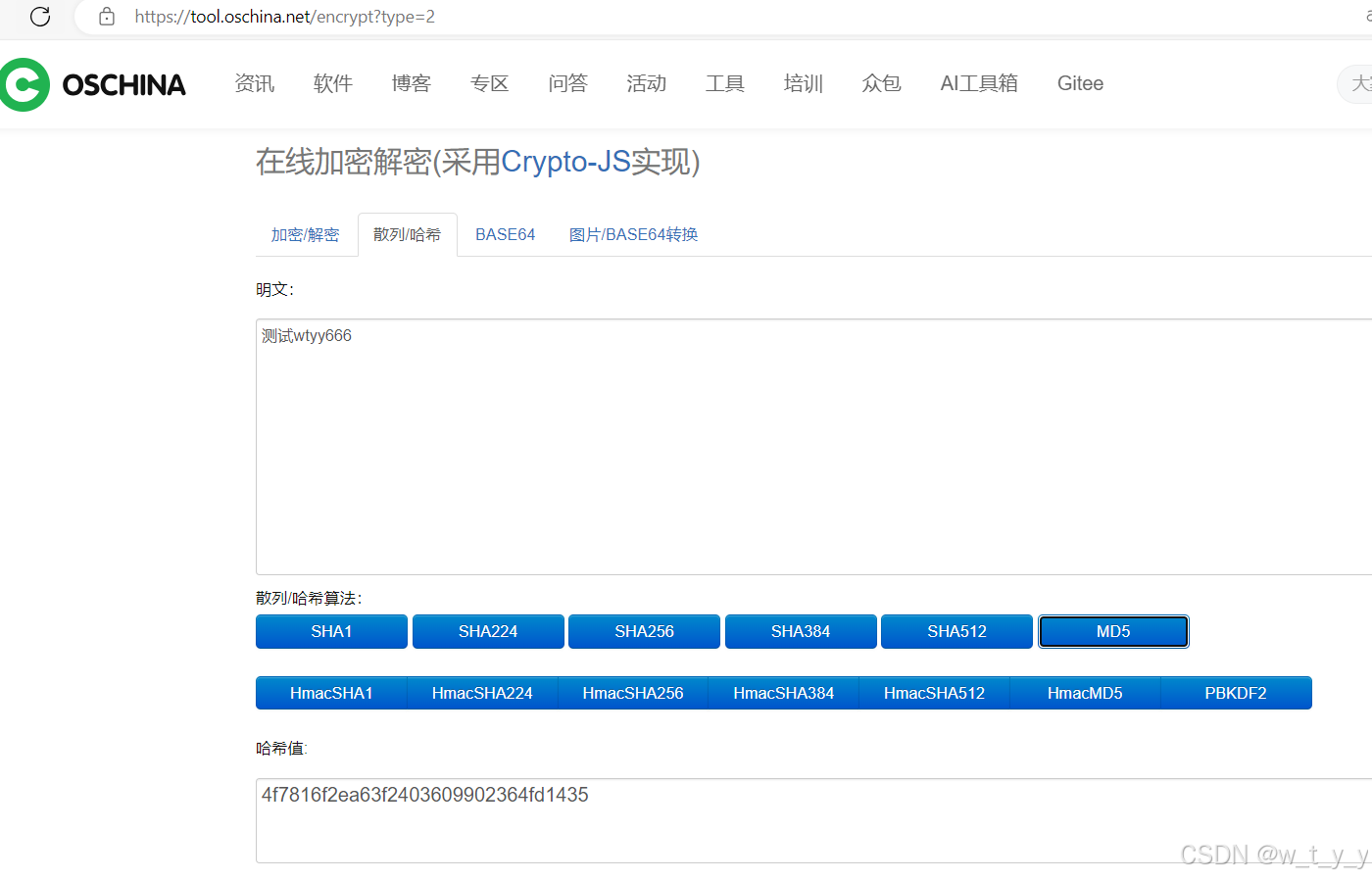
import com.baomidou.mybatisplus.core.toolkit.StringUtils; import lombok.extern.slf4j.Slf4j; import org.springframework.util.DigestUtils; import java.security.MessageDigest; import java.security.NoSuchAlgorithmException; import java.util.Base64; @Slf4j public class Md5Util { public static void main(String[] args) throws NoSuchAlgorithmException { String input = "测试wtyy666"; String md5 = DigestUtils.md5DigestAsHex(input.getBytes()); System.out.println(md5); } public static String toMd5(String msg) { if (StringUtils.isBlank(msg)) { return null; } return DigestUtils.md5DigestAsHex(msg.getBytes()); } } 
测试与在线生成的一致:
方法三:HashFunction
使用guava包下的方法,
HashFunction hashFunc = Hashing.md5(); HashCode hash = hashFunc.hashString(input, StandardCharsets.UTF_8); String hexDigest = hash.toString(); System.out.println("方法3:"+hexDigest);可以看到和DigestUtils生成的一致
import com.baomidou.mybatisplus.core.toolkit.StringUtils; import com.google.common.hash.HashCode; import com.google.common.hash.HashFunction; import com.google.common.hash.Hashing; import lombok.extern.slf4j.Slf4j; import org.springframework.util.DigestUtils; import java.nio.charset.StandardCharsets; import java.security.MessageDigest; import java.security.NoSuchAlgorithmException; import java.util.Base64; @Slf4j public class Md5Util { public static void main(String[] args) throws NoSuchAlgorithmException { String input = "测试wtyy666"; String md5 = DigestUtils.md5DigestAsHex(input.getBytes()); System.out.println("方法2:"+md5); HashFunction hashFunc = Hashing.md5(); HashCode hash = hashFunc.hashString(input, StandardCharsets.UTF_8); String hexDigest = hash.toString(); System.out.println("方法3:"+hexDigest); } public static String toMd5(String msg) { if (StringUtils.isBlank(msg)) { return null; } return DigestUtils.md5DigestAsHex(msg.getBytes()); } } 方法2:4f7816f2ea63f64fd1435 方法3:4f7816f2ea63f64fd1435三、SHA-1
1、实现方法
方法一:MessageDigest
使用MessageDigest,步骤为:
(1)创建一个MessageDigest对象
(2)将待加密的数据转换为字节数组
(3)通过MessageDigest对象对字节数组进行加密
(4)获取加密后的字节数组
(5)将加密后的字节数组转换为十六进制字符串,在线消息摘要使用的就是16进制
import java.security.MessageDigest; import java.security.NoSuchAlgorithmException; public class Sha1Util { public static void main(String[] args) throws NoSuchAlgorithmException { String input = "测试wtyy666"; String pwd = toSha1(input); System.out.println(pwd); } public static String toSha1(String input) throws NoSuchAlgorithmException { MessageDigest digest = MessageDigest.getInstance("SHA-1"); byte[] bytes = input.getBytes(); digest.update(bytes); byte[] hashedBytes = digest.digest(); StringBuilder hexString = new StringBuilder(); for (byte b : hashedBytes) { String hex = Integer.toHexString(0xFF & b); if (hex.length() == 1) { hexString.append('0'); } hexString.append(hex); } String hashedData = hexString.toString(); return hashedData; } } 
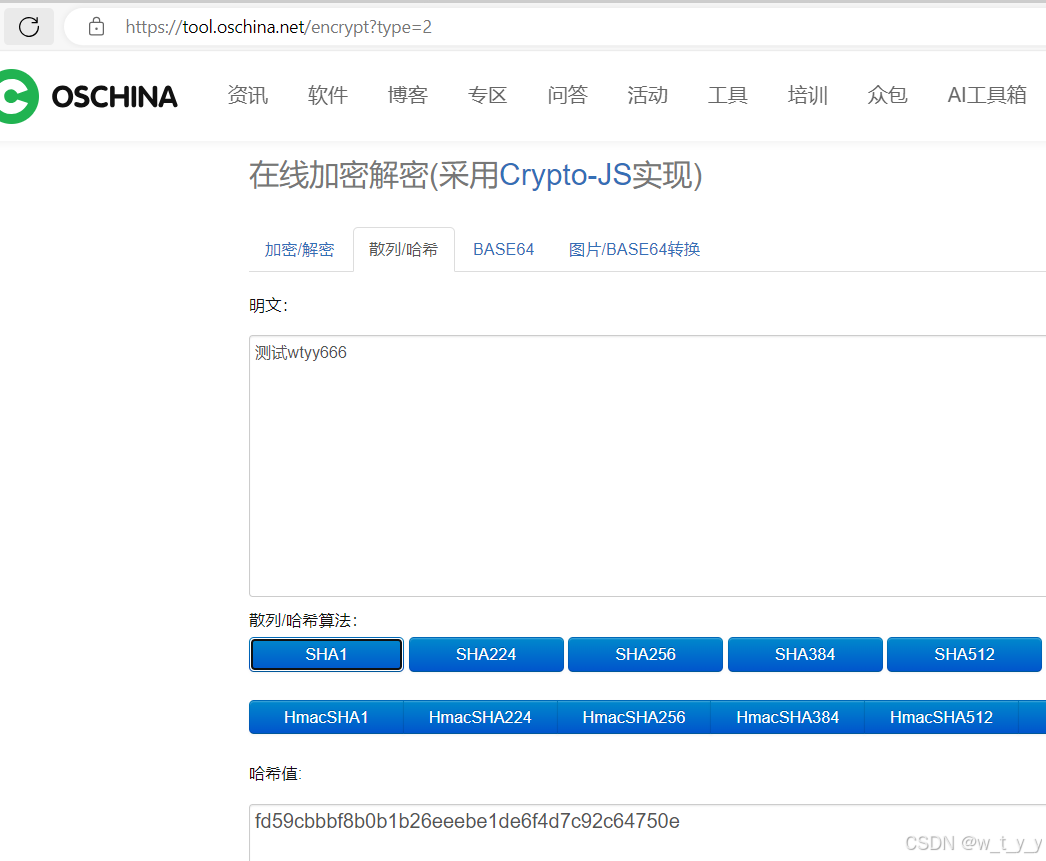
与在线平台生成的一致:
方法二:DigestUtils
String hashed_message = new DigestUtils("SHA-1").digestAsHex(input);方法三:HashFunction
使用guava包下的方法,
HashFunction hashFunc = Hashing.sha1(); HashCode hash = hashFunc.hashString(input, StandardCharsets.UTF_8); String hexDigest = hash.toString(); 可以看到生成的一致:
package com.bit.demo.secret; import com.google.common.hash.HashCode; import com.google.common.hash.HashFunction; import com.google.common.hash.Hashing; import org.apache.commons.codec.digest.DigestUtils; import java.nio.charset.StandardCharsets; import java.security.MessageDigest; import java.security.NoSuchAlgorithmException; public class Sha1Util { public static void main(String[] args) throws NoSuchAlgorithmException { String input = "测试wtyy666"; String pwd = toSha1(input); System.out.println("方法1:"+pwd); //方法2 HashFunction hashFunc = Hashing.sha1(); HashCode hash = hashFunc.hashString(input, StandardCharsets.UTF_8); String hexDigest = hash.toString(); System.out.println("方法2:"+hexDigest); //方法3 String hashed_message = new DigestUtils("SHA-1").digestAsHex(input); System.out.println("方法3:"+hashed_message); } public static String toSha1(String input) throws NoSuchAlgorithmException { MessageDigest digest = MessageDigest.getInstance("SHA-1"); byte[] bytes = input.getBytes(); digest.update(bytes); byte[] hashedBytes = digest.digest(); StringBuilder hexString = new StringBuilder(); for (byte b : hashedBytes) { String hex = Integer.toHexString(0xFF & b); if (hex.length() == 1) { hexString.append('0'); } hexString.append(hex); } String hashedData = hexString.toString(); return hashedData; } } 方法1:fd59cbbbf8b0b1b26eeebe1de6f4d7c92c64750e 方法2:fd59cbbbf8b0b1b26eeebe1de6f4d7c92c64750e 方法3:fd59cbbbf8b0b1b26eeebe1de6f4d7c92c64750e四、SHA-256
1、实现方法
同上面的SHA-1:
方法一:MessageDigest
import java.security.MessageDigest; import java.security.NoSuchAlgorithmException; public class Sha256Util { public static void main(String[] args) throws NoSuchAlgorithmException { String input = "测试wtyy666"; String pwd = toSha1(input); System.out.println(pwd); } public static String toSha1(String input) throws NoSuchAlgorithmException { MessageDigest digest = MessageDigest.getInstance("SHA-256"); byte[] bytes = input.getBytes(); digest.update(bytes); byte[] hashedBytes = digest.digest(); StringBuilder hexString = new StringBuilder(); for (byte b : hashedBytes) { String hex = Integer.toHexString(0xFF & b); if (hex.length() == 1) { hexString.append('0'); } hexString.append(hex); } String hashedData = hexString.toString(); return hashedData; } } 
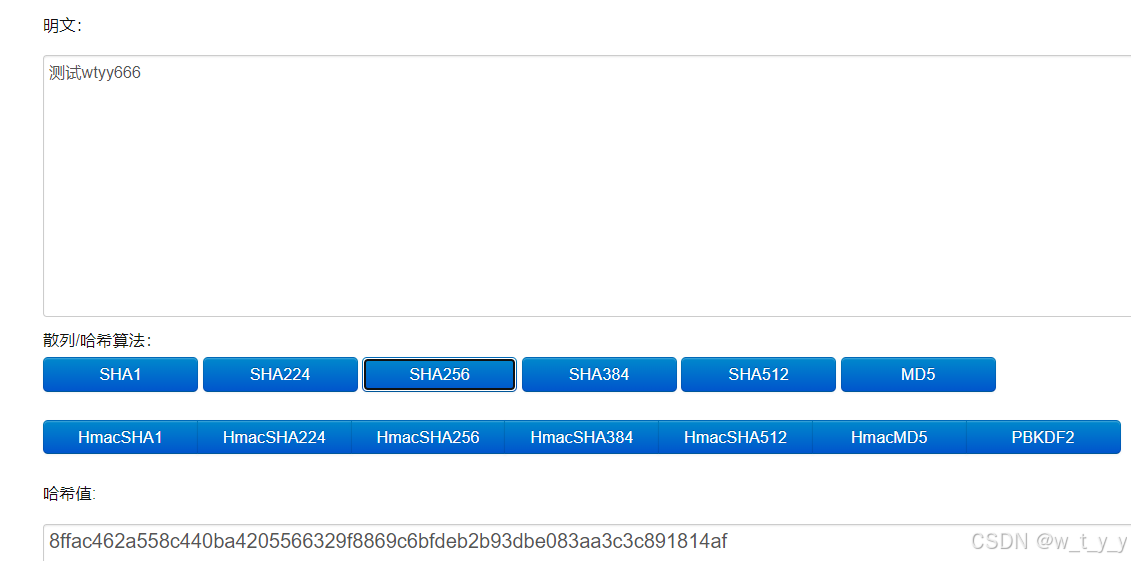
和在线平台生成的一致:
方法二:DigestUtils
String hashed_message = new DigestUtils("SHA-256").digestAsHex(input);方法三
使用guava包下的方法,可以看到和上面生成的一致
package com.bit.demo.secret; import com.google.common.hash.HashCode; import com.google.common.hash.HashFunction; import com.google.common.hash.Hashing; import org.apache.commons.codec.digest.DigestUtils; import java.nio.charset.StandardCharsets; import java.security.MessageDigest; import java.security.NoSuchAlgorithmException; public class Sha256Util { public static void main(String[] args) throws NoSuchAlgorithmException { String input = "测试wtyy666"; String pwd = toSha1(input); System.out.println("方法1:"+pwd); //方法2 String hashed_message = new DigestUtils("SHA-256").digestAsHex(input); System.out.println("方法2:"+hashed_message); //方法3 HashFunction hashFunc = Hashing.sha256(); HashCode hash = hashFunc.hashString(input, StandardCharsets.UTF_8); String hexDigest = hash.toString(); System.out.println("方法3:"+hexDigest); } public static String toSha1(String input) throws NoSuchAlgorithmException { MessageDigest digest = MessageDigest.getInstance("SHA-256"); byte[] bytes = input.getBytes(); digest.update(bytes); byte[] hashedBytes = digest.digest(); StringBuilder hexString = new StringBuilder(); for (byte b : hashedBytes) { String hex = Integer.toHexString(0xFF & b); if (hex.length() == 1) { hexString.append('0'); } hexString.append(hex); } String hashedData = hexString.toString(); return hashedData; } } 方法1:8ffac462a558c440baf8869c6bfdeb2b93dbe083aa3c3caf 方法2:8ffac462a558c440baf8869c6bfdeb2b93dbe083aa3c3caf 方法3:8ffac462a558c440baf8869c6bfdeb2b93dbe083aa3c3caf五、SHA-512
1、实现方法
也是和前面类似
方法一:MessageDigest
import java.security.MessageDigest; import java.security.NoSuchAlgorithmException; public class Sha512Util { public static void main(String[] args) throws NoSuchAlgorithmException { String input = "测试wtyy666"; String pwd = toSha1(input); System.out.println(pwd); System.out.println("16进制长度:"+pwd.length()); } public static String toSha1(String input) throws NoSuchAlgorithmException { MessageDigest digest = MessageDigest.getInstance("SHA-512"); byte[] bytes = input.getBytes(); digest.update(bytes); byte[] hashedBytes = digest.digest(); System.out.println("密文的字节长度:"+hashedBytes.length); StringBuilder hexString = new StringBuilder(); for (byte b : hashedBytes) { String hex = Integer.toHexString(0xFF & b); if (hex.length() == 1) { hexString.append('0'); } hexString.append(hex); } String hashedData = hexString.toString(); return hashedData; } } 密文的字节长度:64 3412fb7c2c59dd49daddac1d3de5e10616f4a2aaab9c3b0b6bec7fac9daac9d8d9ef20c1ee4313f3ece290aa68d7fe92fb559ac125cb4b80d0c45116f 16进制长度:128和在线平台生成的一致。

方法二:DigestUtils
String hashed_message = new DigestUtils("SHA-512").digestAsHex(input);方法三
使用guava包下的方法,可以看到和上面生成的一致
package com.bit.demo.secret; import com.google.common.hash.HashCode; import com.google.common.hash.HashFunction; import com.google.common.hash.Hashing; import org.apache.commons.codec.digest.DigestUtils; import java.nio.charset.StandardCharsets; import java.security.MessageDigest; import java.security.NoSuchAlgorithmException; public class Sha512Util { public static void main(String[] args) throws NoSuchAlgorithmException { String input = "测试wtyy666"; String pwd = toSha1(input); System.out.println("方法1:"+pwd); System.out.println("16进制长度:"+pwd.length()); //方法2 String hashed_message = new DigestUtils("SHA-512").digestAsHex(input); System.out.println("方法2:"+hashed_message); //方法3 HashFunction hashFunc = Hashing.sha512(); HashCode hash = hashFunc.hashString(input, StandardCharsets.UTF_8); String hexDigest = hash.toString(); System.out.println("方法3:"+hexDigest); } public static String toSha1(String input) throws NoSuchAlgorithmException { MessageDigest digest = MessageDigest.getInstance("SHA-512"); byte[] bytes = input.getBytes(); digest.update(bytes); byte[] hashedBytes = digest.digest(); System.out.println("密文的字节长度:"+hashedBytes.length); StringBuilder hexString = new StringBuilder(); for (byte b : hashedBytes) { String hex = Integer.toHexString(0xFF & b); if (hex.length() == 1) { hexString.append('0'); } hexString.append(hex); } String hashedData = hexString.toString(); return hashedData; } } 密文的字节长度:64 方法1:3412fb7c2c59dd49daddac1d3de5e10616f4a2aaab9c3b0b6bec7fac9daac9d8d9ef20c1ee4313f3ece290aa68d7fe92fb559ac125cb4b80d0c45116f 16进制长度:128 方法2:3412fb7c2c59dd49daddac1d3de5e10616f4a2aaab9c3b0b6bec7fac9daac9d8d9ef20c1ee4313f3ece290aa68d7fe92fb559ac125cb4b80d0c45116f 方法3:3412fb7c2c59dd49daddac1d3de5e10616f4a2aaab9c3b0b6bec7fac9daac9d8d9ef20c1ee4313f3ece290aa68d7fe92fb559ac125cb4b80d0c45116f 六、获取文件消息摘要
import com.sun.org.apache.xml.internal.security.utils.Base64; import com.sun.scenario.effect.impl.sw.sse.SSEBlend_SRC_OUTPeer; import sun.misc.BASE64Decoder; import java.io.ByteArrayOutputStream; import java.io.FileInputStream; import java.security.MessageDigest; public class DigestDemo { public static void main(String[] args) throws Exception{ String input = "aa"; String algorithm = "MD5"; // sha1 可以实现秒传功能 String sha1 = getDigestFile("apache-tomcat-9.0.10-windows-x64.zip", "SHA-1"); System.out.println(sha1); String sha512 = getDigestFile("apache-tomcat-9.0.10-windows-x64.zip", "SHA-512"); System.out.println(sha512); String md5 = getDigest("aa", "MD5"); System.out.println(md5); String md51 = getDigest("aa ", "MD5"); System.out.println(md51); } private static String getDigestFile(String filePath, String algorithm) throws Exception{ FileInputStream fis = new FileInputStream(filePath); int len; byte[] buffer = new byte[1024]; ByteArrayOutputStream baos = new ByteArrayOutputStream(); while ( (len = fis.read(buffer))!=-1){ baos.write(buffer,0,len); } // 获取消息摘要对象 MessageDigest messageDigest = MessageDigest.getInstance(algorithm); // 获取消息摘要 byte[] digest = messageDigest.digest(baos.toByteArray()); System.out.println("密文的字节长度:"+digest.length); return toHex(digest); } private static String getDigest(String input, String algorithm) throws Exception{ MessageDigest messageDigest = MessageDigest.getInstance(algorithm); byte[] digest = messageDigest.digest(input.getBytes()); System.out.println("密文的字节长度:"+digest.length); return toHex(digest); } private static String toHex(byte[] digest) { // System.out.println(new String(digest)); // 消息摘要进行表示的时候,是用16进制进行表示 StringBuilder sb = new StringBuilder(); for (byte b : digest) { // 转成16进制 String s = Integer.toHexString(b & 0xff); // 保持数据的完整性,前面不够的用0补齐 if (s.length()==1){ s="0"+s; } sb.append(s); } System.out.println("16进制数据的长度:"+ sb.toString().getBytes().length); return sb.toString(); } } 运行结果 ,获取 sha-1 和 sha-512 的值

查看 tomcat 官网上面 sha-1 和 sha-512 的值:

使用 sha-1 算法,可以实现秒传功能,不管如何修改文件的名字,最后得到的值是一样的
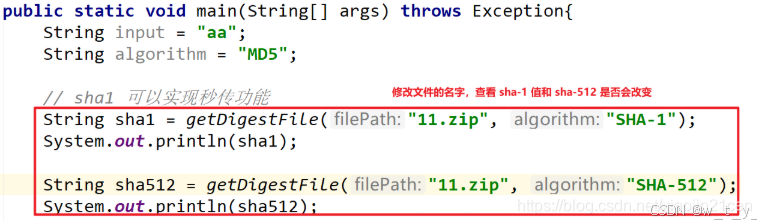
运行结果 ,获取 sha-1 和 sha-512 的值:
 如果原文修改了,那么sha-1值 就会不一样
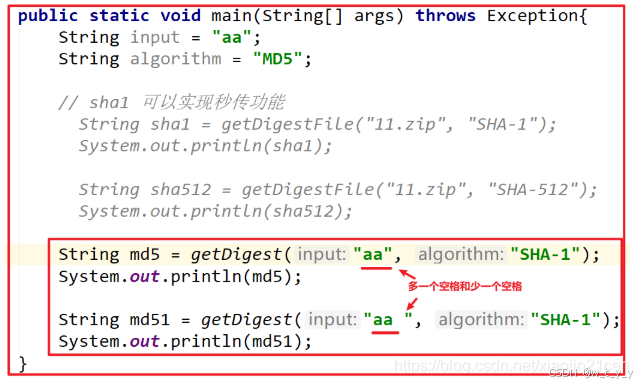

import java.math.BigInteger; import java.nio.charset.StandardCharsets; ... BigInteger sumOfUTFValues = new BigInteger("0"); byte[] bytes = message.getBytes(StandardCharsets.UTF_8); for (int i=0; i<bytes.length; i++){ BigInteger bigIntByte = BigInteger.valueOf(bytes[i]); BigInteger appendedValue = bigIntByte.multiply(PRIME.pow(i+1)); sumOfUTFValues = sumOfUTFValues.add(appendedValue); }import java.math.BigInteger; ... public static String fixedLength(BigInteger hashValue) { String strHashValue = String.valueOf(hashValue); int count = HASH_LENGTH + 1 - strHashValue.length(); for(int i=1; i<count; i++){ BigInteger bigIntIndex = BigInteger.valueOf(i); strHashValue += String.valueOf(hashValue.mod(bigIntIndex)); } return strHashValue.substring(0,HASH_LENGTH); }import java.security.SecureRandom; import com.google.common.io.BaseEncoding; ... SecureRandom rand = new SecureRandom(); byte[] buffer = new byte[32]; rand.nextBytes(buffer); String salt = BaseEncoding.base16().lowerCase().encode(buffer);免责声明:本站所有文章内容,图片,视频等均是来源于用户投稿和互联网及文摘转载整编而成,不代表本站观点,不承担相关法律责任。其著作权各归其原作者或其出版社所有。如发现本站有涉嫌抄袭侵权/违法违规的内容,侵犯到您的权益,请在线联系站长,一经查实,本站将立刻删除。 本文来自网络,若有侵权,请联系删除,如若转载,请注明出处:https://haidsoft.com/111740.html

