
大家好,欢迎来到IT知识分享网。
方法一:在 series 内配置饼状图颜色
series: [
itemStyle: {
normal: {
color: function (colors) {
var colorList = [ ‘#fc8251’, ‘#5470c6’, ‘#91cd77’, ‘#ef6567’, ‘#f9c956’, ‘#75bedc’ ];
return colorList[colors.dataIndex];
}
},
}
]
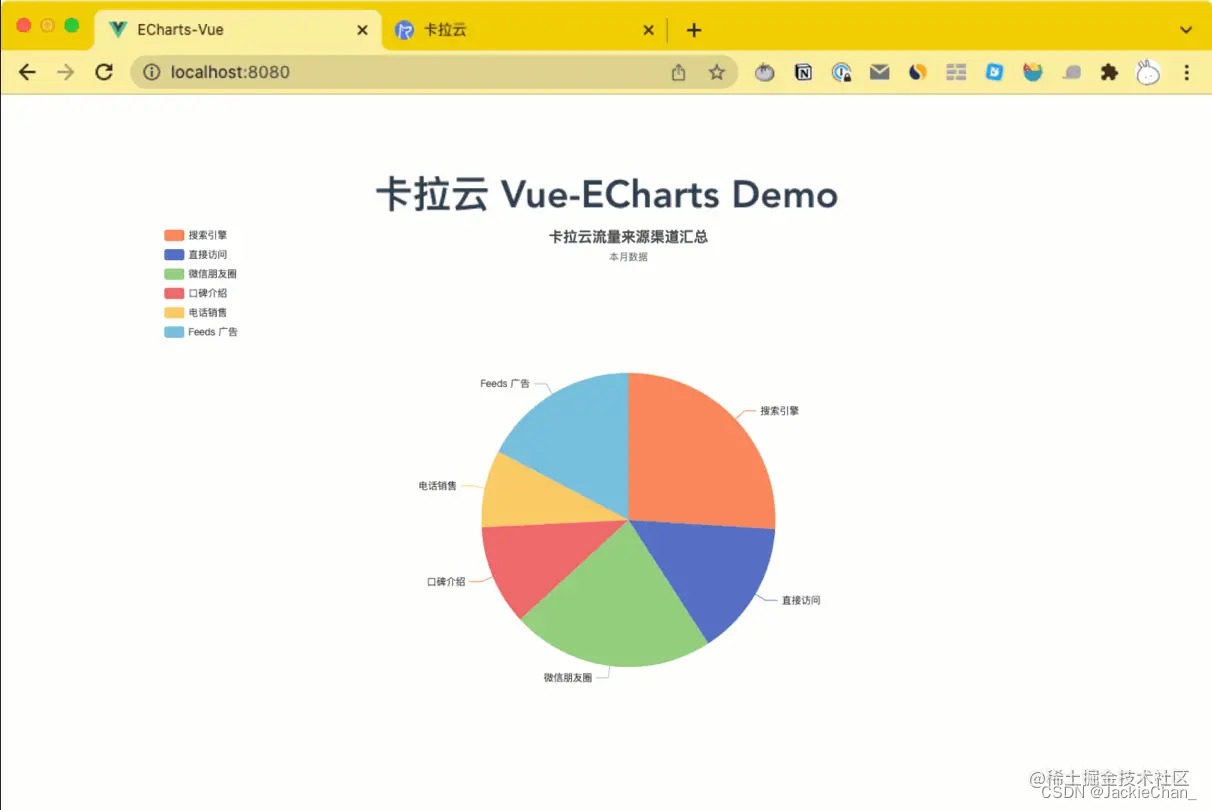
EChart.js 在 series 中设置饼状图颜色的 Demo 源代码:
option = {
title: {
text: ‘卡拉云流量来源渠道汇总’,
subtext: ‘本月数据’,
left: ‘center’
},
tooltip: {
trigger: ‘item’
},
legend: {
orient: ‘vertical’,
left: ‘left’
},
series: [
{
name: ‘GA 数据统计’,
type: ‘pie’,
radius: ‘50%’,
data: [
{ value: 1017, name: ‘搜索引擎’ },
{ value: 583, name: ‘直接访问’ },
{ value: 873, name: ‘微信朋友圈’ },
{ value: 432, name: ‘口碑介绍’ },
{ value: 332, name: ‘电话销售’ },
{ value: 678, name: ‘Feeds 广告’ }
],
itemStyle: {
normal: {
color: function (colors) {
var colorList = [ ‘#fc8251’, ‘#5470c6’, ‘#91cd77’, ‘#ef6567’, ‘#f9c956’, ‘#75bedc’ ];
return colorList[colors.dataIndex];
}
},
}
}
]
};
扩展阅读:《最好用的 7 款 Vue admin 后台管理框架测评》
方法二:在 option 内配置饼状图颜色
color😗*[‘#3ca170’,‘#5470c6’, ‘#91cd77’,‘#ef6567’, ‘#f9c956’,‘#75bedc’],
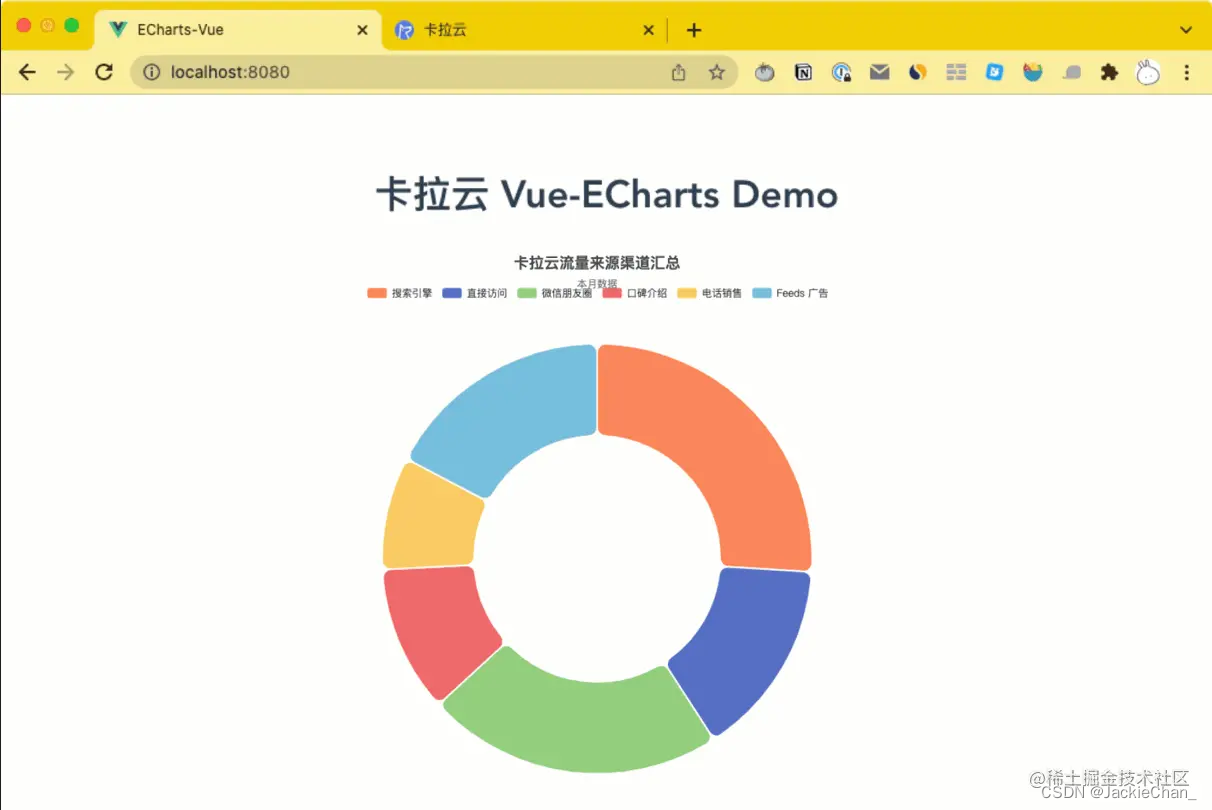
EChart.js 在 option 中设置饼状图颜色的 Demo 源代码:
option = {
title: {
text: ‘卡拉云流量来源渠道汇总’,
subtext: ‘本月数据’,
left: ‘center’
},
tooltip: {
trigger: ‘item’
},
legend: {
top: ‘5%’,
left: ‘center’
},
color: [‘#fc8251’, ‘#5470c6’, ‘#91cd77’, ‘#ef6567’, ‘#f9c956’, ‘#75bedc’],
series: [
{
name: ‘GA 数据统计’,
type: ‘pie’,
radius: [‘40%’, ‘70%’],
avoidLabelOverlap: false,
itemStyle: {
borderRadius: 10,
borderColor: ‘#fff’,
borderWidth: 2
},
label: {
show: false,
position: ‘center’
},
emphasis: {
label: {
show: true,
fontSize: ‘40’,
fontWeight: ‘bold’
}
},
labelLine: {
show: false
},
data: [
{ value: 1017, name: ‘搜索引擎’ },
{ value: 583, name: ‘直接访问’ },
{ value: 873, name: ‘微信朋友圈’ },
{ value: 432, name: ‘口碑介绍’ },
{ value: 332, name: ‘电话销售’ },
{ value: 678, name: ‘Feeds 广告’ }
]
}
]
};
扩展阅读:《Vue 实现 PDF 文件在线预览 – 手把手教你写 Vue PDF 预览功能》
方法三:在 data 内配置饼状图颜色
data: [
{ value: 917, name: ‘搜索引擎’,itemStyle: {color:‘#fc8251’}},
{ value: 873, name: ‘微信朋友圈’,itemStyle: {color:‘#5470c6’}},
{ value: 678, name: ‘Feeds 广告’,itemStyle: {color:‘#91cd77’}},
{ value: 583, name: ‘直接访问’,itemStyle: {color:‘#ef6567’}},
{ value: 432, name: ‘口碑介绍’,itemStyle: {color:‘#f9c956’}}
]
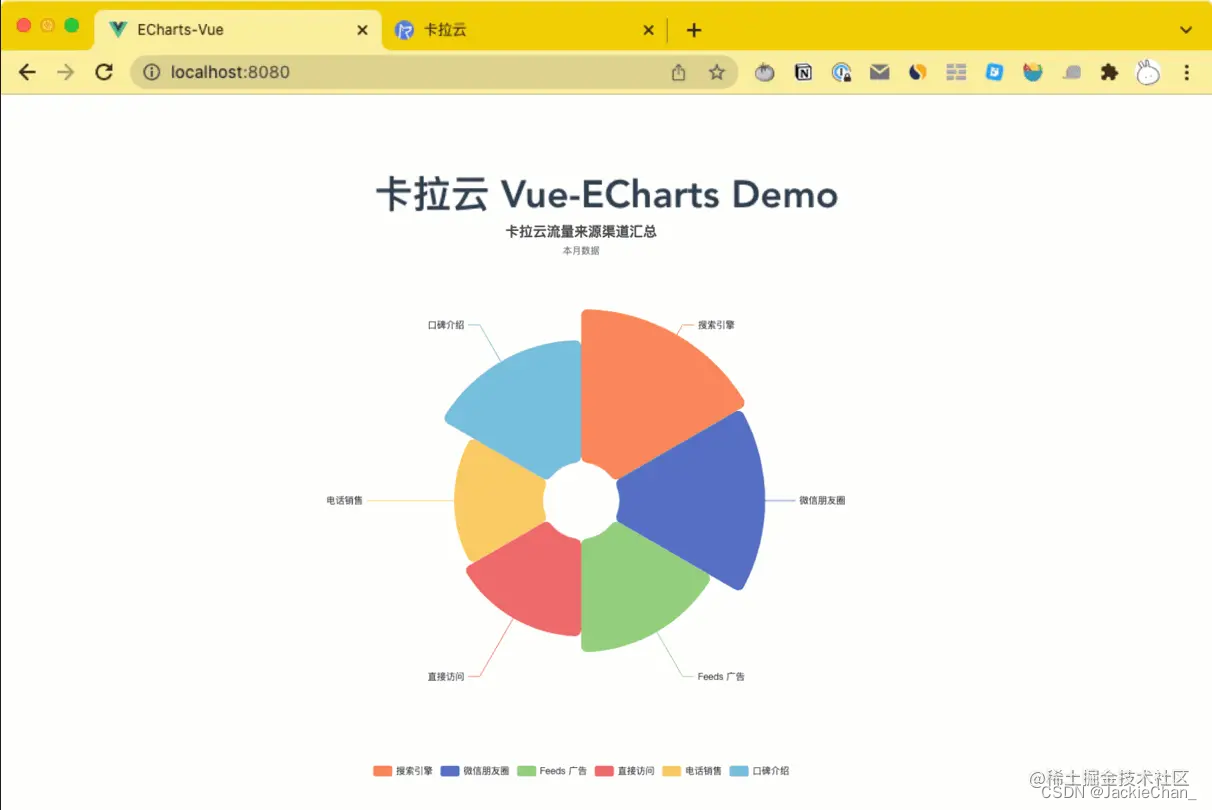
EChart.js 在 data 中设置饼状图颜色的 Demo 源代码:
option = {
title: {
text: ‘卡拉云流量来源渠道汇总’,
subtext: ‘本月数据’,
left: ‘center’
},
legend: {
top: ‘bottom’
},
series: [
{
name: ‘GA 数据统计’,
type: ‘pie’,
radius: [50, 250],
center: [‘50%’, ‘50%’],
roseType: ‘area’,
itemStyle: {
borderRadius: 8
},
data: [
{ value: 917, name: ‘搜索引擎’,itemStyle: {color:‘#fc8251’}},
{ value: 873, name: ‘微信朋友圈’,itemStyle: {color:‘#5470c6’}},
{ value: 678, name: ‘Feeds 广告’,itemStyle: {color:‘#91cd77’}},
{ value: 583, name: ‘直接访问’,itemStyle: {color:‘#ef6567’}},
{ value: 332, name: ‘电话销售’,itemStyle: {color:‘#f9c956’} },
{ value: 432, name: ‘口碑介绍’,itemStyle: {color:‘#75bedc’}}
]
}
]
};
扩展阅读:《ECharts X 轴标签过长导致文字重叠的 4 种解决方案》
方法四:配置 ECharts 饼状图随机颜色
color: function () {
return (
‘rgb(’ +
[
Math.round(Math.random() * 270),
Math.round(Math.random() * 370),
Math.round(Math.random() * 400)
].join(‘,’) +
‘)’
);
},
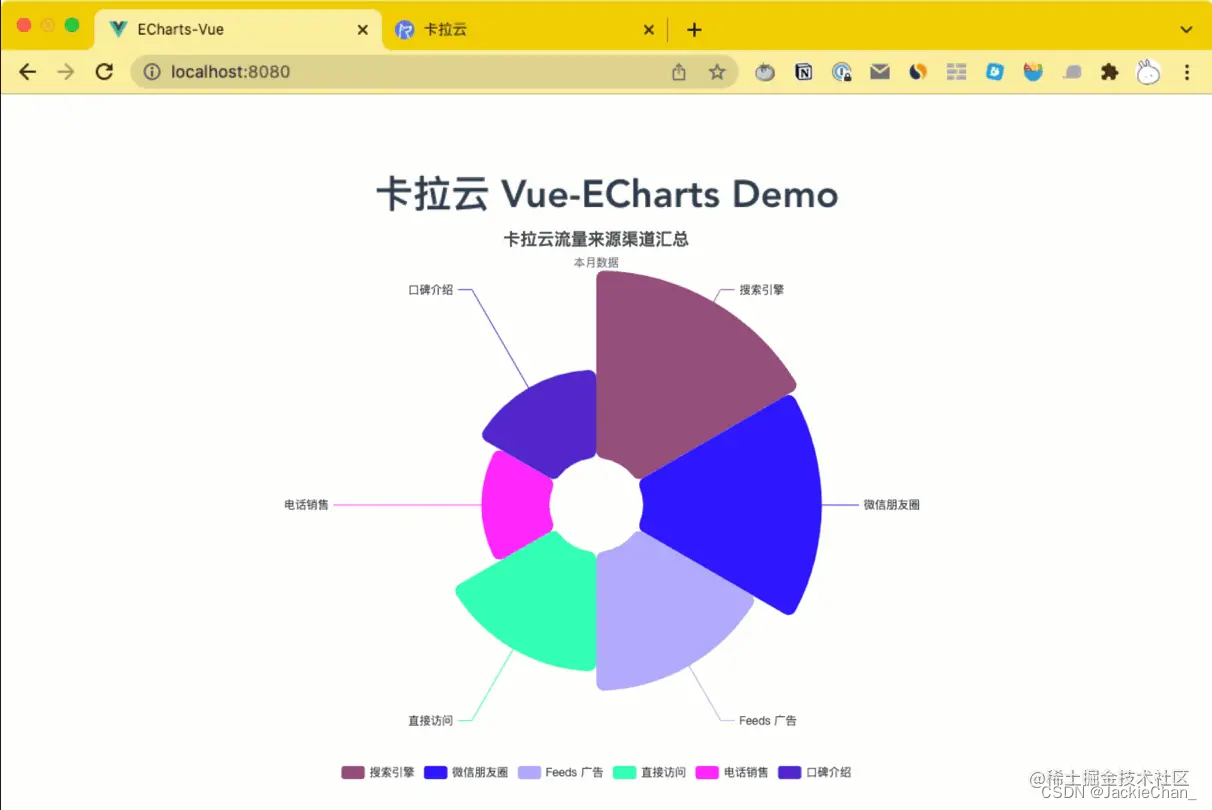
option = {
title: {
text: ‘卡拉云流量来源渠道汇总’,
subtext: ‘本月数据’,
left: ‘center’
},
legend: {
top: ‘bottom’
},
series: [
{
name: ‘GA 数据统计’,
type: ‘pie’,
radius: [50, 250],
center: [‘50%’, ‘50%’],
roseType: ‘area’,
itemStyle: {
color: function () {
return (
‘rgb(’ +
[ Math.round(Math.random() * 270), Math.round(Math.random() * 370), Math.round(Math.random() * 400) ].join(‘,’) +
‘)’
);
},
borderRadius: 8
},
data: [
{ value: 917, name: ‘搜索引擎’},
{ value: 873, name: ‘微信朋友圈’},
{ value: 678, name: ‘Feeds 广告’},
{ value: 583, name: ‘直接访问’},
{ value: 332, name: ‘电话销售’},
{ value: 432, name: ‘口碑介绍’}
]
} 卡拉云是新一代低代码开发工具,免安装部署,可一键接入包括 MySQL 在内的常见数据库及 API。可根据自己的工作流,定制开发。无需繁琐的前端开发,只需要简单拖拽,即可快速搭建企业内部工具。原来三天的开发工作量,使用卡拉云后可缩减至 1 小时,欢迎免费试用卡拉云。https://link.juejin.cn/?target=https%3A%2F%2Fkalacloud.com%2F
免责声明:本站所有文章内容,图片,视频等均是来源于用户投稿和互联网及文摘转载整编而成,不代表本站观点,不承担相关法律责任。其著作权各归其原作者或其出版社所有。如发现本站有涉嫌抄袭侵权/违法违规的内容,侵犯到您的权益,请在线联系站长,一经查实,本站将立刻删除。 本文来自网络,若有侵权,请联系删除,如若转载,请注明出处:https://haidsoft.com/115467.html

