
大家好,欢迎来到IT知识分享网。
bond网卡的制作
一:在机其上安装两块网卡,并修改相应的网络配置文件
vim /etc/sysconfig/network-scripts/ifcfg-eth0
DEVICE=eth0
ONBOOT=yes
BOOTPROTO=static
MASTER=bond0
vim /etc/sysconfig/network-scripts/ifcfg-eth1
DEVICE=eth1
ONBOOT=yes
BOOTPROTO=static
MASTER=bond0
vim /etc/sysconfig/network-scripts/ ifcfg-bond0
DEVICE=bond0
ONBOOT=yes
BOOTPROTO=static
IPADDR=IP地址
NETMASK=子网掩码
Modprobe bonding
二。vim /etc/modprobe.conf 加载相关的网卡驱动
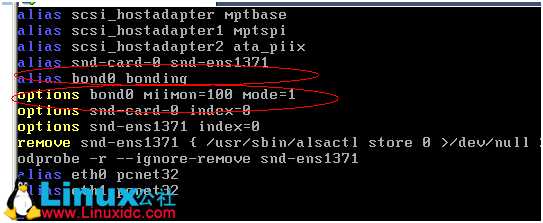
开机脚本
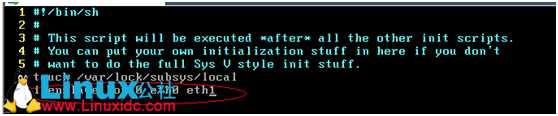
三:vim /etc/rc.d/rc.local 增加一行
四:查看状态 cat /proc/net/bonding/bond0并进行测试
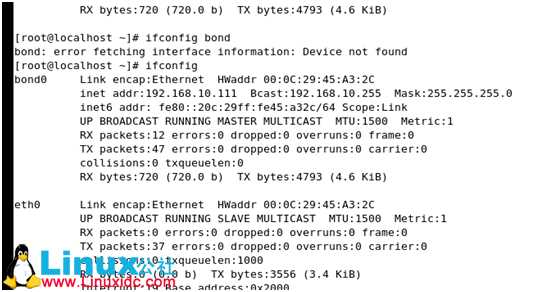
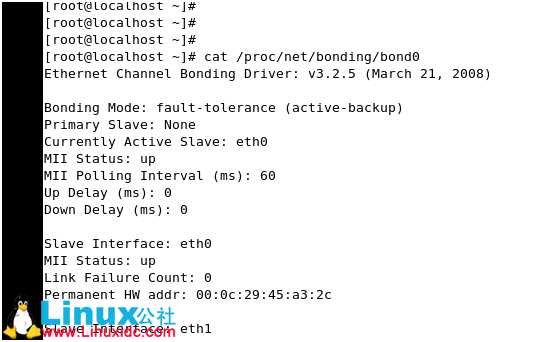
使用桥接模式
Ping bond0的ip地址
当中在虚拟机中eth0断开模拟网卡损坏是的情景,可以看到网卡的替换过程,过程十分的短暂
C:\Documents and Settings\Administrator>ping -t 192.168.10.111
Pinging 192.168.10.111 with 32 bytes of data:
Reply from 192.168.10.111: bytes=32 time<1ms TTL=64
Reply from 192.168.10.111: bytes=32 time<1ms TTL=64
Reply from 192.168.10.111: bytes=32 time<1ms TTL=64
Reply from 192.168.10.111: bytes=32 time<1ms TTL=64
Reply from 192.168.10.111: bytes=32 time<1ms TTL=64
Reply from 192.168.10.111: bytes=32 time<1ms TTL=64
Reply from 192.168.10.111: bytes=32 time<1ms TTL=64
Reply from 192.168.10.111: bytes=32 time<1ms TTL=64
Reply from 192.168.10.111: bytes=32 time<1ms TTL=64
Reply from 192.168.10.111: bytes=32 time<1ms TTL=64
Reply from 192.168.10.111: bytes=32 time<1ms TTL=64
Reply from 192.168.10.111: bytes=32 time<1ms TTL=64
Reply from 192.168.10.111: bytes=32 time<1ms TTL=64
Reply from 192.168.10.111: bytes=32 time<1ms TTL=64
Reply from 192.168.10.111: bytes=32 time<1ms TTL=64
Reply from 192.168.10.111: bytes=32 time<1ms TTL=64
Reply from 192.168.10.111: bytes=32 time<1ms TTL=64
Request timed out.
Reply from 192.168.10.111: bytes=32 time<1ms TTL=64
Reply from 192.168.10.111: bytes=32 time<1ms TTL=64
Reply from 192.168.10.111: bytes=32 time<1ms TTL=64
Reply from 192.168.10.111: bytes=32 time<1ms TTL=64
Reply from 192.168.10.111: bytes=32 time<1ms TTL=64
Reply from 192.168.10.111: bytes=32 time<1ms TTL=64
Reply from 192.168.10.111: bytes=32 time<1ms TTL=64
免责声明:本站所有文章内容,图片,视频等均是来源于用户投稿和互联网及文摘转载整编而成,不代表本站观点,不承担相关法律责任。其著作权各归其原作者或其出版社所有。如发现本站有涉嫌抄袭侵权/违法违规的内容,侵犯到您的权益,请在线联系站长,一经查实,本站将立刻删除。 本文来自网络,若有侵权,请联系删除,如若转载,请注明出处:https://haidsoft.com/24674.html

