
大家好,欢迎来到IT知识分享网。
【转自】http://www.cppblog.com/codejie/archive/2009/09/24/97141.html
使用LoadLibrary函数调用DLL中的函数的方法一般被称为“显式”调用,意义和使用lib的“隐式”调用相对应。
LoadLibrary调用DLL中的函数的方法比较简单,通过GetProcAddress获得函数的在DLL的地址就可以访问了,但DLL中的Class访问就相对很复杂了(目前我就发现这一种显式调用方式,哪位有其他方法么?)。一个简单的情况就是Class的函数在调用是,其名称是什么?还有Class的contructor函数怎么调用?下面的代码将演示下这些问题。
这里是DLL的文件:
DllMain.h

#ifndef __DLLMAIN_H__
2
#define
__DLLMAIN_H__
3
4
#include
<
string
>
5
6
#define
DllExport __declspec(dllexport)
7
8
extern
“
C
“
int
DllExport Func(
int
x);
9
10
extern
“
C
“
class
DllExport CA
11

{
12
 public:
13
CA(int x);14
~CA();15
16
int Func0();17
int Func(int x);18
const std::string& FuncS(int x, const std::string& str) const;19
protected:20
int _x;21
 }
};
22
23
24
#endif
DllMain.cpp
#include
<
iostream
>
2
3
#include
“
DllMain.h
“
4
5
int
Func(
int
x)
6
{
7
return x * 10;8
}9
10
CA::CA(
int
x)
11
: _x(x)
12
{
13
std::cout << “contructor“ << std::endl;14
}15
16
CA::
~
CA()
17
{
18
std::cout << “destructor“ << std::endl;19
}20
21
int
CA::Func0()
22
{
23
return _x;24
}25
26
int
CA::Func(
int
x)
27
{
28
return _x * x;29
}30
31
const
std::
string
&
CA::FuncS(
int
x,
const
std::
string
&
str)
const
32
{
33
return str;34
}35
这里需要.def文件了,因为Class在DLL中的命名不像函数命名那么简单,会被转义的,像CA::Func(int)在DLL的export表中就是?Func@CA@@QAEHH@Z
,具体定义说明可参看《xxx的自我修养》一书。因此,这里需要使用.def文件对函数进行重命名,下面是DllMain.def文件内容:
LIBRARY TESTDLL
2
EXPORTS
3
Func
=
Func
4
CA::CA(
int
)
=
??
0CA@@QAE@H@Z
5
CA::
~
CA
=
??
1CA@@QAE@XZ
6
CA::Func0
=
?
Func0@CA@@QAEHXZ
7
CA::Func(
int
)
=
?
Func@CA@@QAEHH@Z
8
;CA::FuncS(
int
,std::basic_string
<
char
>&
)
=
?
FuncS@CA@@QBEABV
?
$basic_string@DU
?
$char_traits@D@std@@V
?
$allocator@D@
2
@@std@@HABV23@@Z
9
CA::FuncS
=
?
FuncS@CA@@QBEABV
?
$basic_string@DU
?
$char_traits@D@std@@V
?
$allocator@D@
2
@@std@@HABV23@@Z
多说一句,这里.def的编写很需要Depends(Dependency Walker)工具的支持,其是查看DLL的首选工具啊。。 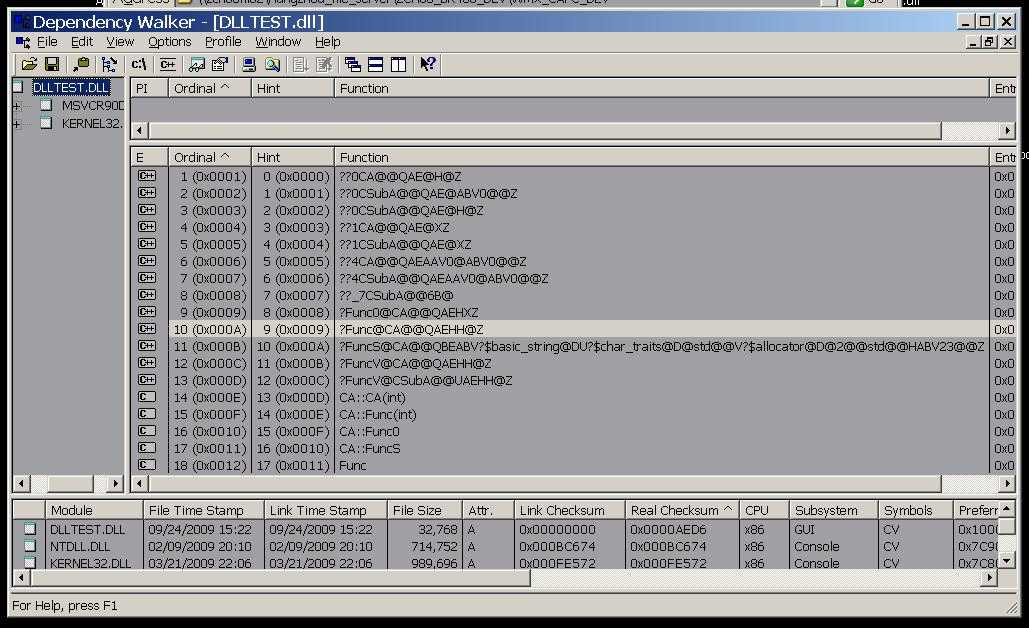
编译DLL,用下面代码进行测试:
LoadLib.cpp
#include
<
iostream
>
2
#include
<
string
>
3
4
#include
<
windows.h
>
5
6
//
#include “DllMain.h”
7
8
#define
DllExport __declspec(dllexport)
9
10
extern
“
C
“
int
DllExport Func(
int
x);
11
12
extern
“
C
“
class
DllExport CA
13
{
14
public:15
CA(int x);16
~CA();17
18
int Func0();19
int Func(int x);20
const std::string& FuncS(int x, const std::string& str) const;21
22
private:23
int _x;24
};
25
26
typedef
int
(
*
func)(
int
);
27
typedef
void
(WINAPI
*
PCTOR)(
int
);
28
typedef
int
(WINAPI
*
func0)(
void
);
29
typedef
int
(WINAPI
*
funcc)(
int
);
30
typedef
const
std::
string
&
(WINAPI
*
funcs)(
int
,
const
std::
string
&
);
31
typedef
void
(WINAPI
*
PDTOR)(
void
);
32
33
int
main()
34
{
35
HINSTANCE hdll;36
hdll = LoadLibraryA((“../DLLTEST/Debug/DLLTEST.dll“));37
if(hdll != NULL)38
 {
{39
func pf = (func)GetProcAddress(hdll, “Func“);40
std::cout << pf(10) << std::endl;41
CA* a = (CA*)malloc(sizeof(CA));42
PCTOR pc = (PCTOR)GetProcAddress(hdll, “CA::CA(int)“);43
_asm { MOV ECX, a } 44
pc(5);45
func0 pf0 = (func0)GetProcAddress(hdll, “CA::Func0“);46
_asm {MOV ECX, a }47
std::cout << pf0() << std::endl;48
funcc pfc = (funcc)GetProcAddress(hdll, “CA::Func(int)“);49
_asm { MOV ECX, a }50
std::cout << pfc(10) << std::endl;51
funcs pfs = (funcs)GetProcAddress(hdll, “CA::FuncS“);52
_asm { MOV ECX, a }53
std::cout << pfs(0, std::string(“hello world“)) << std::endl;54
PDTOR pd = (PDTOR)GetProcAddress(hdll, “CA::~CA“);55
_asm { MOV ECX, a } 56
pd(); 57
free(a); 58
 }
}59
FreeLibrary(hdll);60
61
return 0;62
}
结果还算正常:
100
2
contructor
3
5
4
50
5
hello world
6
destructor
7
上面的代码基本演示了DLL中Class的简单使用,包括对contructor、destrunctor的调用,有参、无参、多参函数调用,不知道有啥缺陷,但至少Work了,嘿嘿~
由上述代码可以看出,这种“显式”使用DLL中的Class是非常繁琐和危险的事情,因此我觉得能用“隐式”就不要用“显式”,能静态就不要用动态。。。
注意到没,代码没有演示继承和虚函数,那是因此我加入Virtual函数,程序就会core,实在搞不定,这里也就没法给出好的方案来,不知道哪位有啥建议么。。。
上面代码参考了如下地址:
http://www.codeproject.com/dll/classesexportedusingLL.asp
http://blog.csdn.net/jdcb2001/archive/2006/11/21/1401569.aspx
免责声明:本站所有文章内容,图片,视频等均是来源于用户投稿和互联网及文摘转载整编而成,不代表本站观点,不承担相关法律责任。其著作权各归其原作者或其出版社所有。如发现本站有涉嫌抄袭侵权/违法违规的内容,侵犯到您的权益,请在线联系站长,一经查实,本站将立刻删除。 本文来自网络,若有侵权,请联系删除,如若转载,请注明出处:https://haidsoft.com/34748.html

