
大家好,欢迎来到IT知识分享网。
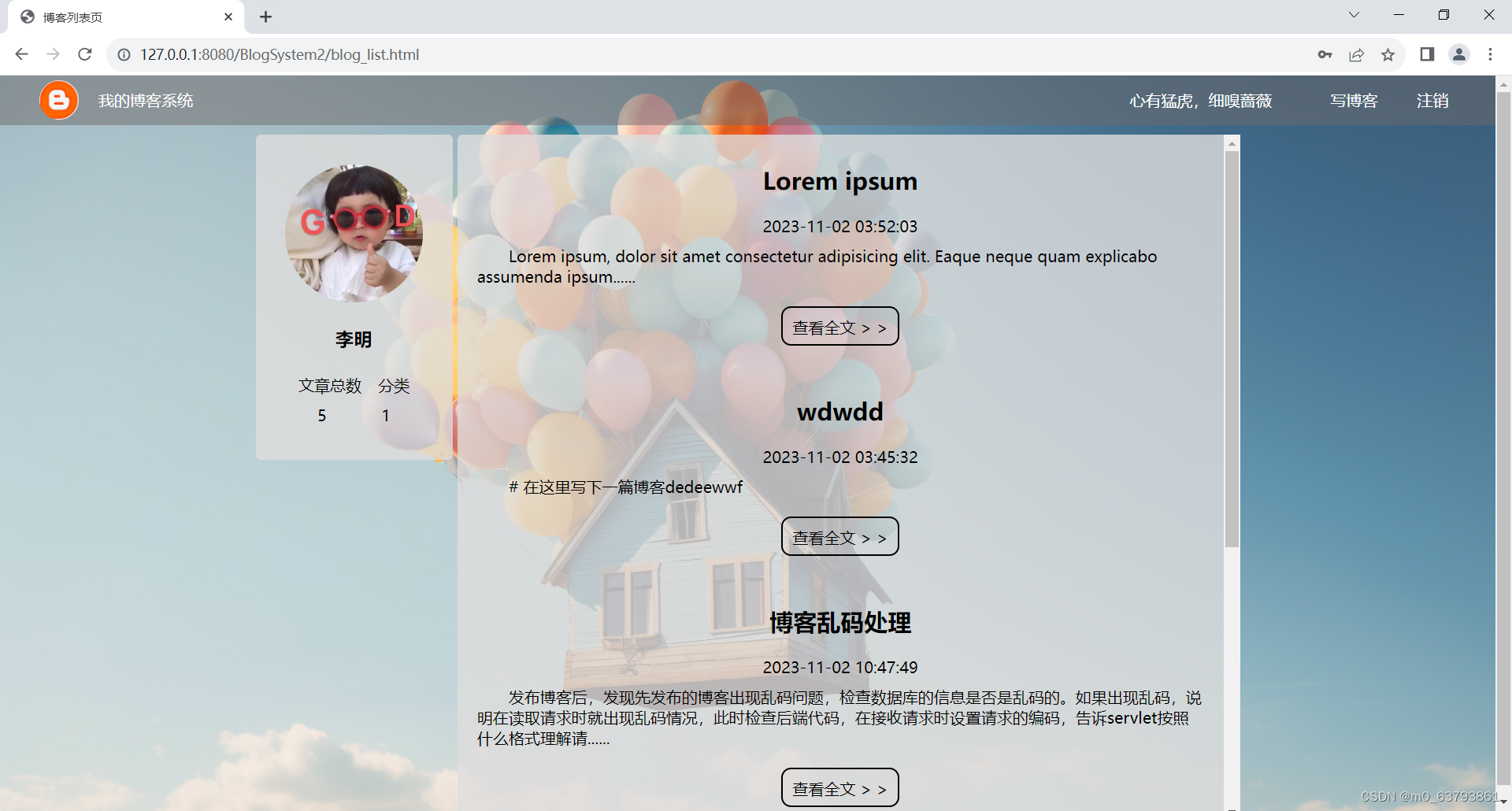
我的博客系统采用前后端分离的方法实现,使用数据库存储相关的数据,通过Tomcat进行项目部署。主要包含用户登录与退出、博客查询与浏览、博客编写与删除、博客数量统计以及强制登陆的功能。
项目前期,进行需求分析,明确项目应该具有的功能、产生的数据分类,以及各个界面间的跳转关系。第二步设计界面,包括界面的布局以及确定每个功能对应到界面上的元素。第三步进行前端开发,通过代码实现界面。第四步进行后端开发,将整个后端开发过程拆分成三个部分:首先准备好项目开发的环境,引入依赖,创建目录结构,将初步完成的前端代码整合到IDEA上;其次,设计数据库,分别创建好项目所需要用到数据对应的数据表;最后,依次完成各个页面的功能实现,约定前后端交互接口格式,完善前端代码,编写后端代码。以下是博客系统设计的完整流程。
项目初期的前端开发,可移步到我的博客系统——Web前端开发(HTML+CSS+JS)
一、准备工作
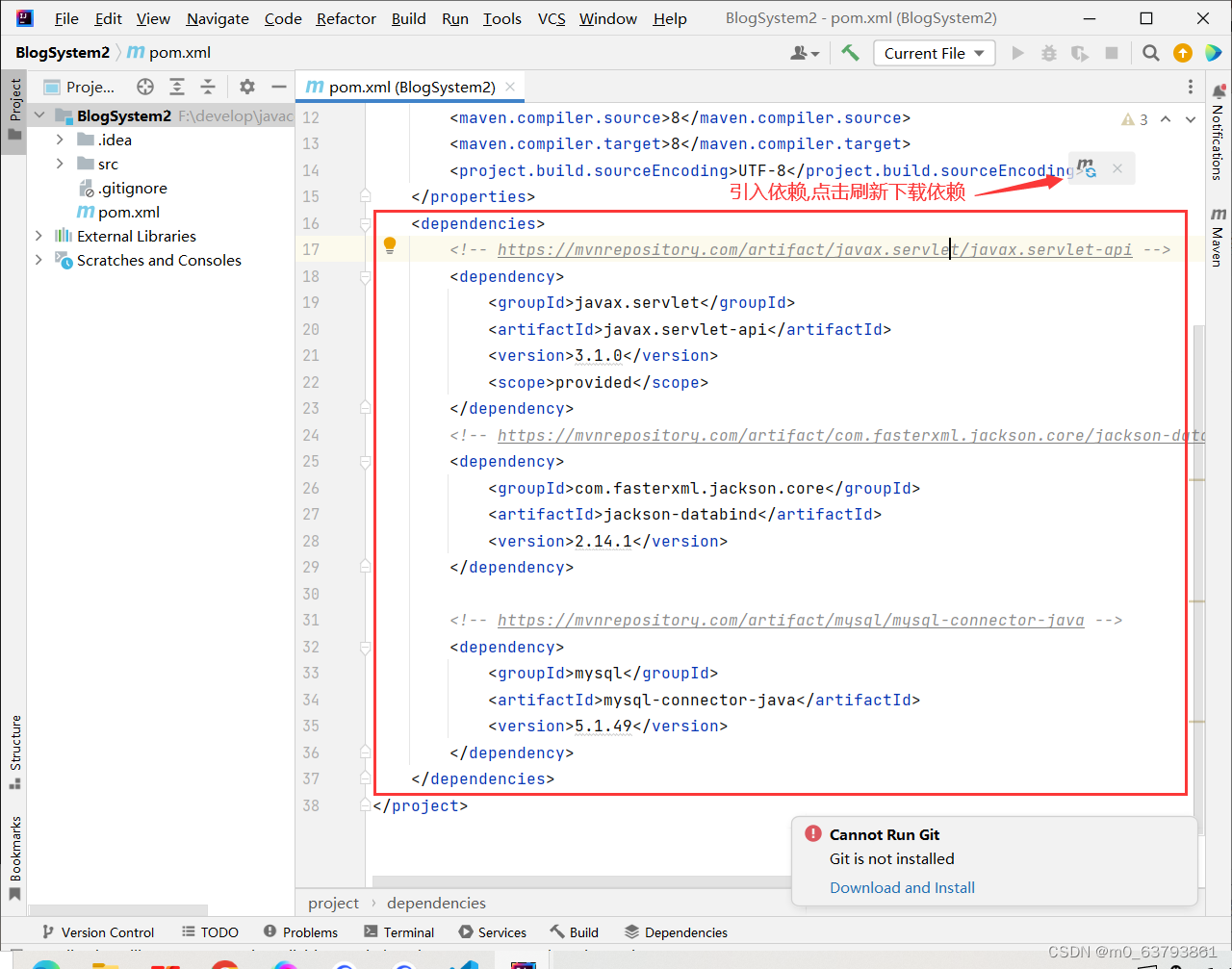
创建项目,在 pom.xml 文件中引入依赖(servlet、mysql、jackson),创建目录结构,新建web.xml文件,它是web项目的配置文件。
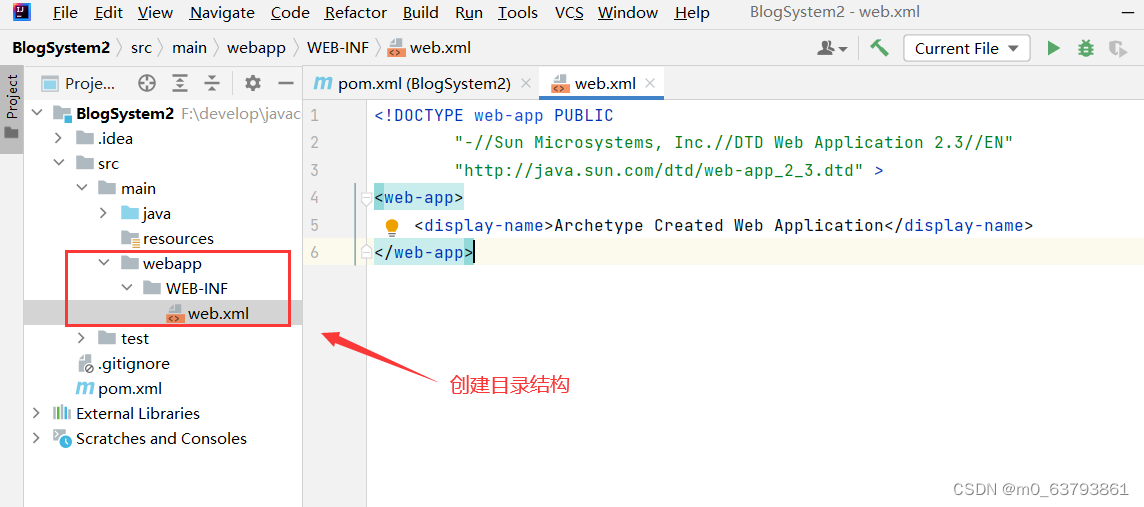
web.xml中的内容,可直接复制粘贴
<!DOCTYPE web-app PUBLIC "-//Sun Microsystems, Inc.//DTD Web Application 2.3//EN" "http://java.sun.com/dtd/web-app_2_3.dtd" > <web-app> <display-name>Archetype Created Web Application</display-name> </web-app>
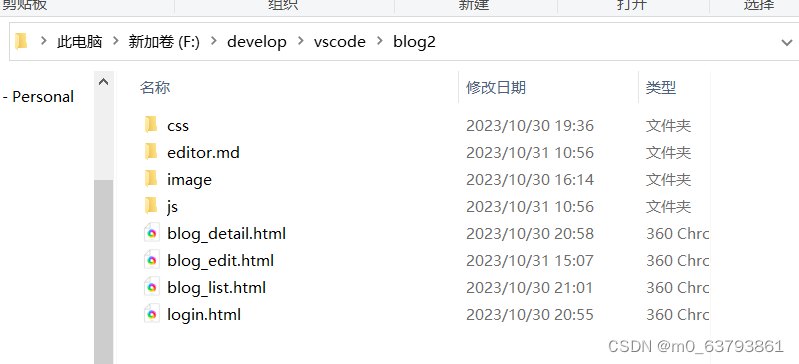
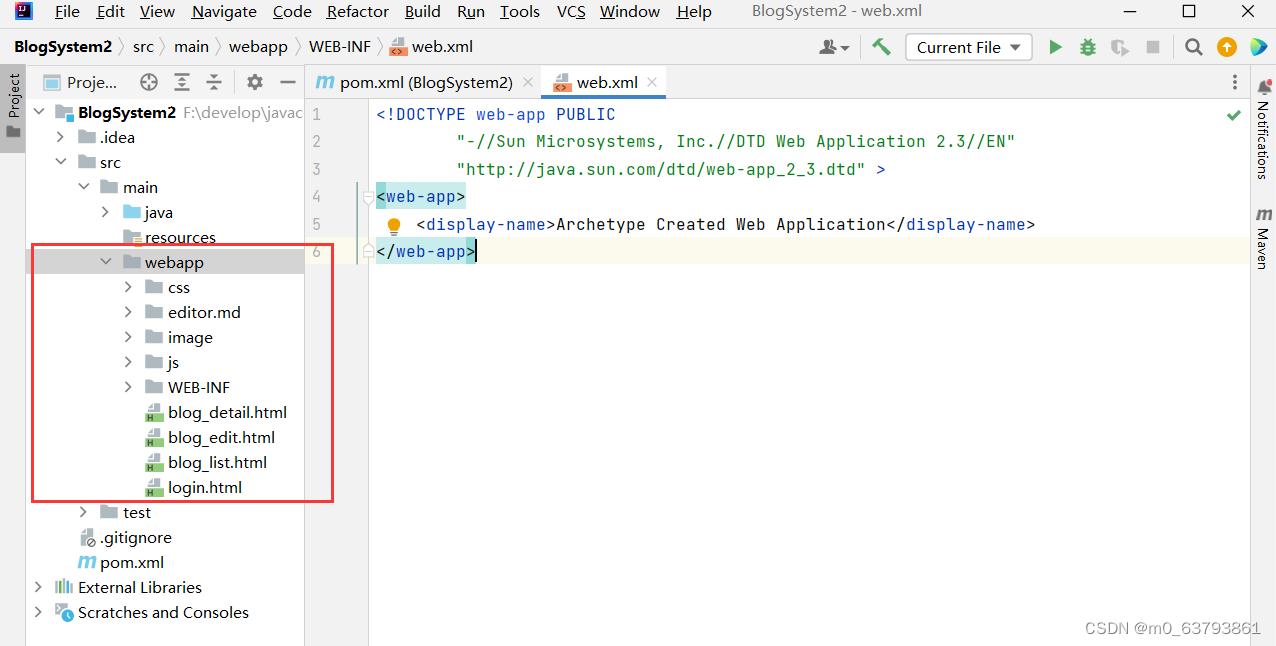
将博客系统前端内容复制到IDEA的webapp目录下

 二、设计数据库
参考Java的JDBC编程
当前博客系统中,主要涉及两个实体:用户和博客,它们是一对多的关系。通过数据库保存用户信息和博客信息。
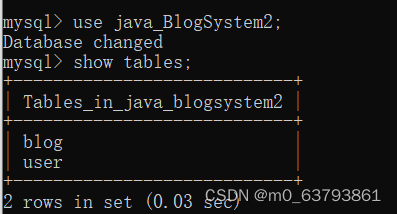
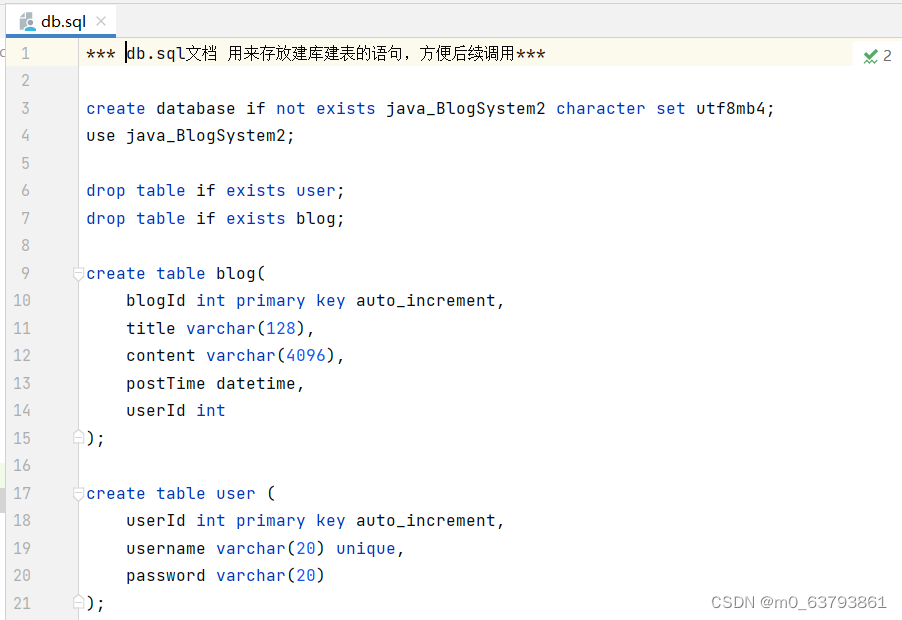
①创建java_BlogSystem2数据库以及blog表和user表。
②封装DBUtil
package model; import com.mysql.jdbc.jdbc2.optional.MysqlDataSource; import javax.sql.DataSource; import java.sql.Connection; import java.sql.PreparedStatement; import java.sql.ResultSet; import java.sql.SQLException; public class DBUtil { private static DataSource dataSource = new MysqlDataSource(); static { ((MysqlDataSource)dataSource).setUrl("jdbc:mysql://127.0.0.1:3306/java_BlogSystem2?characterEncoding=utf8&useSSL=false"); ((MysqlDataSource)dataSource).setUser("root"); ((MysqlDataSource)dataSource).setPassword("root"); } public static Connection getConnection() throws SQLException { return dataSource.getConnection(); } public static void close(Connection connection, PreparedStatement statement, ResultSet resultSet){ if (resultSet!=null){ try { resultSet.close(); } catch (SQLException e) { throw new RuntimeException(e); } } if(statement != null){ try { statement.close(); } catch (SQLException e) { throw new RuntimeException(e); } } if (connection!=null){ try { connection.close(); } catch (SQLException e) { throw new RuntimeException(e); } } } } ③创建实体类
用户类
package model; public class User { //用户中的私有成员变量:用户id、用户名、密码 private int userId; private String username; private String password; //私有成员变量的get()和set()方法 public int getUserId() { return userId; } public void setUserId(int userId) { this.userId = userId; } public String getUsername() { return username; } public void setUsername(String username) { this.username = username; } public String getPassword() { return password; } public void setPassword(String password) { this.password = password; } } 博客类
package model; import java.sql.Timestamp; import java.text.SimpleDateFormat; public class Blog { //博客中的私有成员变量:博客id、博客名称、博客内容、博客发布时间、用户id private int blogId; private String title; private String content; private Timestamp postTime; private int userId; //私有成员变量的get()和set()方法 public int getBlogId() { return blogId; } public void setBlogId(int blogId) { this.blogId = blogId; } public String getTitle() { return title; } public void setTitle(String title) { this.title = title; } public String getContent() { return content; } public void setContent(String content) { this.content = content; } public Timestamp getPostTimestamp() {return postTime;} public String getPostTime(){ SimpleDateFormat simpleDateFormat=new SimpleDateFormat("yyyy-MM-dd hh:mm:ss"); return simpleDateFormat.format(postTime); } public void setPostTime(Timestamp postTime) { this.postTime = postTime; } public int getUserId() { return userId; } public void setUserId(int userId) { this.userId = userId; } } 博客数量类
package model; public class Num { private int blognum; public int getBlognum() { return blognum; } public void setBlognum(int blognum) { this.blognum = blognum; } } ④封装数据库中博客表和用户表的增删查改功能
针对用户表创建UserDao来提供两个方法:
- 根据用户id查询用户信息 selectById()方法
- 根据用户姓名查询用户信息。selectByUsername()方法
package model; import java.sql.Connection; import java.sql.PreparedStatement; import java.sql.ResultSet; import java.sql.SQLException; //针对用户表的基本操作: public class UserDao extends User{ //1、根据userId来查用户信息 public User selectById(int userId){ Connection connection = null; PreparedStatement statement = null; ResultSet resultSet = null; try { //1、和数据库建立连接 connection = DBUtil.getConnection(); //2、构造SQL语句 String sql = "select * from user where userId = ?"; statement = connection.prepareStatement(sql); statement.setInt(1,userId); //3、执行 resultSet = statement.executeQuery(); //4、遍历集合 if (resultSet.next()){ User user = new User(); user.setUserId(resultSet.getInt("userId")); user.setUsername(resultSet.getString("username")); user.setPassword(resultSet.getString("password")); return user; } } catch (SQLException e) { throw new RuntimeException(e); }finally { //关闭资源 DBUtil.close(connection,statement,resultSet); } return null; } //2、根据username来查用户信息(登录) public User selectByUsername(String userName){ Connection connection = null; PreparedStatement statement = null; ResultSet resultSet = null; try { //1、和数据库建立连接 connection = DBUtil.getConnection(); //2、构造SQL语句 String sql = "select * from user where userId = ?"; statement = connection.prepareStatement(sql); statement.setString(1,userName); //3、执行 resultSet = statement.executeQuery(); //4、遍历集合 if (resultSet.next()){ User user = new User(); user.setUserId(resultSet.getInt("userId")); user.setUsername(resultSet.getString("username")); user.setPassword(resultSet.getString("password")); return user; } } catch (SQLException e) { throw new RuntimeException(e); }finally { //关闭资源 DBUtil.close(connection,statement,resultSet); } return null; } } 针对博客表创建BlogDao,提供六个方法:
- 新增一篇博客(用于博客编辑页)add()方法
- 根据博客id查询博客详细内容(用于博客详情页)selectById()方法
- 查询数据库中所有博客信息(用于博客列表页) selectAll()方法
- 删除指定博客 delete()方法
- 统计博客总数 selectNum()方法
- 统计某个用户的博客数量 selectByUser()方法
package model; import java.sql.Connection; import java.sql.PreparedStatement; import java.sql.ResultSet; import java.sql.SQLException; import java.util.ArrayList; import java.util.List; //针对博客表的基本操作:实现增删查改 public class BlogDao { //1、新增一篇博客(用于博客编辑页) public void add(Blog blog){ Connection connection = null; PreparedStatement statement = null; try { //1、和数据库建立连接 connection = DBUtil.getConnection(); //2、构造SQL语句 String sql = "insert into blog values(null,?,?,now(),?)"; statement = connection.prepareStatement(sql); statement.setString(1,blog.getTitle()); statement.setString(2,blog.getContent()); statement.setString(3,blog.getPostTime()); statement.setInt(4,blog.getUserId()); //3、执行 statement.executeUpdate(); } catch (SQLException e) { throw new RuntimeException(e); }finally { //释放资源 DBUtil.close(connection,statement,null); } } //2、根据博客id查询博客详细内容(用于博客详情页) public Blog selectById(int blogId){ Connection connection = null; PreparedStatement statement = null; ResultSet resultSet = null; try { //1、和数据库建立连接 connection = DBUtil.getConnection(); //2、构造SQL语句 String sql = "select * from blog where blogId = ?"; statement = connection.prepareStatement(sql); statement.setInt(1,blogId); //3、执行 // executeQuery()方法执行后返回单个结果集 ,通常用于select语句 //executeUpdate()方法返回值是一个整数,指示受影响的行数,通常用于update、insert、delete语句 resultSet = statement.executeQuery(); //4、遍历结果集合 //blogId唯一,要么查到一篇,要么查不到 if(resultSet.next()){ //把resultSet想象成一个表格,同时表格里有个光标,初始情况下光标指向表最上层 //每次调用next,光标往下走一行 //当光标指向某一行的时候,就可以通过getxxx来获取当前行的数据 Blog blog = new Blog(); blog.setBlogId(resultSet.getInt("blogId")); blog.setTitle(resultSet.getString("title")); blog.setContent(resultSet.getString("content")); blog.setPostTime(resultSet.getTimestamp("postTime")); blog.setUserId(resultSet.getInt("userId")); return blog; } } catch (SQLException e) { throw new RuntimeException(e); }finally { //释放资源 DBUtil.close(connection,statement,resultSet); } return null; } //3、查询数据库中所有博客信息(用于博客列表页) public List<Blog> selectAll(){ //把遍历出来的每一篇博客添加到blogs中 List<Blog> blogs = new ArrayList<>(); Connection connection = null; PreparedStatement statement = null; ResultSet resultSet = null; try { //1、和数据库建立连接 connection = DBUtil.getConnection(); //2、构造SQL语句 String sql = "select * from blog "; statement = connection.prepareStatement(sql); //3、执行 // executeQuery()方法执行后返回单个结果集 ,通常用于select语句 //executeUpdate()方法返回值是一个整数,指示受影响的行数,通常用于update、insert、delete语句 resultSet = statement.executeQuery(); //4、遍历结果集合 //blogId唯一,要么查到一篇,要么查不到 while (resultSet.next()){ //把resultSet想象成一个表格,同时表格里有个光标,初始情况下光标指向表最上层 //每次调用next,光标往下走一行 //当光标指向某一行的时候,就可以通过getxxx来获取当前行的数据 Blog blog = new Blog(); blog.setBlogId(resultSet.getInt("blogId")); blog.setTitle(resultSet.getString("title")); //在博客列表页展示时,只需要展示部分正文 String content = resultSet.getString("content"); if (content.length()>=100){ content=content.substring(0,100)+"......"; } blog.setContent(content); blog.setPostTime(resultSet.getTimestamp("postTime")); blog.setUserId(resultSet.getInt("userId")); //把遍历出来的每一篇博客添加到blogs中 blogs.add(blog); } } catch (SQLException e) { throw new RuntimeException(e); }finally { //释放资源 DBUtil.close(connection,statement,resultSet); } return blogs; } //4、删除指定博客 public void delete(int blogId){ Connection connection = null; PreparedStatement statement = null; try { //和数据库建立连接 connection = DBUtil.getConnection(); //2、构造SQL String sql ="delete from blog where blogId = ? " ; statement = connection.prepareStatement(sql); statement.setInt(1,blogId); //3、执行SQL statement.executeUpdate(); } catch (SQLException e) { throw new RuntimeException(e); }finally { //释放资源 DBUtil.close(connection,statement,null); } } //5、统计博客总数 public int selectNum(){ List<Blog> blogs = selectAll(); return blogs.size(); } //6、统计某个用户的博客数量 public int selectByUser(int userId){ List<String> blogs = new ArrayList<>(); Connection connection = null; PreparedStatement statement = null; ResultSet resultSet = null; try { //1、和数据库建立连接 connection = DBUtil.getConnection(); //2、构造SQL语句 String sql = "select title from blog where userId = ?"; statement = connection.prepareStatement(sql); statement.setInt(1,userId); //3、执行 // executeQuery()方法执行后返回单个结果集 ,通常用于select语句 //executeUpdate()方法返回值是一个整数,指示受影响的行数,通常用于update、insert、delete语句 resultSet = statement.executeQuery(); //4、遍历结果集合 //blogId唯一,要么查到一篇,要么查不到 while (resultSet.next()){ //把resultSet想象成一个表格,同时表格里有个光标,初始情况下光标指向表最上层 //每次调用next,光标往下走一行 //当光标指向某一行的时候,就可以通过getxxx来获取当前行的数据 blogs.add(resultSet.getString("title")); return blogs.size(); } } catch (SQLException e) { throw new RuntimeException(e); }finally { //释放资源 DBUtil.close(connection,statement,resultSet); } return 0; } } 三、博客系统页面功能实现
博客系统的每个页面在加载时,通过向服务器发送一个请求 ,服务器通过查数据库获取到博客相应页面的数据,然后返回给浏览器,浏览器根据数据构造页面。这种“前后端分离”的交互过程,使得前后端更加解耦。
JavaScript(JS)是一种脚本语言,而jquery是一个JavaScript函数库,是JavaScript函数的集合;jquery基于JavaScript语言,封装JavaScript的原生方法,提供了简便的函数接口,简化了JS的操作。在Jquery中,能通过创建一些Ajax来进行异步传输,数据从服务器发送到网页时使用 JSON。
数据经历的路径:浏览器的数据 <—— 返回的响应 <—— 服务器依据BlogDao 类构造json格式字符串 <—— BlogDao通过selectAll()方法获取数据库中的数据
博客列表页功能实现基本思路:
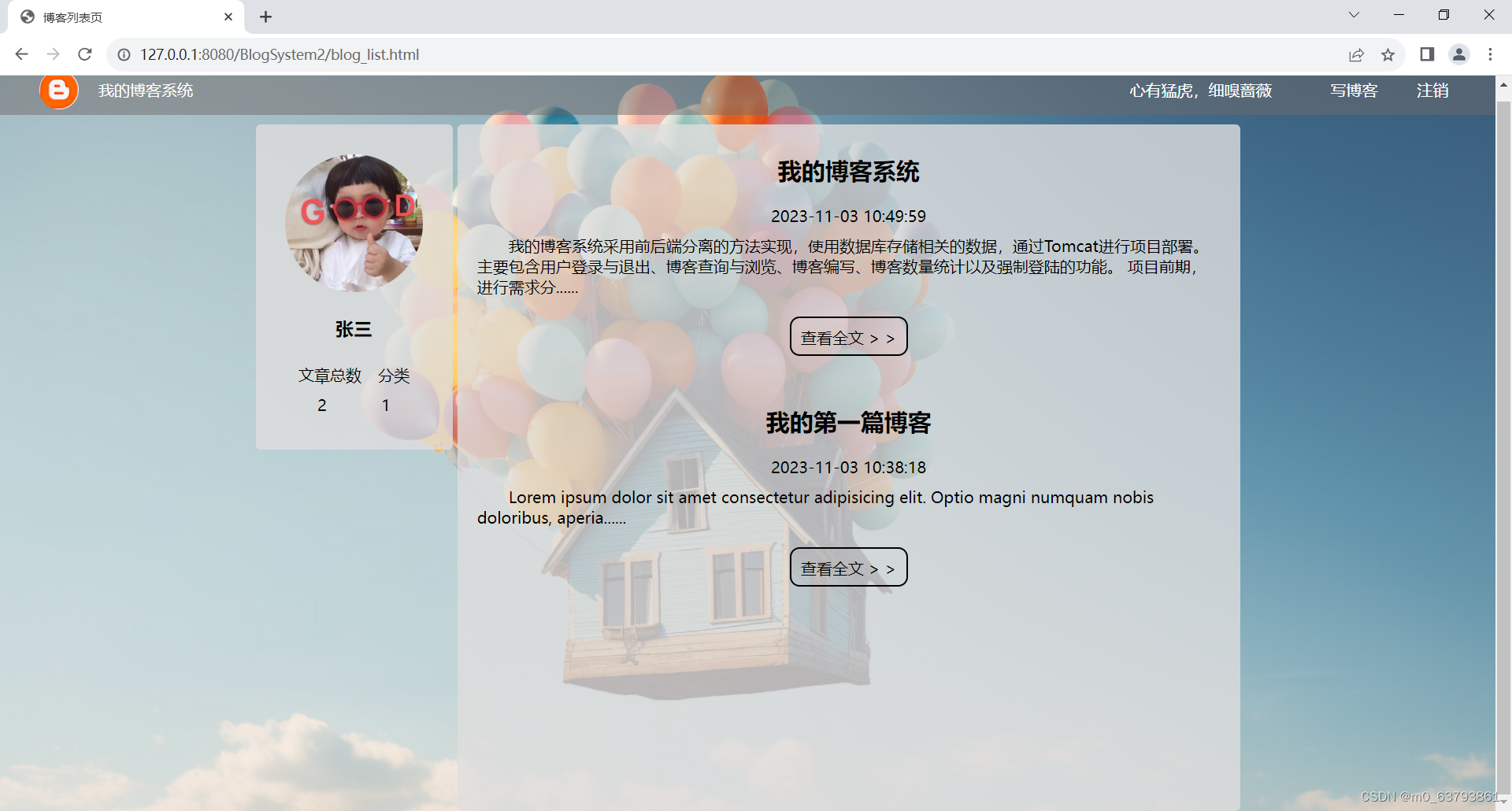
1、展示所有博客
1)约定前后端交互接口格式
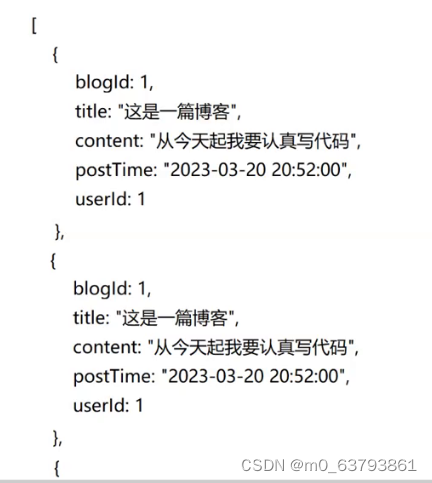
请求:GET /blog
响应:使用Json格式的数据组织(数组)
2)开发后端代码
//网络接口,处理HTTP请求,返回HTTP响应 @WebServlet("/blog") public class BlogServlet extends HttpServlet { private ObjectMapper objectMapper = new ObjectMapper(); @Override protected void doGet(HttpServletRequest req, HttpServletResponse resp) throws ServletException, IOException { BlogDao blogDao = new BlogDao(); //查询数据库 List<Blog> blogs = blogDao.selectAll(); // 把blogs转成符合要求的json格式字符串 String respJson = objectMapper.writeValueAsString(blogs); resp.setContentType("application/json; charset=utf8"); resp.getWriter().write(respJson); } } } 3)开发前端代码
在博客列表页加载过程中,触发ajax请求,访问数据库中的数据,将拿到的数据构造到页面中,博客按照发布时间进行排列。
<!-- 右侧内容 -->
<div class="container-right">
<!-- 表示一篇博客 -->
<!-- <div class="blog">
<div class="title">博客标题</div>
<div class="date">时间</div>
<div class="desc">内容</div>
<a href="#">查看全文 > ></a>
</div> -->
</div>
</div>
<!-- jQuery是javaScript框架, -->
<script src="./js/jquery.min.js"></script>
<script>
//在页面加载时,通过ajax向服务器发起请求,获取博客列表数据
function getBlogs(){
$.ajax({
type:'get',
url:'blog',
success:function(body){
//响应的正文是一个json字符串,此处已经被jQuery自动解析成js对象数组了
//先找到父类元素
let containerRight = document.querySelector('.container-right');
//使用for循环遍历,创建blogDiv
for(let blog of body){
//构造页面内容,博客对应的标题 、时间、内容的名字要和后端创建的Blog类的成员一样
//titleDiv.innerHTML=?
//构造整个博客div
let blogDiv = document.createElement('div');
blogDiv.className='blog';
let titleDiv = document.createElement('div');
titleDiv.className='title';
//获取标题并设置进去
titleDiv.innerHTML=blog.title;
blogDiv.appendChild(titleDiv);
let dateDiv = document.createElement('div');
dateDiv.className='date';
//获取时间并设置进去
dateDiv.innerHTML=blog.postTime;
blogDiv.appendChild(dateDiv);
let descDiv = document.createElement('div');
descDiv.className='desc';
//获取内容摘要并设置进去
descDiv.innerHTML=blog.content;
blogDiv.appendChild(descDiv);
//构造查看全文按钮
let a = document.createElement('a');
a.innerHTML='查看全文 > >';
//点击之后跳转到博客详情页
a.href='blog_detail.html?blogId='+blog.blogId;
blogDiv.appendChild(a);
//把创建的blogDiv添加到父类中
containerRight.appendChild(blogDiv);
}
}
});
}
getBlogs();
</script>2、显示用户信息(用户名)
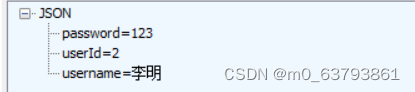
1)约定前后端交互接口
请求:GET /login
响应:
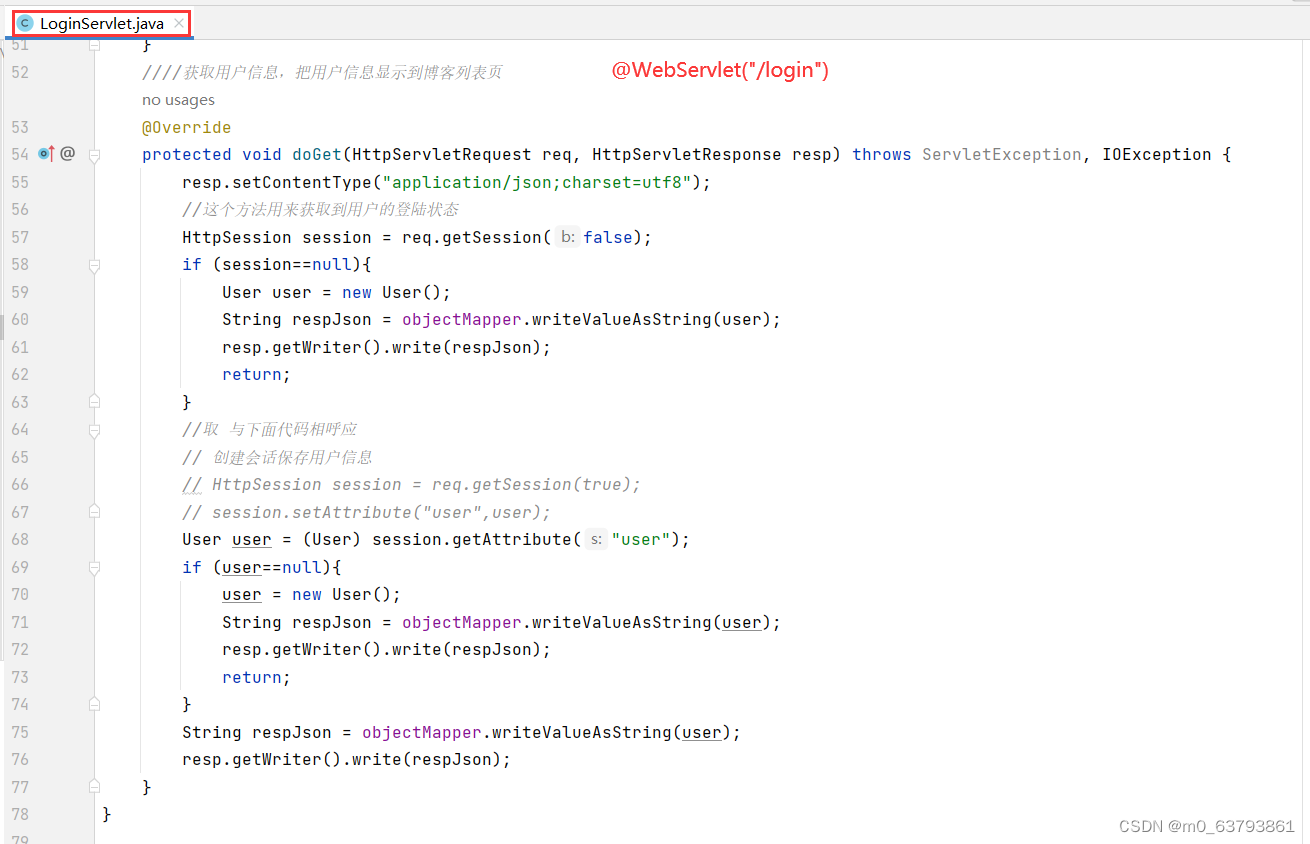
2)开发后端代码
3)开发前端代码
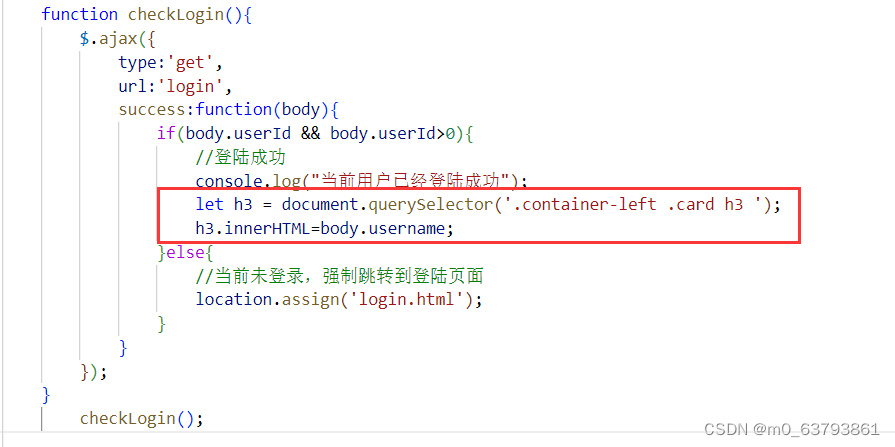
3、显示博客总数
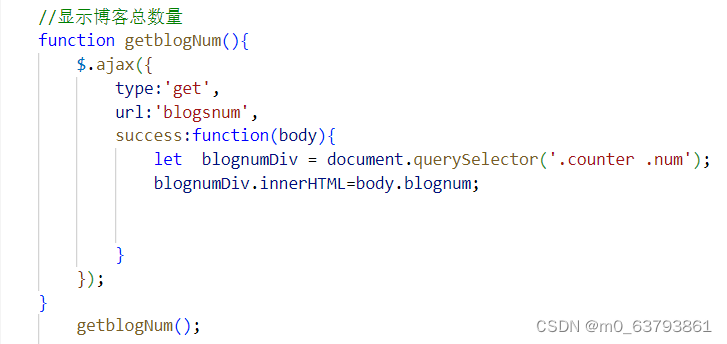
1)约定前后端交互接口
请求: GET /blogsnum
响应:

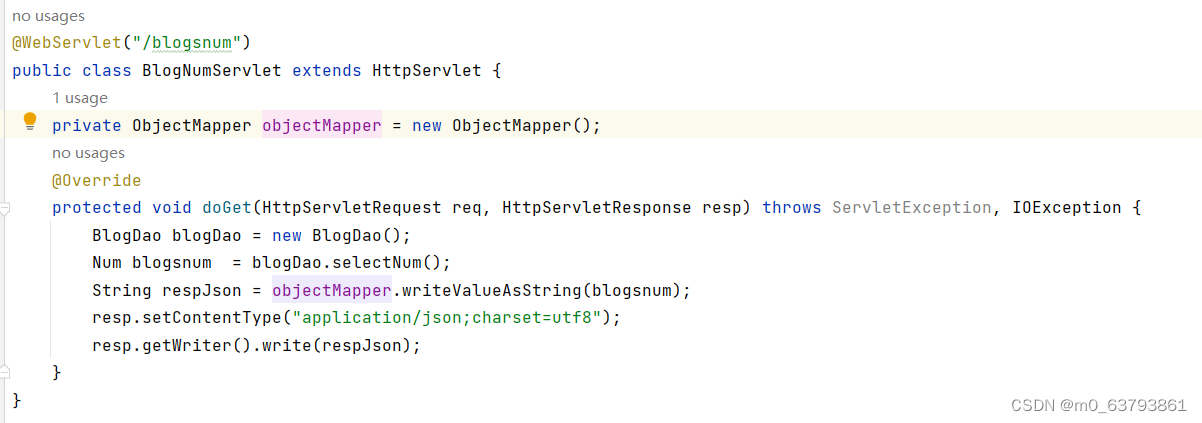
2)开发后端代码
3)开发前端代码
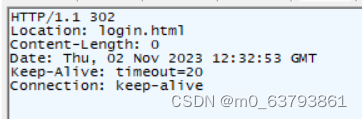
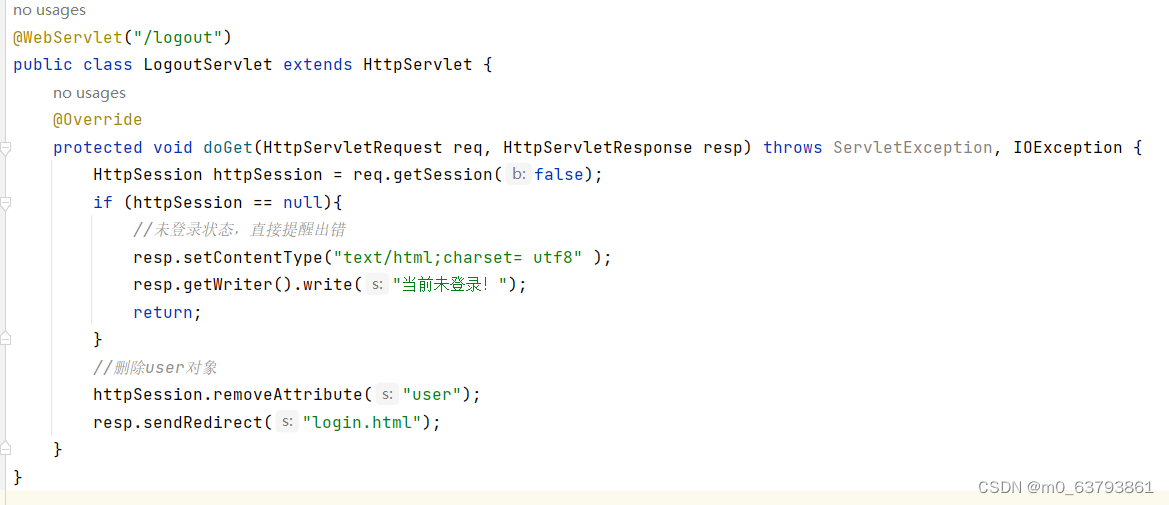
4、实现注销功能
1)约定前后端交互接口
请求:GET /logout
响应:
2)开发后端代码
3)开发前端代码

5、实现写博客功能
此时,只是从博客列表页跳转到博客编辑页

博客详情页功能实现基本思路:
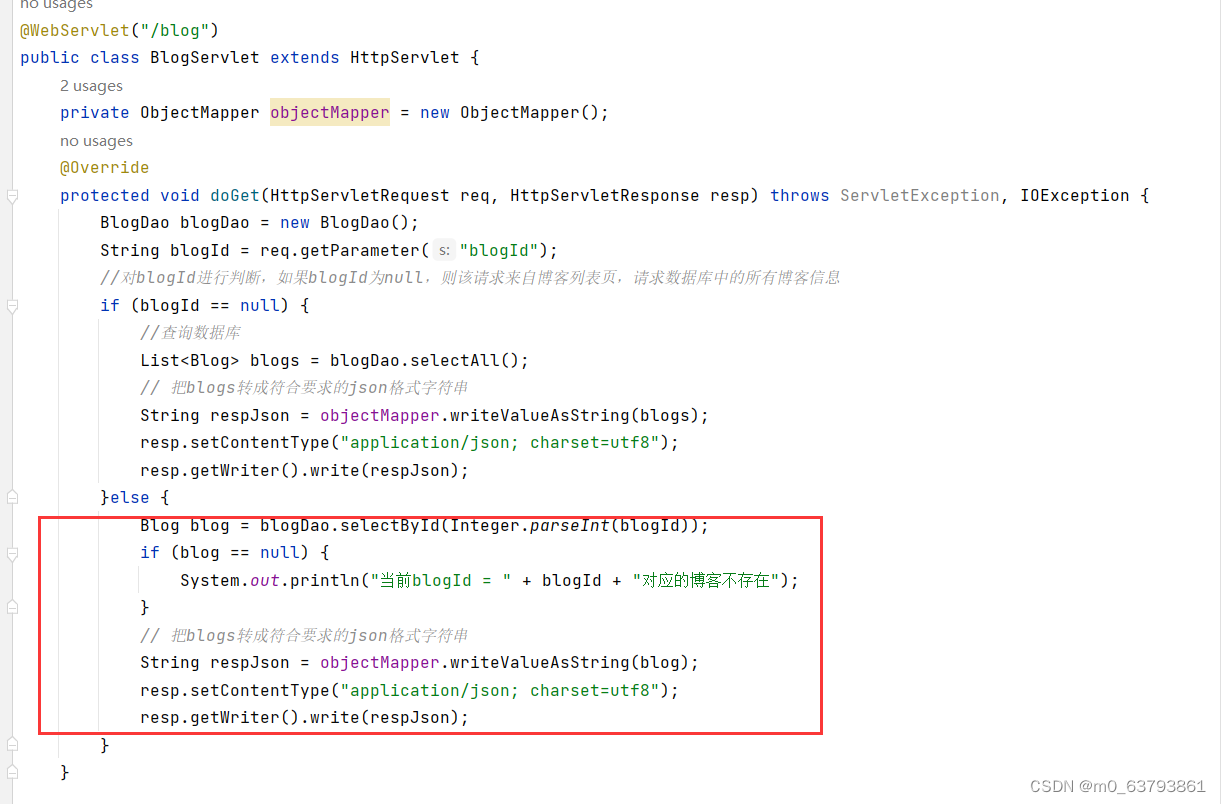
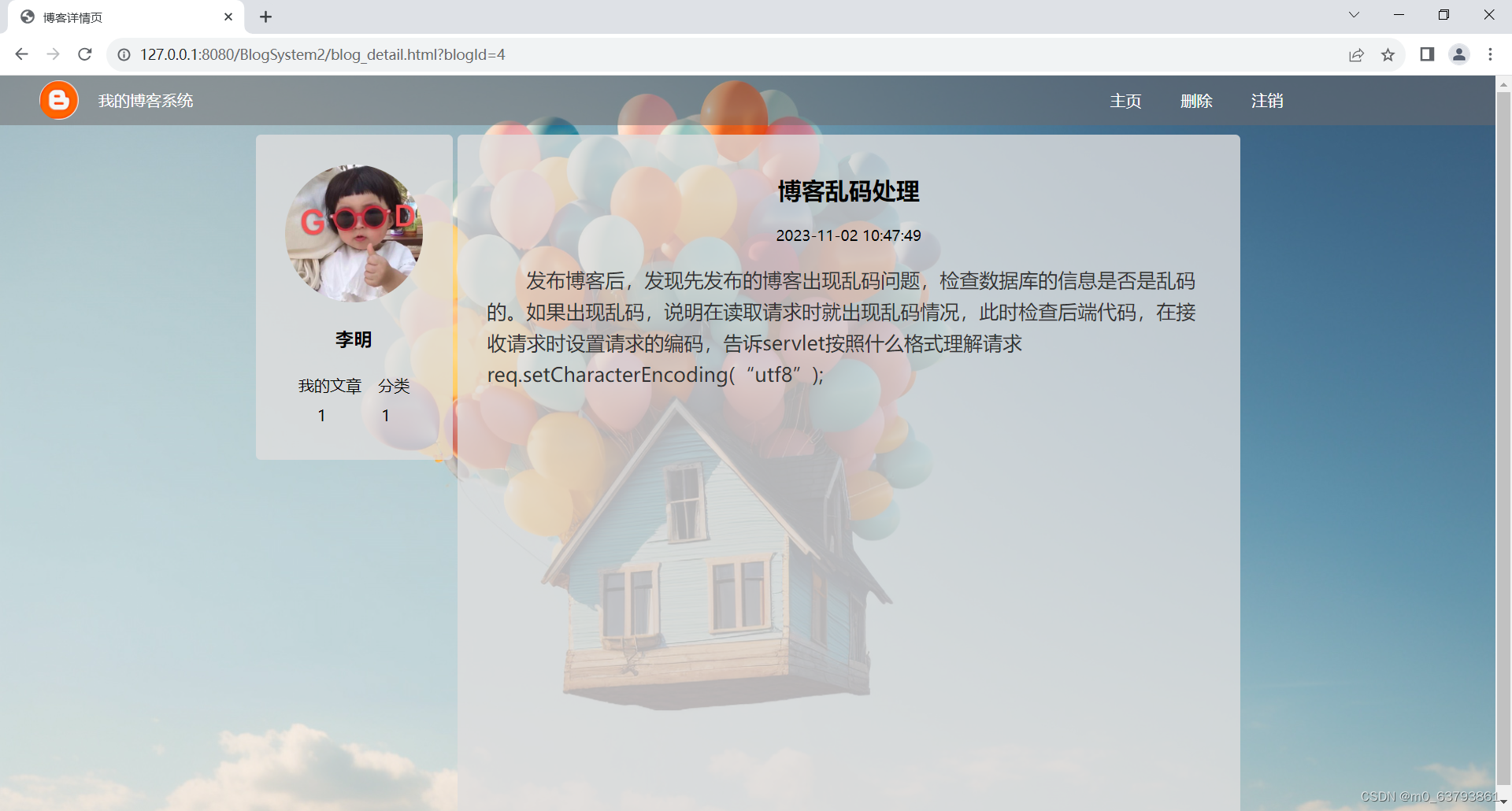
1、展示blogId对应博客的详细内容
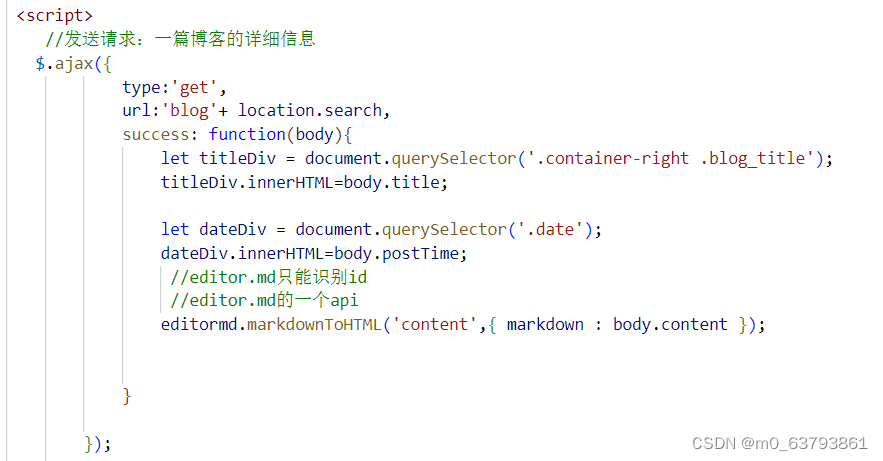
点击“查看全文”按钮,跳转到博客详情页,在博客详情页发起Ajax请求,从服务器获取当前博客的内容。
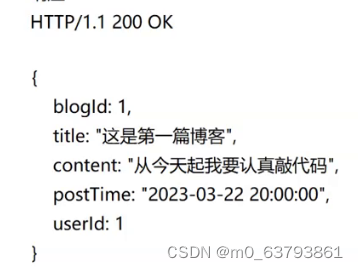
1)约定前后端交互接口
请求:GET /blog?blogId=1
响应:
2)开发后端代码
3)开发前端代码
2、统计该博客作者发布文章的数量
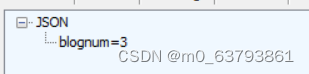
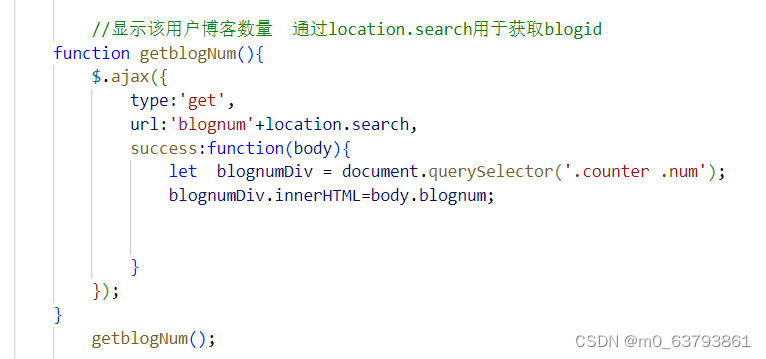
1)约定前后端交互接口
请求:GET /blognum
响应:
2)开发后端代码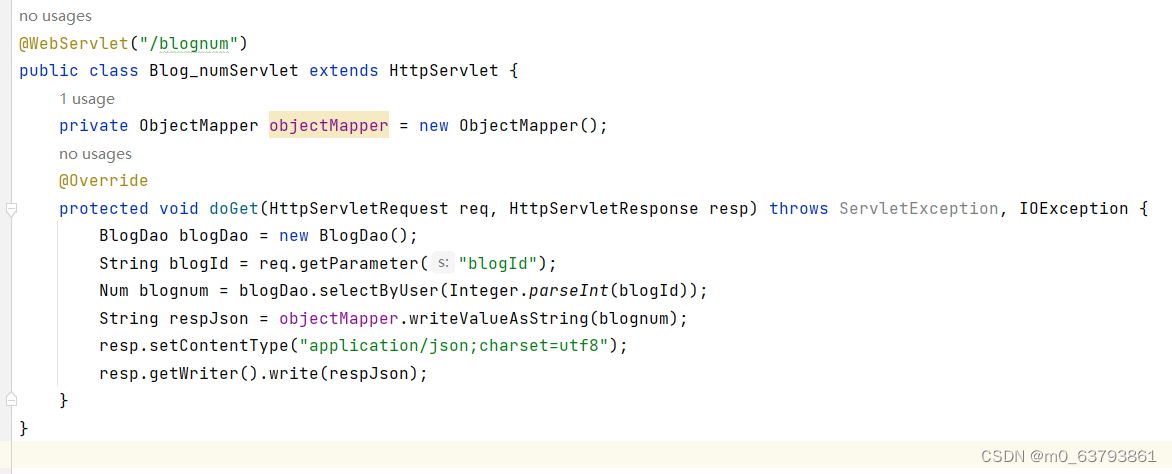
3)开发前端代码
3、博客删除功能实现
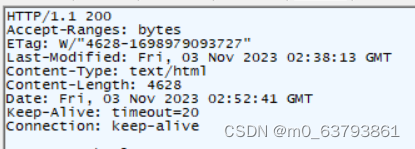
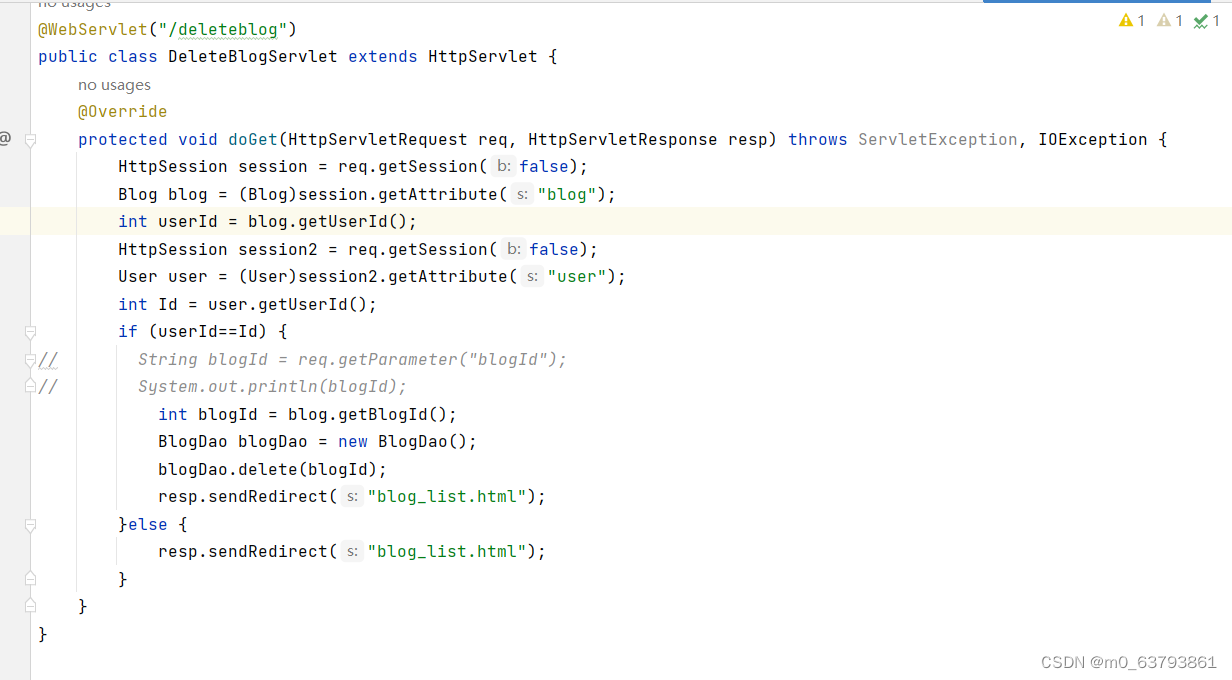
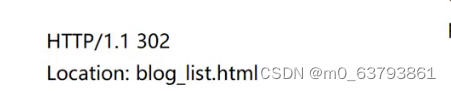
通过查阅资料,发现a标签通常用于向服务器传递定值 ,当我尝试通过网上传递参数的方法传递blogId时,并没有成功,服务器不能获取到要删除博客的信息。于是我就改变思路,在实现注销功能的时候,根据登录时创建的用于保存用户信息的会话可以得到登录用户的信息,通过删除用户对象从而退出登录。同理,我在博客详情页获取该博客详细内容时创建了一个保存博客对象的会话,此时,服务器在接收到客户端删除请求时,从该会话获取到博客对象,就能进行删除了。
对于删除博客的权限做出了规定,用户只能删除自己的博客,无权删除其他用户的博客。
1)约定前后端交互接口
请求:GET /deleteblog
响应:
2)开发后端代码
3)开发前端代码

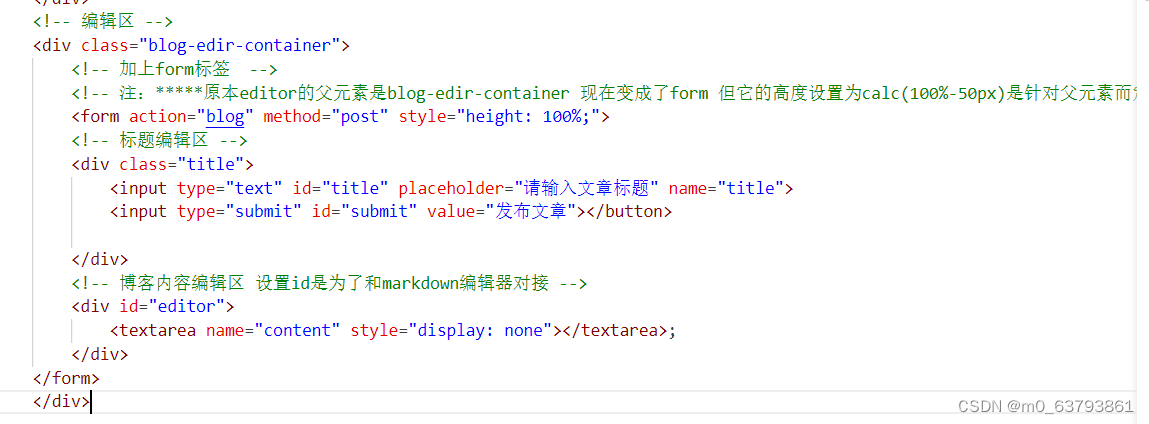
博客编辑页功能实现基本思路
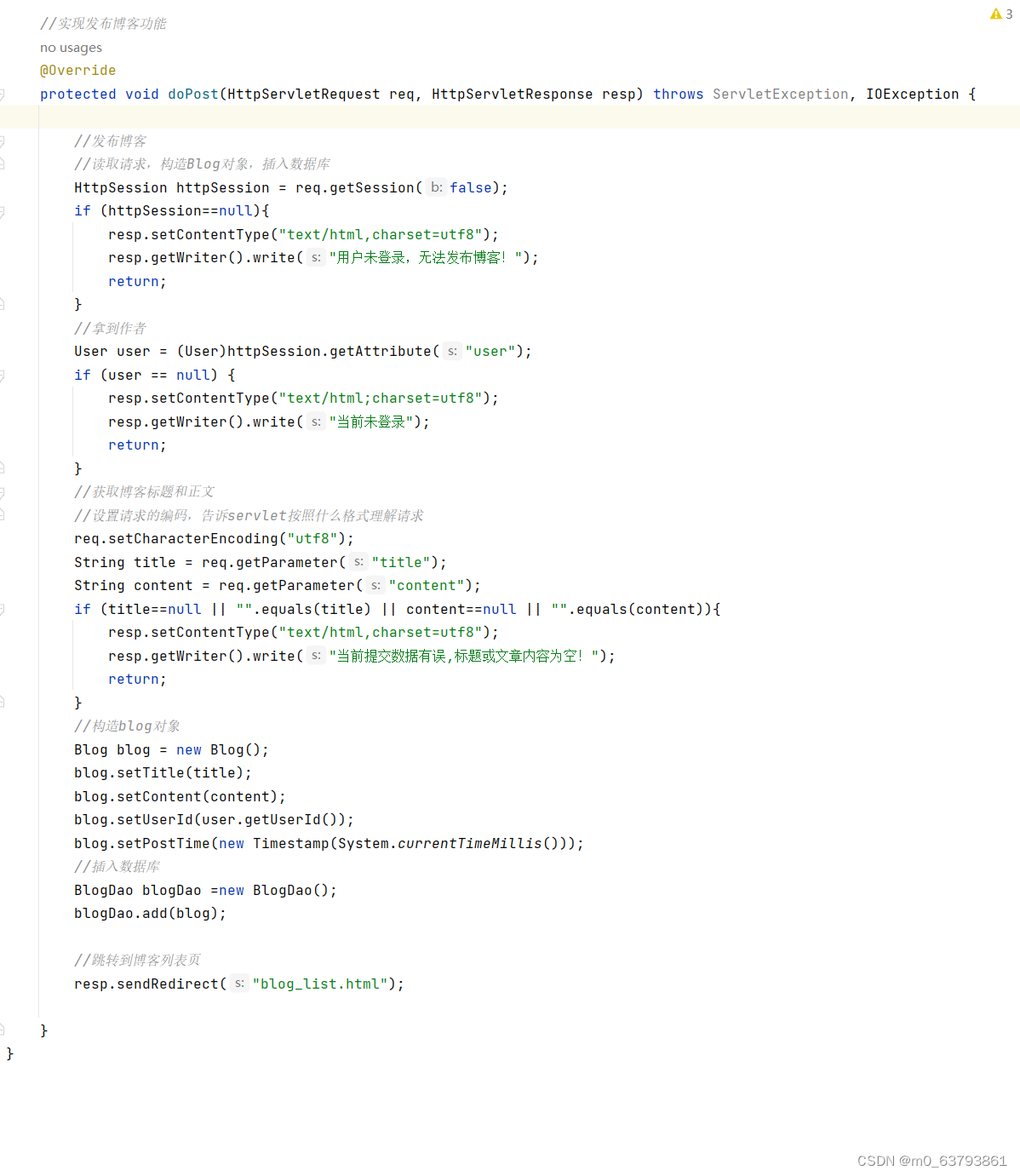
1、发布博客
通过使用form表单
1)约定前后端交互接口
请求:POST /blog
响应:

2)开发后端代码
3)开发前端代码
博客登录页功能实现基本思路:
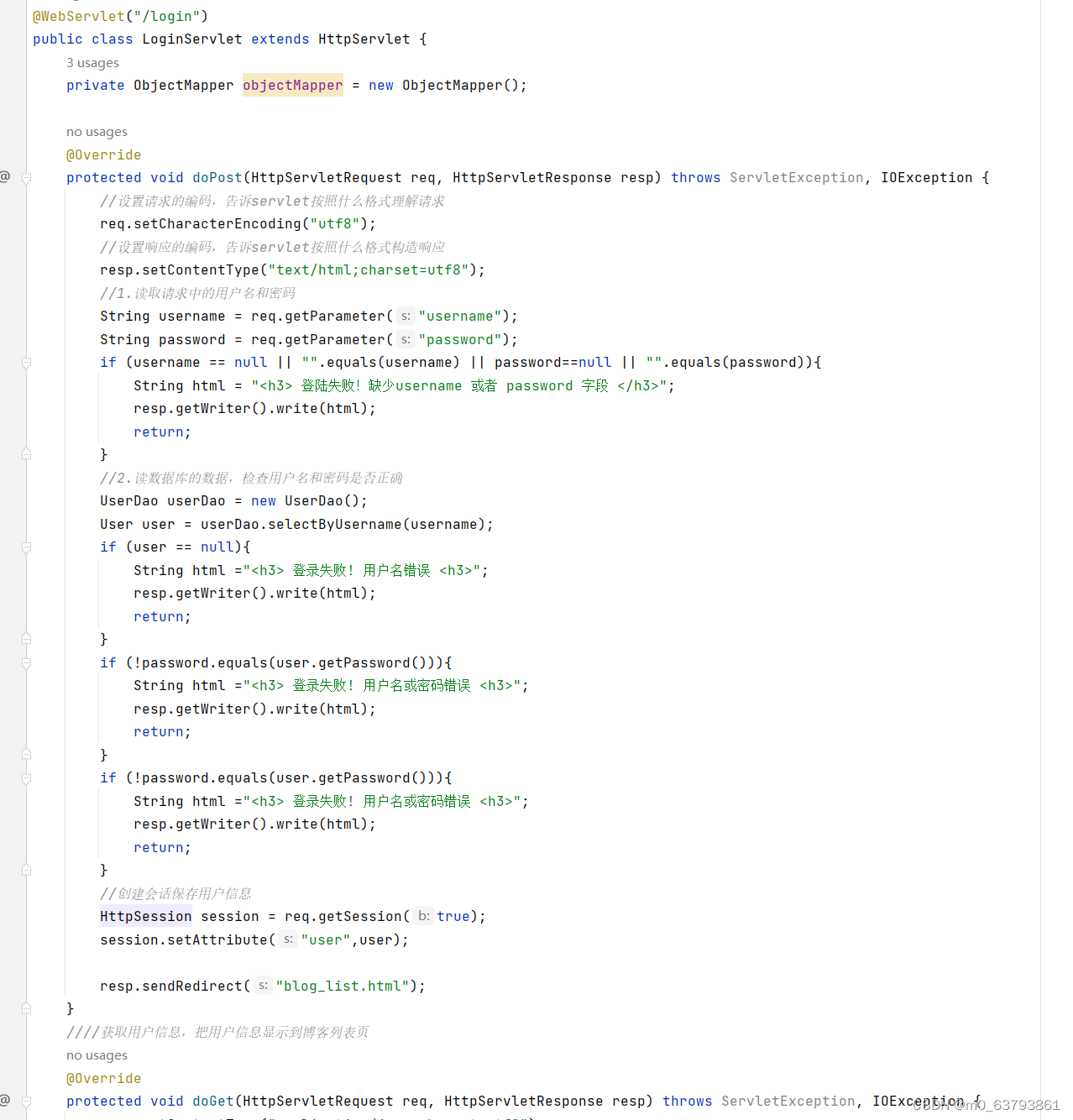
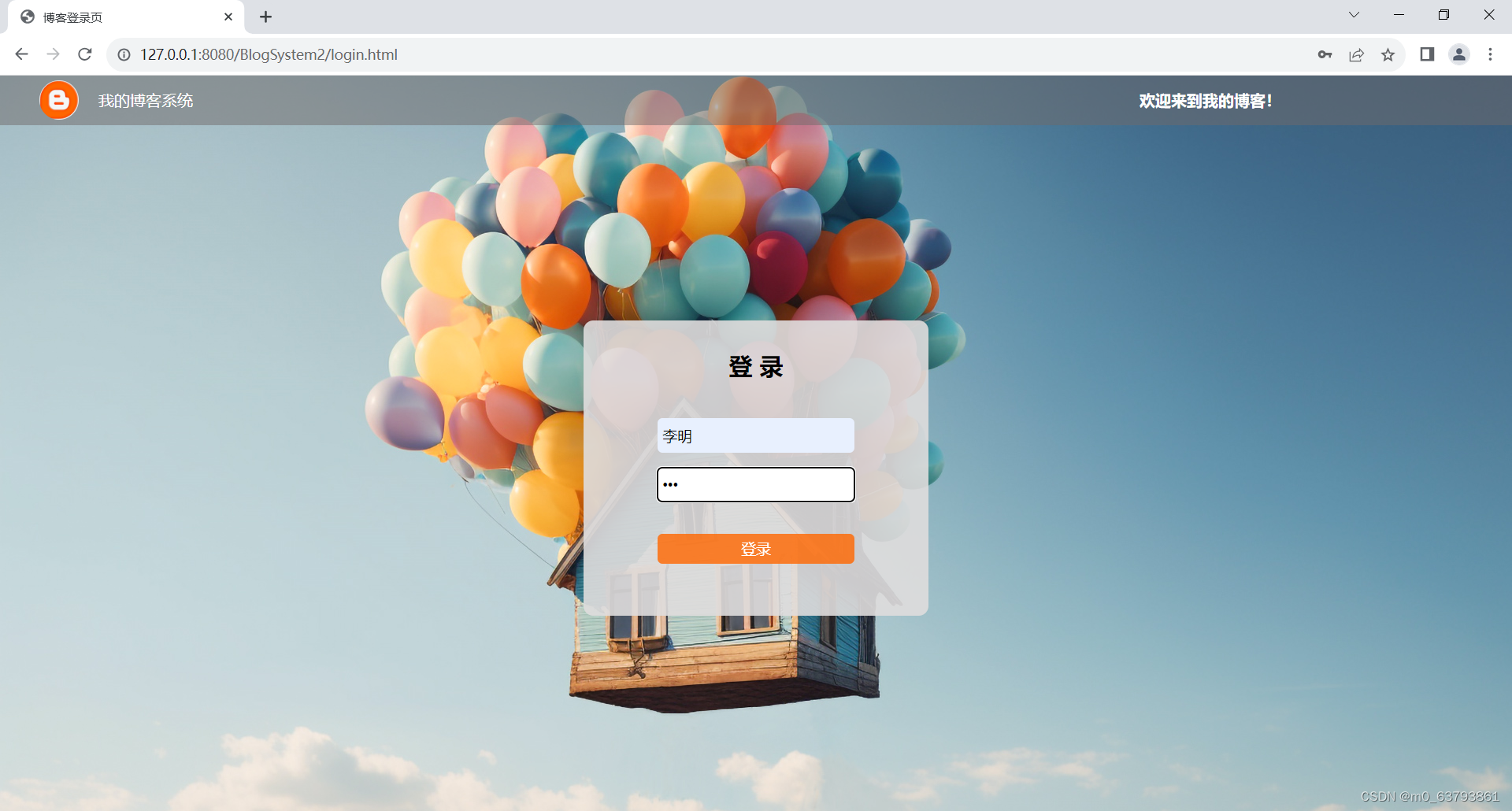
1、登录实现
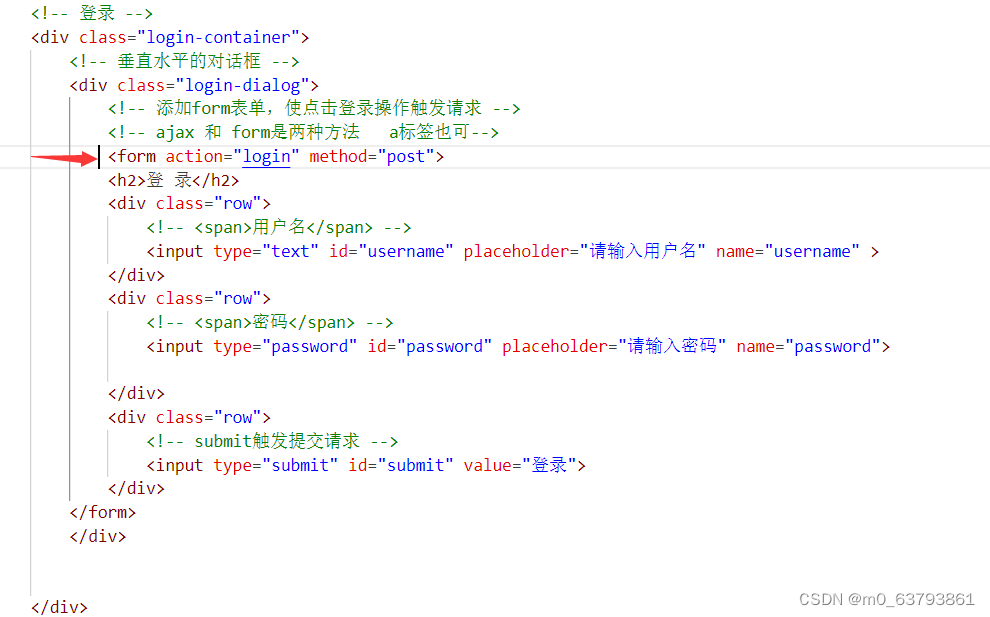
在输入框输入对应的用户信息,点击登录,会触发一个http请求,服务器验证用户名和密码,根据结果判定是否登陆成功。如果成功,就跳转到博客列表页。
1)约定前后端交互接口
请求:POST /login
响应:


form表单根据响应302才会触发页面跳转
2)开发后端代码
3)开发前端代码
2、各页面强制登录
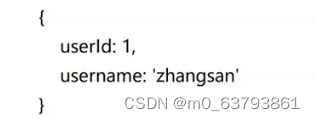
页面加载时,发起一个Ajax请求,响应用户的信息。判断是否已登录,如果未登录,则通过前端跳转到登录页。
1)约定前后端交互接口
请求:GET /login
响应:
2)开发后端代码
@Override protected void doGet(HttpServletRequest req, HttpServletResponse resp) throws ServletException, IOException { resp.setContentType("application/json;charset=utf8"); //这个方法用来获取到用户的登陆状态 HttpSession session = req.getSession(false); if (session==null){ User user = new User(); String respJson = objectMapper.writeValueAsString(user); resp.getWriter().write(respJson); return; } //取 与下面代码相呼应 // 创建会话保存用户信息 // HttpSession session = req.getSession(true); // session.setAttribute("user",user); User user = (User) session.getAttribute("user"); if (user==null){ user = new User(); String respJson = objectMapper.writeValueAsString(user); resp.getWriter().write(respJson); return; } String respJson = objectMapper.writeValueAsString(user); resp.getWriter().write(respJson); }3)开发前端代码
//强制用户登录
        function checkLogin(){
            $.ajax({
                type:'get',
                url:'login',
                success:function(body){
                    if(body.userId && body.userId>0){
                        //登陆成功
                        console.log("当前用户已经登陆成功");
                        let h3 = document.querySelector('.container-left .card h3 ');
                        h3.innerHTML=body.username;
                    }else{
                        //当前未登录,强制跳转到登陆页面
                        location.assign('login.html');
                    }
                }
            });
        }
            checkLogin();
四、成果展示
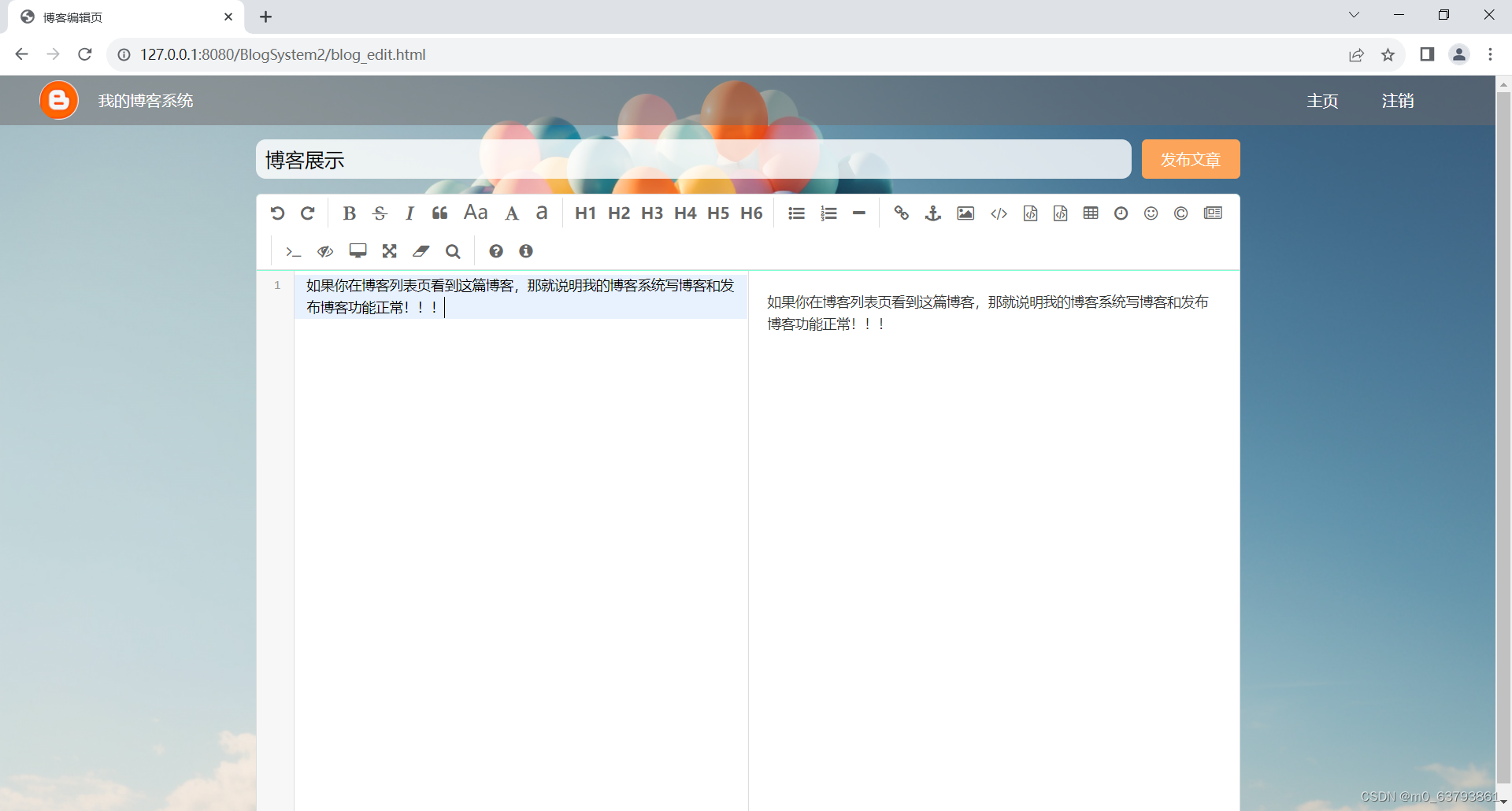
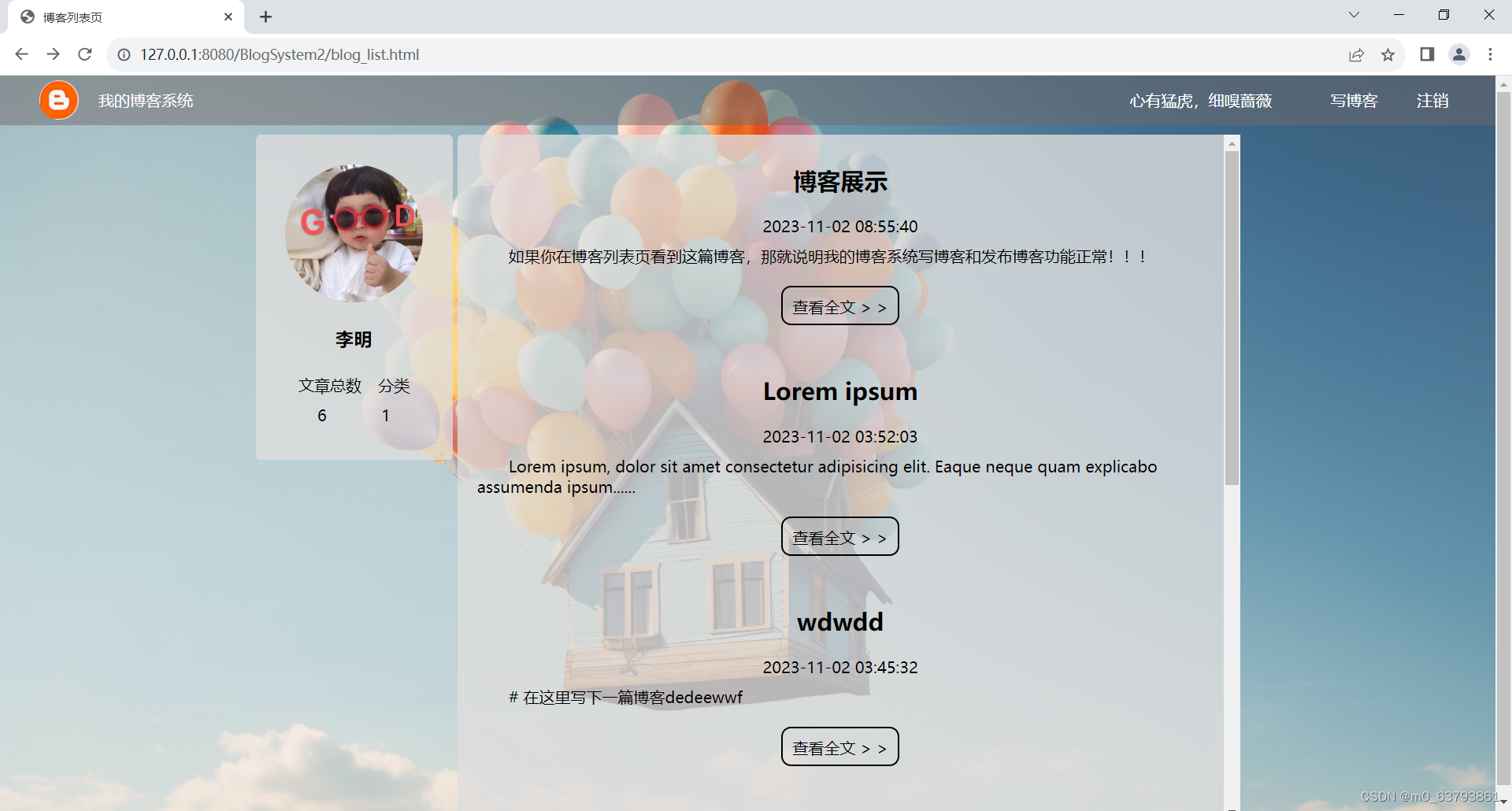
免责声明:本站所有文章内容,图片,视频等均是来源于用户投稿和互联网及文摘转载整编而成,不代表本站观点,不承担相关法律责任。其著作权各归其原作者或其出版社所有。如发现本站有涉嫌抄袭侵权/违法违规的内容,侵犯到您的权益,请在线联系站长,一经查实,本站将立刻删除。 本文来自网络,若有侵权,请联系删除,如若转载,请注明出处:https://haidsoft.com/101359.html

