
大家好,欢迎来到IT知识分享网。
基于detectron2训练自己的数据集
1. 首先下载官方提供的baloon数据集
import wget from zipfile import ZipFile def progress_bar(current, total, width=80): progress = current / total bar = '#' * int(progress * width) percentage = round(progress * 100, 2) print(f'[{
     bar:<{
     width}}] {
     percentage}%') save_path = 'balloon_dataset.zip' if True: url = 'https://github.com/matterport/Mask_RCNN/releases/download/v2.1/balloon_dataset.zip' try: wget.download(url, save_path, bar=progress_bar) except Exception as e: print(f'An error occurred: {
     e}') extract_path = 'balloon_dataset' with ZipFile(save_path, "r") as zip: zip.printdir() zip.extractall(extract_path)
2. 转换成detectron2的格式
# ---------------------------------------------------------------------------- # 转换成 detectron2 的数据格式 # if your dataset is in COCO format, this cell can be replaced by the following three lines: # from detectron2.data.datasets import register_coco_instances # register_coco_instances("my_dataset_train", {}, "json_annotation_train.json", "path/to/image/dir") # register_coco_instances("my_dataset_val", {}, "json_annotation_val.json", "path/to/image/dir") import cv2 import os import json import numpy as np import random # import some common detectron2 utilities from detectron2 import model_zoo from detectron2.engine import DefaultPredictor from detectron2.config import get_cfg from detectron2.utils.visualizer import Visualizer from detectron2.data import MetadataCatalog, DatasetCatalog from detectron2.structures import BoxMode def get_balloon_dicts(img_dir): json_file = os.path.join(img_dir, "via_region_data.json") with open(json_file) as f: imgs_anns = json.load(f) dataset_dicts = [] for idx, v in enumerate(imgs_anns.values()): record = {
   } filename = os.path.join(img_dir, v["filename"]) height, width = cv2.imread(filename).shape[:2] record["file_name"] = filename record["image_id"] = idx record["height"] = height record["width"] = width annos = v["regions"] objs = [] for _, anno in annos.items(): assert not anno["region_attributes"] anno = anno["shape_attributes"] px = anno["all_points_x"] py = anno["all_points_y"] poly = [(x + 0.5, y + 0.5) for x, y in zip(px, py)] poly = [p for x in poly for p in x] obj = {
    "bbox": [np.min(px), np.min(py), np.max(px), np.max(py)], "bbox_mode": BoxMode.XYXY_ABS, "segmentation": [poly], "category_id": 0, } objs.append(obj) record["annotations"] = objs dataset_dicts.append(record) return dataset_dicts # 由于ballon中所有的图像标注都是存储在一个json文件中,所以需要分开,也可以自己保存成单个的json文件 for d in ["train", "val"]: DatasetCatalog.register("balloon_" + d, lambda d=d: get_balloon_dicts("balloon_dataset/balloon/" + d)) MetadataCatalog.get("balloon_" + d).set(thing_classes=["balloon"]) balloon_metadata = MetadataCatalog.get("balloon_train") dataset_dicts = get_balloon_dicts("balloon_dataset/balloon/train") for d in random.sample(dataset_dicts, 3): img = cv2.imread(d["file_name"]) visualizer = Visualizer(img[:, :, ::-1], metadata=balloon_metadata, scale=0.5) out = visualizer.draw_dataset_dict(d) cv2.imshow('img', out.get_image()[:, :, ::-1]) cv2.waitKey(0) # ----------------------------------------------------------------------------
3. 训练
# ---------------------------------------------------------------------------- # 转换成 detectron2 的数据格式 # if your dataset is in COCO format, this cell can be replaced by the following three lines: # from detectron2.data.datasets import register_coco_instances # register_coco_instances("my_dataset_train", {}, "json_annotation_train.json", "path/to/image/dir") # register_coco_instances("my_dataset_val", {}, "json_annotation_val.json", "path/to/image/dir") import cv2 import os import json import numpy as np import random # import some common detectron2 utilities from detectron2 import model_zoo from detectron2.engine import DefaultPredictor from detectron2.engine import DefaultTrainer from detectron2.config import get_cfg from detectron2.utils.visualizer import Visualizer from detectron2.data import MetadataCatalog, DatasetCatalog from detectron2.structures import BoxMode def get_balloon_dicts(img_dir): json_file = os.path.join(img_dir, "via_region_data.json") with open(json_file) as f: imgs_anns = json.load(f) dataset_dicts = [] for idx, v in enumerate(imgs_anns.values()): record = {
   } filename = os.path.join(img_dir, v["filename"]) height, width = cv2.imread(filename).shape[:2] record["file_name"] = filename record["image_id"] = idx record["height"] = height record["width"] = width annos = v["regions"] objs = [] for _, anno in annos.items(): assert not anno["region_attributes"] anno = anno["shape_attributes"] px = anno["all_points_x"] py = anno["all_points_y"] poly = [(x + 0.5, y + 0.5) for x, y in zip(px, py)] poly = [p for x in poly for p in x] obj = {
    "bbox": [np.min(px), np.min(py), np.max(px), np.max(py)], "bbox_mode": BoxMode.XYXY_ABS, "segmentation": [poly], "category_id": 0, } objs.append(obj) record["annotations"] = objs dataset_dicts.append(record) return dataset_dicts # 由于ballon中所有的图像标注都是存储在一个json文件中,所以需要分开,也可以自己保存成单个的json文件 for d in ["train", "val"]: DatasetCatalog.register("balloon_" + d, lambda d=d: get_balloon_dicts("balloon_dataset/balloon/" + d)) MetadataCatalog.get("balloon_" + d).set(thing_classes=["balloon"]) balloon_metadata = MetadataCatalog.get("balloon_train") cfg = get_cfg() cfg.merge_from_file(model_zoo.get_config_file("COCO-InstanceSegmentation/mask_rcnn_R_50_FPN_3x.yaml")) cfg.DATASETS.TRAIN = ("balloon_train",) cfg.DATASETS.TEST = () cfg.DATALOADER.NUM_WORKERS = 0 cfg.MODEL.WEIGHTS = model_zoo.get_checkpoint_url("COCO-InstanceSegmentation/mask_rcnn_R_50_FPN_3x.yaml") # Let training initialize from model zoo cfg.SOLVER.IMS_PER_BATCH = 2 # This is the real "batch size" commonly known to deep learning people cfg.SOLVER.BASE_LR = 0.00025 # pick a good LR cfg.SOLVER.MAX_ITER = 300 # 300 iterations seems good enough for this toy dataset; you will need to train longer for a practical dataset cfg.SOLVER.STEPS = [] # do not decay learning rate cfg.MODEL.ROI_HEADS.BATCH_SIZE_PER_IMAGE = 128 # The "RoIHead batch size". 128 is faster, and good enough for this toy dataset (default: 512) cfg.MODEL.ROI_HEADS.NUM_CLASSES = 1 # only has one class (ballon). (see https://detectron2.readthedocs.io/tutorials/datasets.html#update-the-config-for-new-datasets) # NOTE: this config means the number of classes, but a few popular unofficial tutorials incorrect uses num_classes+1 here. os.makedirs(cfg.OUTPUT_DIR, exist_ok=True) trainer = DefaultTrainer(cfg) trainer.resume_or_load(resume=False) trainer.train()
4. 测试与评价
# ---------------------------------------------------------------------------- # 转换成 detectron2 的数据格式 # if your dataset is in COCO format, this cell can be replaced by the following three lines: # from detectron2.data.datasets import register_coco_instances # register_coco_instances("my_dataset_train", {}, "json_annotation_train.json", "path/to/image/dir") # register_coco_instances("my_dataset_val", {}, "json_annotation_val.json", "path/to/image/dir") import cv2 import os import json import numpy as np import random # import some common detectron2 utilities from detectron2 import model_zoo from detectron2.engine import DefaultPredictor from detectron2.engine import DefaultTrainer from detectron2.config import get_cfg from detectron2.utils.visualizer import Visualizer from detectron2.data import MetadataCatalog, DatasetCatalog from detectron2.structures import BoxMode from detectron2.utils.visualizer import ColorMode from detectron2.evaluation import COCOEvaluator, inference_on_dataset from detectron2.data import build_detection_test_loader from multiprocessing import freeze_support def get_balloon_dicts(img_dir): json_file = os.path.join(img_dir, "via_region_data.json") with open(json_file) as f: imgs_anns = json.load(f) dataset_dicts = [] for idx, v in enumerate(imgs_anns.values()): record = {
   } filename = os.path.join(img_dir, v["filename"]) height, width = cv2.imread(filename).shape[:2] record["file_name"] = filename record["image_id"] = idx record["height"] = height record["width"] = width annos = v["regions"] objs = [] for _, anno in annos.items(): assert not anno["region_attributes"] anno = anno["shape_attributes"] px = anno["all_points_x"] py = anno["all_points_y"] poly = [(x + 0.5, y + 0.5) for x, y in zip(px, py)] poly = [p for x in poly for p in x] obj = {
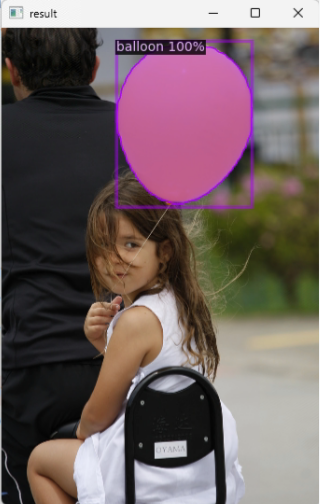
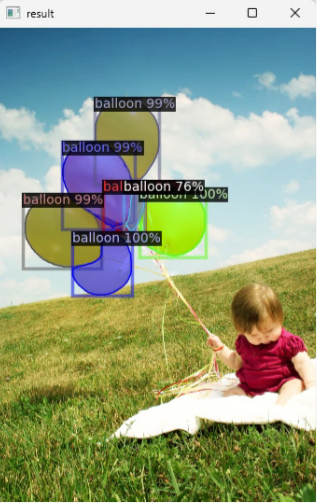
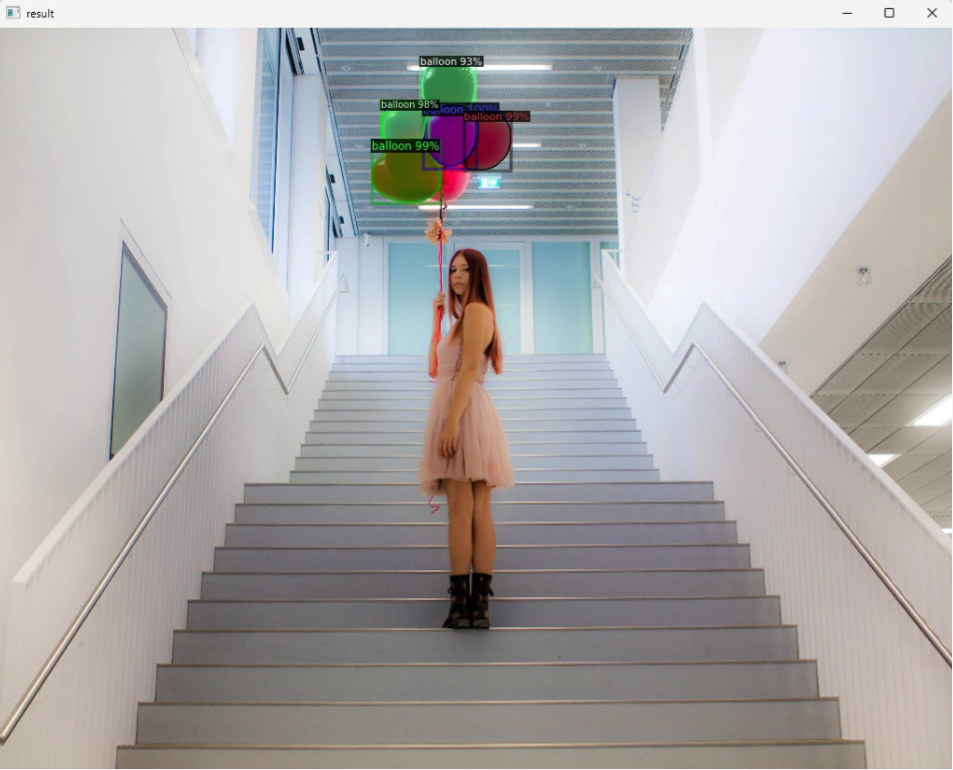
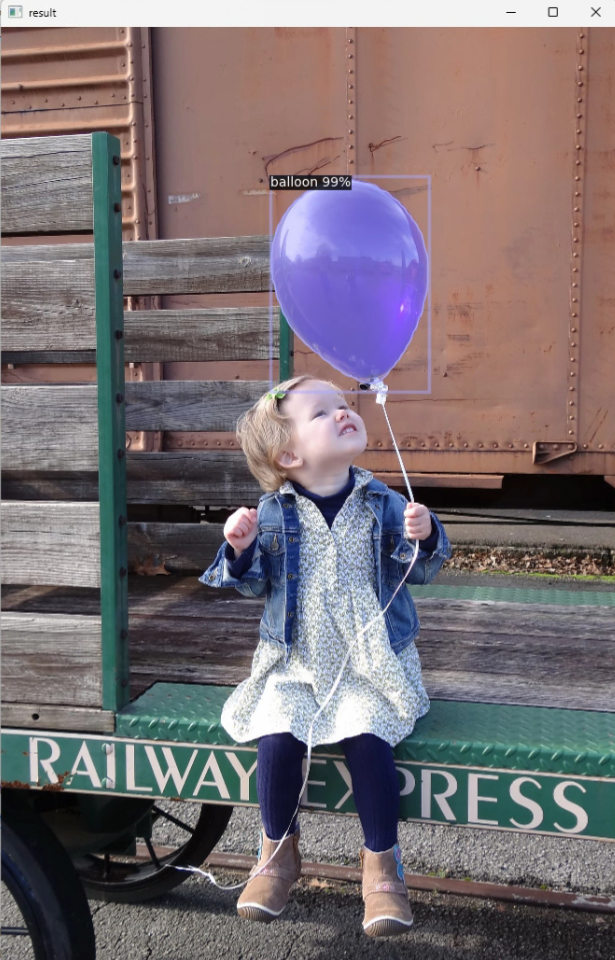
"bbox": [np.min(px), np.min(py), np.max(px), np.max(py)], "bbox_mode": BoxMode.XYXY_ABS, "segmentation": [poly], "category_id": 0, } objs.append(obj) record["annotations"] = objs dataset_dicts.append(record) return dataset_dicts if __name__ == '__main__': freeze_support() # Inference should use the config with parameters that are used in training # cfg now already contains everything we've set previously. We changed it a little bit for inference: cfg = get_cfg() cfg.DATALOADER.NUM_WORKERS = 0 cfg.MODEL.ROI_HEADS.SCORE_THRESH_TEST = 0.7 # set a custom testing threshold cfg.merge_from_file(model_zoo.get_config_file("COCO-InstanceSegmentation/mask_rcnn_R_50_FPN_3x.yaml")) cfg.MODEL.WEIGHTS = os.path.join(cfg.OUTPUT_DIR, "model_final.pth") # path to the model we just trained cfg.MODEL.ROI_HEADS.BATCH_SIZE_PER_IMAGE = 128 # The "RoIHead batch size". 128 is faster, and good enough for this toy dataset (default: 512) cfg.MODEL.ROI_HEADS.NUM_CLASSES = 1 # only has one class (ballon). (see https://detectron2.readthedocs.io/tutorials/datasets.html#update-the-config-for-new-datasets) predictor = DefaultPredictor(cfg) # 由于ballon中所有的图像标注都是存储在一个json文件中,所以需要分开,也可以自己保存成单个的json文件 for d in ["train", "val"]: DatasetCatalog.register("balloon_" + d, lambda d=d: get_balloon_dicts("balloon_dataset/balloon/" + d)) MetadataCatalog.get("balloon_" + d).set(thing_classes=["balloon"]) balloon_metadata = MetadataCatalog.get("balloon_train") dataset_dicts = get_balloon_dicts("balloon_dataset/balloon/val") for d in random.sample(dataset_dicts, 10): im = cv2.imread(d["file_name"]) outputs = predictor( im) # format is documented at https://detectron2.readthedocs.io/tutorials/models.html#model-output-format v = Visualizer(im[:, :, ::-1], metadata=balloon_metadata, scale=0.5, instance_mode=ColorMode.IMAGE # remove the colors of unsegmented pixels. This option is only available for segmentation models ) out = v.draw_instance_predictions(outputs["instances"].to("cpu")) cv2.imshow('result', out.get_image()[:, :, ::-1]) # cv2.waitKey(0) evaluator = COCOEvaluator("balloon_val", output_dir="./output") val_loader = build_detection_test_loader(cfg, "balloon_val") print(inference_on_dataset(predictor.model, val_loader, evaluator)) 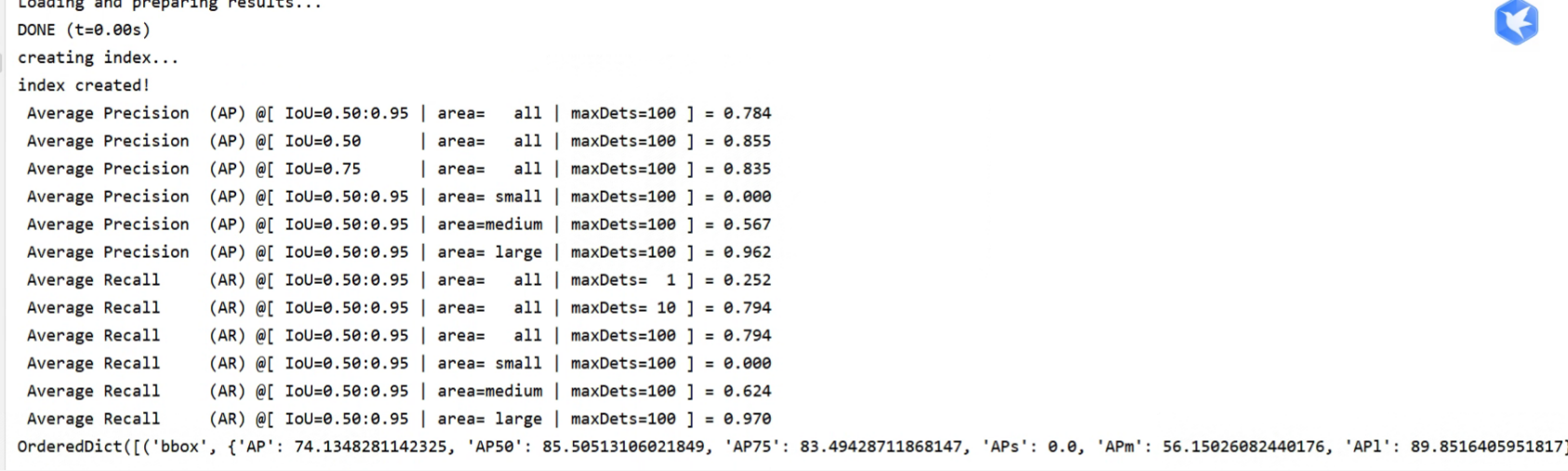
免责声明:本站所有文章内容,图片,视频等均是来源于用户投稿和互联网及文摘转载整编而成,不代表本站观点,不承担相关法律责任。其著作权各归其原作者或其出版社所有。如发现本站有涉嫌抄袭侵权/违法违规的内容,侵犯到您的权益,请在线联系站长,一经查实,本站将立刻删除。 本文来自网络,若有侵权,请联系删除,如若转载,请注明出处:https://haidsoft.com/112363.html

