
大家好,欢迎来到IT知识分享网。
前言
之前对于xml格式的YOLO数据集,之前记录过如何用imgaug对其进行数据增强。不过DOTA数据集采用的是txt格式的旋转框标注,因此不能直接套用,只能另辟蹊径。
DOTA数据集简介
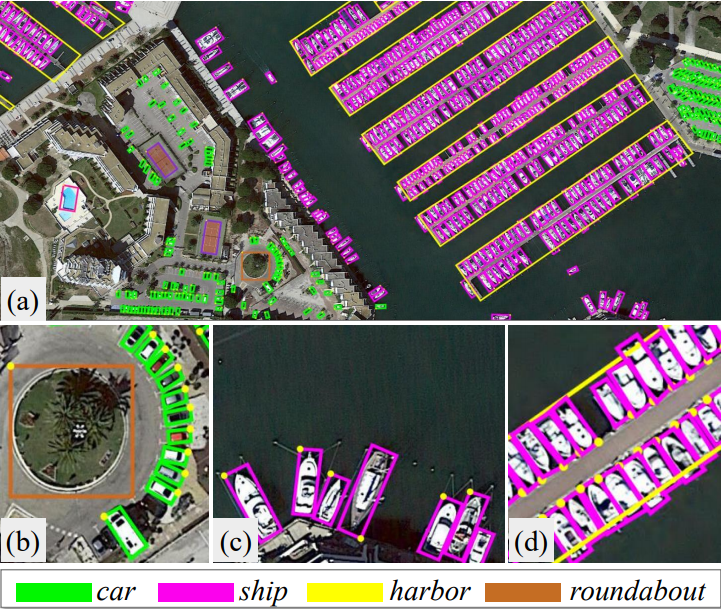
DOTA数据集总共有3个版本
DOTAV1.0
- 类别数目:15
- 类别名称:plane, ship, storage tank, baseball diamond, tennis court, basketball court, ground track field, harbor, bridge, large vehicle, small vehicle, helicopter, roundabout, soccer ball field , swimming pool
DOTAV1.5
- 类别数目:16
- 类别名称:plane, ship, storage tank, baseball diamond, tennis court, basketball court, ground track field, harbor, bridge, large vehicle, small vehicle, helicopter, roundabout, soccer ball field, swimming pool , container crane
DOTAV2.0
- 类别数目:18
- 类别名称:plane, ship, storage tank, baseball diamond, tennis court, basketball court, ground track field, harbor, bridge, large vehicle, small vehicle, helicopter, roundabout, soccer ball field, swimming pool, container crane, airport , helipad
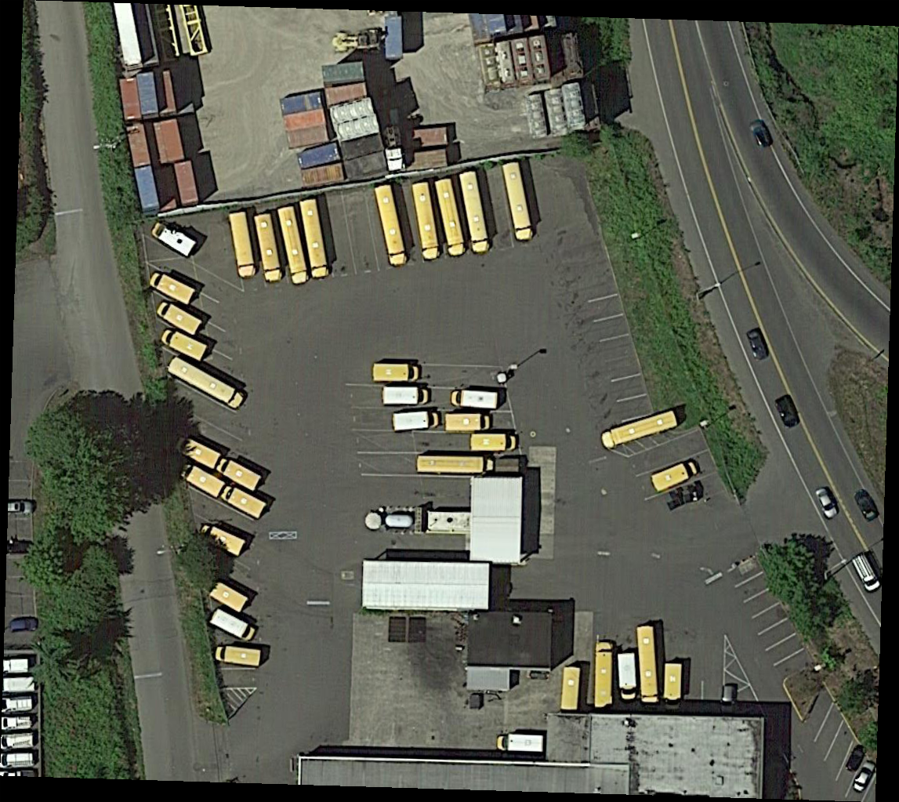
本实验演示选择的是DOTA数据集中的一张图片,原图如下:
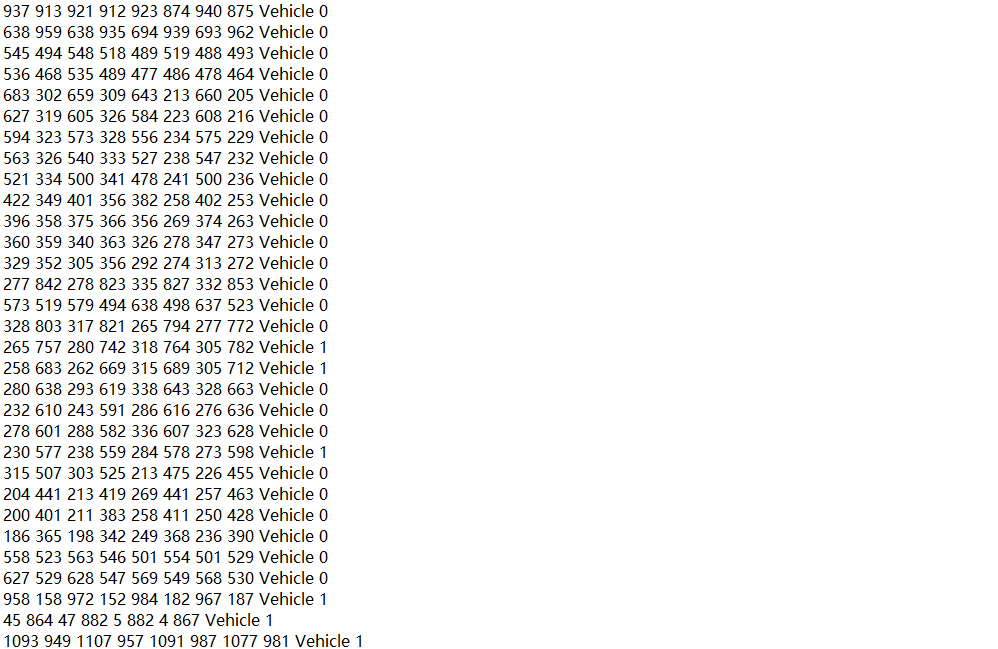
标签如下:
每个对象有10个数值,前8个代表一个矩形框四个角的坐标,第9个表示对象类别,第10个表示识别难易程度,0表示简单,1表示困难。
使用JDet中的visualization.py将标签可视化,效果如下图所示:
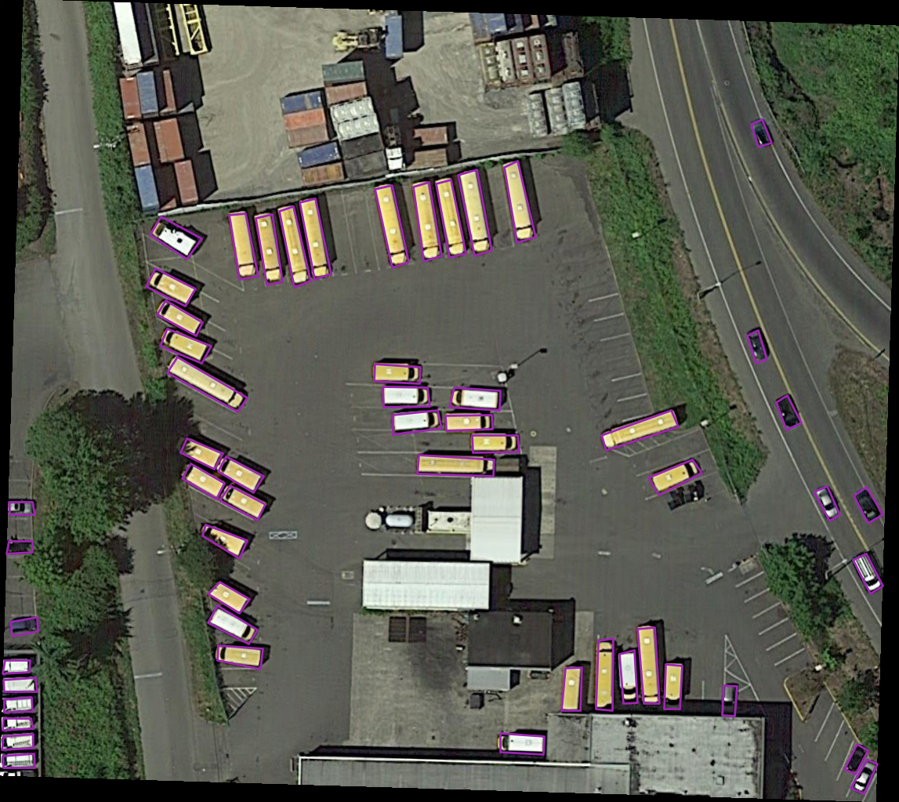
注:由于可视化代码需要坐标点输入为整数,因此后续给输出对象坐标点进行了取整操作,这会损失一些精度。
数据增强及可视化
数据增强代码主要参考的是这篇博文:目标识别小样本数据扩增
调整亮度
这里通过skimage.exposure.adjust_gamma来调整亮度:
# 调整亮度 def changeLight(img, inputtxt, outputiamge, outputtxt): # random.seed(int(time.time())) flag = random.uniform(0.5, 1.5) # flag>1为调暗,小于1为调亮 label = round(flag, 2) (filepath, tempfilename) = os.path.split(inputtxt) (filename, extension) = os.path.splitext(tempfilename) outputiamge = os.path.join(outputiamge + "/" + filename + "_" + str(label) + ".png") outputtxt = os.path.join(outputtxt + "/" + filename + "_" + str(label) + extension) ima_gamma = exposure.adjust_gamma(img, 0.5) shutil.copyfile(inputtxt, outputtxt) cv.imwrite(outputiamge, ima_gamma) 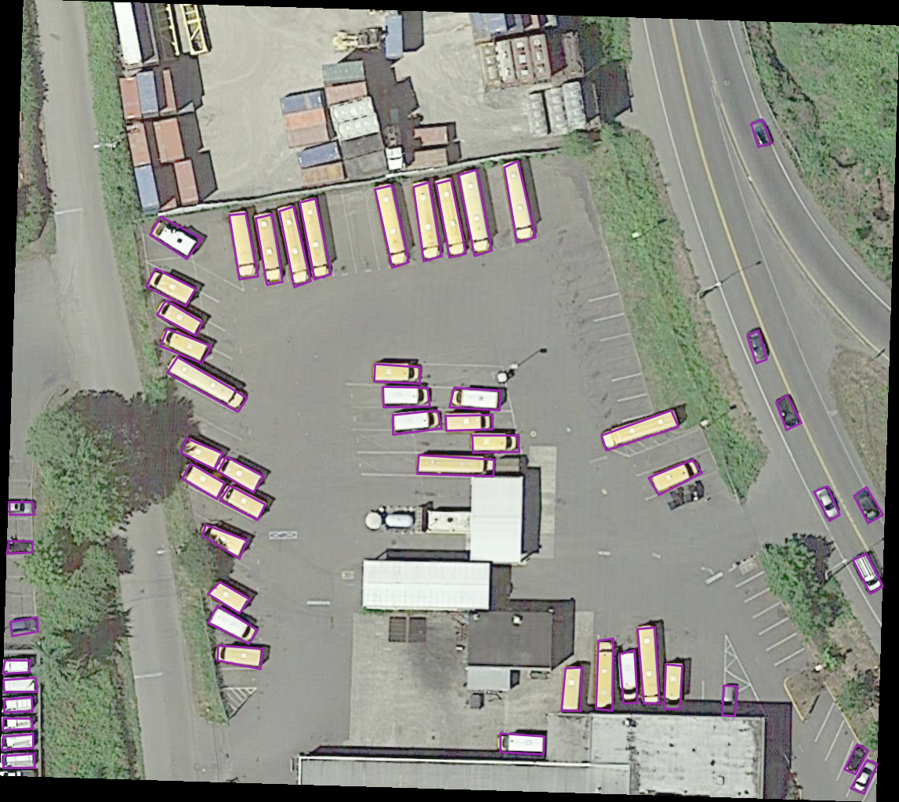
添加高斯噪声
添加高斯噪声需要先将像素点进行归一化(/255)
# 添加高斯噪声 def gasuss_noise(image, inputtxt, outputiamge, outputtxt, mean=0, var=0.01): ''' mean : 均值 var : 方差 ''' image = np.array(image / 255, dtype=float) noise = np.random.normal(mean, var 0.5, image.shape) out = image + noise if out.min() < 0: low_clip = -1. else: low_clip = 0. out = np.clip(out, low_clip, 1.0) out = np.uint8(out * 255) (filepath, tempfilename) = os.path.split(inputtxt) (filename, extension) = os.path.splitext(tempfilename) outputiamge = os.path.join(outputiamge + "/" + filename + "_gasunoise_" + str(mean) + "_" + str(var) + ".png") outputtxt = os.path.join(outputtxt + "/" + filename + "_gasunoise_" + str(mean) + "_" + str(var) + extension) shutil.copyfile(inputtxt, outputtxt) cv.imwrite(outputiamge, out) 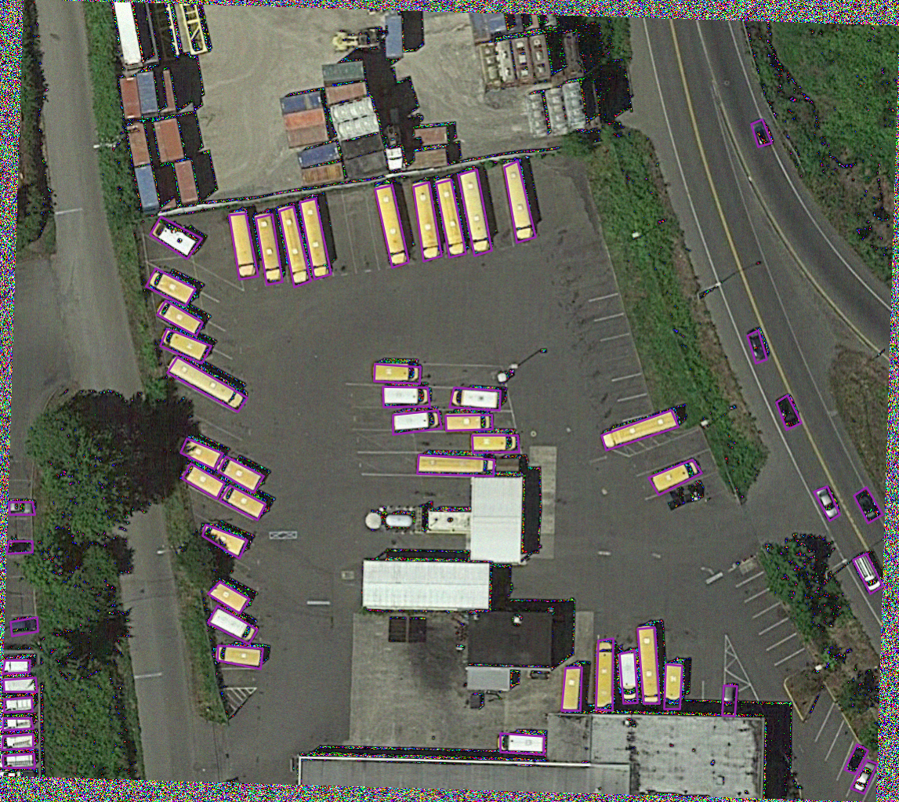
调整对比度
# 调整对比度 def ContrastAlgorithm(rgb_img, inputtxt, outputiamge, outputtxt): img_shape = rgb_img.shape temp_imag = np.zeros(img_shape, dtype=float) for num in range(0, 3): # 通过直方图正规化增强对比度 in_image = rgb_img[:, :, num] # 求输入图片像素最大值和最小值 Imax = np.max(in_image) Imin = np.min(in_image) # 要输出的最小灰度级和最大灰度级 Omin, Omax = 0, 255 # 计算a 和 b的值 a = float(Omax - Omin) / (Imax - Imin) b = Omin - a * Imin # 矩阵的线性变化 out_image = a * in_image + b # 数据类型的转化 out_image = out_image.astype(np.uint8) temp_imag[:, :, num] = out_image (filepath, tempfilename) = os.path.split(inputtxt) (filename, extension) = os.path.splitext(tempfilename) outputiamge = os.path.join(outputiamge + "/" + filename + "_contrastAlgorithm" + ".png") outputtxt = os.path.join(outputtxt + "/" + filename + "_contrastAlgorithm" + extension) shutil.copyfile(inputtxt, outputtxt) cv.imwrite(outputiamge, temp_imag) 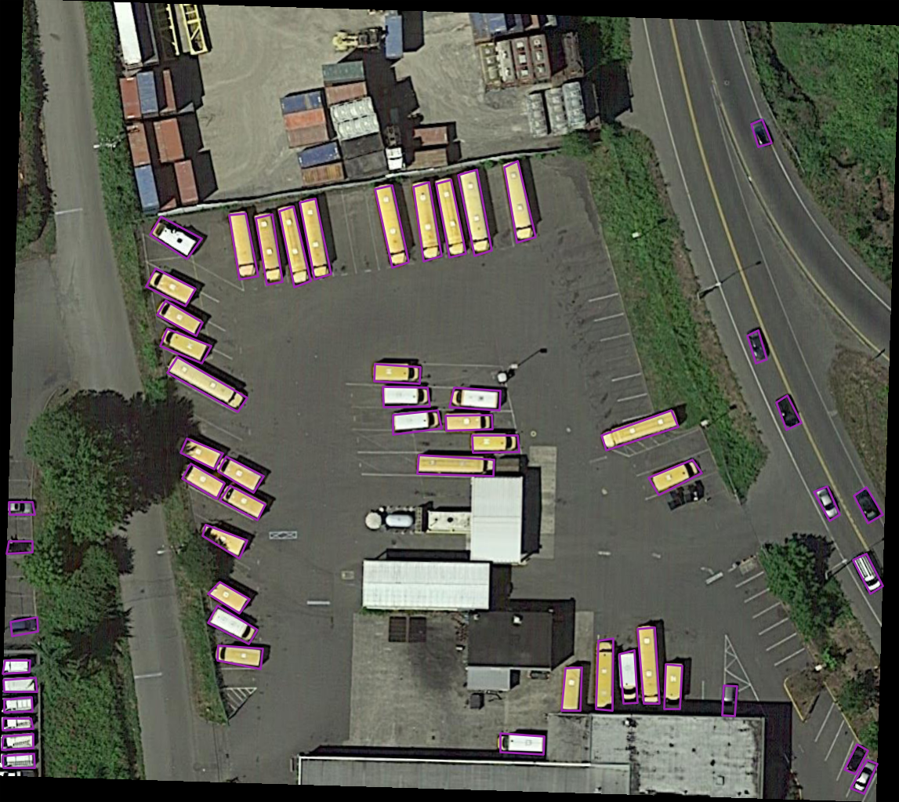
旋转
旋转本质上是利用仿射矩阵,这里预留了接口参数,可以自定义旋转角度
# 旋转 def rotate_img_bbox(img, inputtxt, temp_outputiamge, temp_outputtxt, angle, scale=1): nAgree = angle size = img.shape w = size[1] h = size[0] for numAngle in range(0, len(nAgree)): dRot = nAgree[numAngle] * np.pi / 180 dSinRot = math.sin(dRot) dCosRot = math.cos(dRot) nw = (abs(np.sin(dRot) * h) + abs(np.cos(dRot) * w)) * scale nh = (abs(np.cos(dRot) * h) + abs(np.sin(dRot) * w)) * scale (filepath, tempfilename) = os.path.split(inputtxt) (filename, extension) = os.path.splitext(tempfilename) outputiamge = os.path.join(temp_outputiamge + "/" + filename + "_rotate_" + str(nAgree[numAngle]) + ".png") outputtxt = os.path.join(temp_outputtxt + "/" + filename + "_rotate_" + str(nAgree[numAngle]) + extension) rot_mat = cv.getRotationMatrix2D((nw * 0.5, nh * 0.5), nAgree[numAngle], scale) rot_move = np.dot(rot_mat, np.array([(nw - w) * 0.5, (nh - h) * 0.5, 0])) rot_mat[0, 2] += rot_move[0] rot_mat[1, 2] += rot_move[1] # 仿射变换 rotat_img = cv.warpAffine(img, rot_mat, (int(math.ceil(nw)), int(math.ceil(nh))), flags=cv.INTER_LANCZOS4) cv.imwrite(outputiamge, rotat_img) save_txt = open(outputtxt, 'w') f = open(inputtxt) for line in f.readlines(): line = line.split(" ") x1 = float(line[0]) y1 = float(line[1]) x2 = float(line[2]) y2 = float(line[3]) x3 = float(line[4]) y3 = float(line[5]) x4 = float(line[6]) y4 = float(line[7]) category = str(line[8]) dif = str(line[9]) point1 = np.dot(rot_mat, np.array([x1, y1, 1])) point2 = np.dot(rot_mat, np.array([x2, y2, 1])) point3 = np.dot(rot_mat, np.array([x3, y3, 1])) point4 = np.dot(rot_mat, np.array([x4, y4, 1])) x1 = round(point1[0], 3) y1 = round(point1[1], 3) x2 = round(point2[0], 3) y2 = round(point2[1], 3) x3 = round(point3[0], 3) y3 = round(point3[1], 3) x4 = round(point4[0], 3) y4 = round(point4[1], 3) # string = str(x1) + " " + str(y1) + " " + str(x2) + " " + str(y2) + " " + str(x3) + " " + str(y3) + " " + str(x4) + " " + str(y4) + " " + category + " " + dif string = str(int(x1)) + " " + str(int(y1)) + " " + str(int(x2)) + " " + str(int(y2)) + " " + str( int(x3)) + " " + str(int(y3)) + " " + str(int(x4)) + " " + str(int(y4)) + " " + category + " " + dif save_txt.write(string) 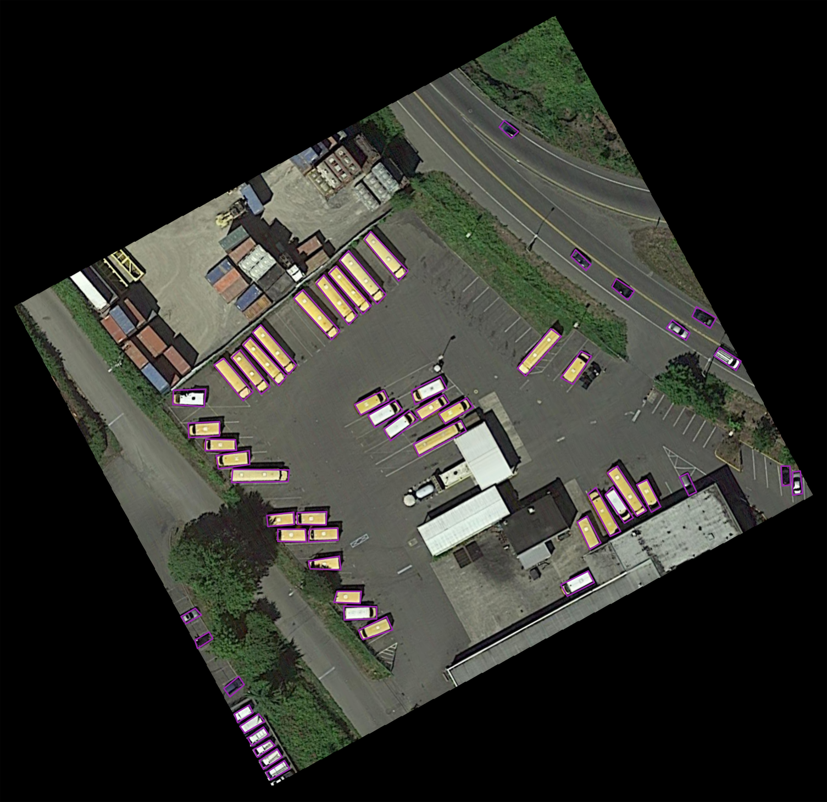
翻转图像
翻转图像使用cv.flip进行
# 翻转图像 def filp_pic_bboxes(img, inputtxt, outputiamge, outputtxt): (filepath, tempfilename) = os.path.split(inputtxt) (filename, extension) = os.path.splitext(tempfilename) output_vert_flip_img = os.path.join(outputiamge + "/" + filename + "_vert_flip" + ".png") output_vert_flip_txt = os.path.join(outputtxt + "/" + filename + "_vert_flip" + extension) output_horiz_flip_img = os.path.join(outputiamge + "/" + filename + "_horiz_flip" + ".png") output_horiz_flip_txt = os.path.join(outputtxt + "/" + filename + "_horiz_flip" + extension) h, w, _ = img.shape # 垂直翻转 vert_flip_img = cv.flip(img, 1) cv.imwrite(output_vert_flip_img, vert_flip_img) # 水平翻转 horiz_flip_img = cv.flip(img, 0) cv.imwrite(output_horiz_flip_img, horiz_flip_img) # ---------------------- 调整boundingbox ---------------------- save_vert_txt = open(output_vert_flip_txt, 'w') save_horiz_txt = open(output_horiz_flip_txt, 'w') f = open(inputtxt) for line in f.readlines(): line = line.split(" ") x1 = float(line[0]) y1 = float(line[1]) x2 = float(line[2]) y2 = float(line[3]) x3 = float(line[4]) y3 = float(line[5]) x4 = float(line[6]) y4 = float(line[7]) category = str(line[8]) dif = str(line[9]) vert_string = str(int(round(w - x1, 3))) + " " + str(int(y1)) + " " + str(int(round(w - x2, 3))) + " " + str( int(y2)) + " " + str(int(round(w - x3, 3))) + " " + str(int(y3)) + " " + str( int(round(w - x4, 3))) + " " + str(int(y4)) + " " + category + " " + dif horiz_string = str(int(x1)) + " " + str(int(round(h - y1, 3))) + " " + str(int(x2)) + " " + str( int(round(h - y2, 3))) + " " + str(int(x3)) + " " + str(int(round(h - y3, 3))) + " " + str( int(x4)) + " " + str(int(round(h - y4, 3))) + " " + category + " " + dif save_horiz_txt.write(horiz_string) save_vert_txt.write(vert_string) 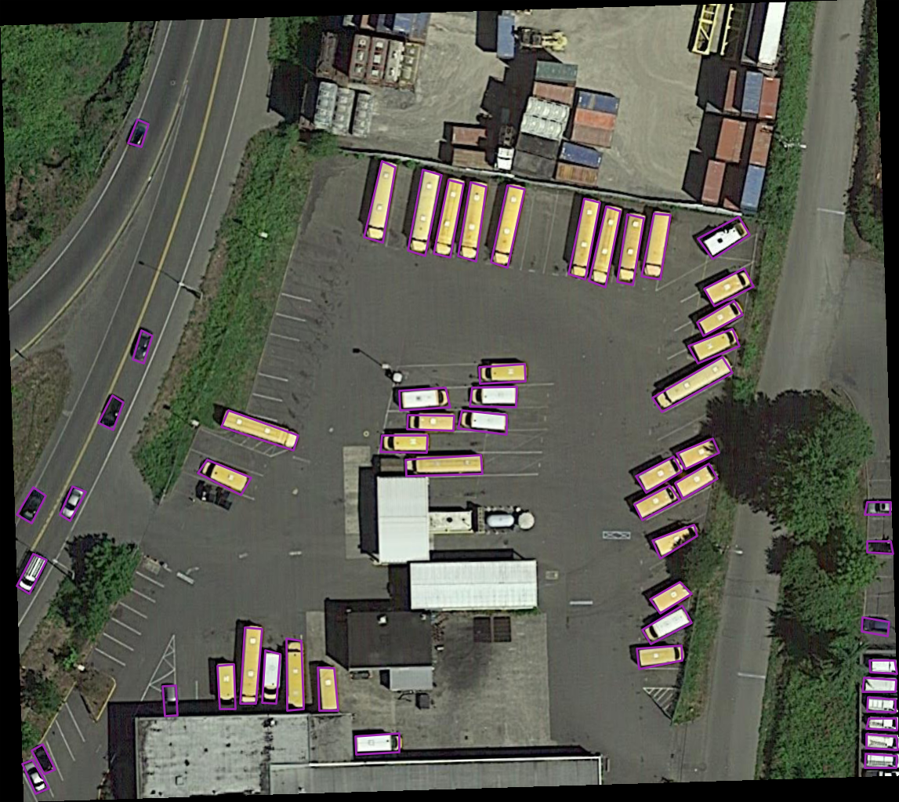
平移图像
平移图像本质也是利用仿射矩阵
# 平移图像 def shift_pic_bboxes(img, inputtxt, outputiamge, outputtxt): w = img.shape[1] h = img.shape[0] x_min = w # 裁剪后的包含所有目标框的最小的框 x_max = 0 y_min = h y_max = 0 f = open(inputtxt) for line in f.readlines(): line = line.split(" ") x1 = float(line[0]) y1 = float(line[1]) x2 = float(line[2]) y2 = float(line[3]) x3 = float(line[4]) y3 = float(line[5]) x4 = float(line[6]) y4 = float(line[7]) category = str(line[8]) dif = str(line[9]) x_min = min(x_min, x1, x2, x3, x4) y_min = min(y_min, y1, y2, y3, y4) x_max = max(x_max, x1, x2, x3, x4) y_max = max(y_max, y1, y2, y3, y4) d_to_left = x_min # 包含所有目标框的最大左移动距离 d_to_right = w - x_max # 包含所有目标框的最大右移动距离 d_to_top = y_min # 包含所有目标框的最大上移动距离 d_to_bottom = h - y_max # 包含所有目标框的最大下移动距离 x = random.uniform(-(d_to_left - 1) / 3, (d_to_right - 1) / 3) y = random.uniform(-(d_to_top - 1) / 3, (d_to_bottom - 1) / 3) (filepath, tempfilename) = os.path.split(inputtxt) (filename, extension) = os.path.splitext(tempfilename) if x >= 0 and y >= 0: outputiamge = os.path.join( outputiamge + "/" + filename + "_shift_" + str(round(x, 3)) + "_" + str(round(y, 3)) + ".png") outputtxt = os.path.join( outputtxt + "/" + filename + "_shift_" + str(round(x, 3)) + "_" + str(round(y, 3)) + extension) elif x >= 0 and y < 0: outputiamge = os.path.join( outputiamge + "/" + filename + "_shift_" + str(round(x, 3)) + "__" + str(round(abs(y), 3)) + ".png") outputtxt = os.path.join( outputtxt + "/" + filename + "_shift_" + str(round(x, 3)) + "__" + str(round(abs(y), 3)) + extension) elif x < 0 and y >= 0: outputiamge = os.path.join( outputiamge + "/" + filename + "_shift__" + str(round(abs(x), 3)) + "_" + str(round(y, 3)) + ".png") outputtxt = os.path.join( outputtxt + "/" + filename + "_shift__" + str(round(abs(x), 3)) + "_" + str(round(y, 3)) + extension) elif x < 0 and y < 0: outputiamge = os.path.join( outputiamge + "/" + filename + "_shift__" + str(round(abs(x), 3)) + "__" + str(round(abs(y), 3)) + ".png") outputtxt = os.path.join( outputtxt + "/" + filename + "_shift__" + str(round(abs(x), 3)) + "__" + str(round(abs(y), 3)) + extension) M = np.float32([[1, 0, x], [0, 1, y]]) # x为向左或右移动的像素值,正为向右负为向左; y为向上或者向下移动的像素值,正为向下负为向上 shift_img = cv.warpAffine(img, M, (img.shape[1], img.shape[0])) cv.imwrite(outputiamge, shift_img) # ---------------------- 平移boundingbox ---------------------- save_txt = open(outputtxt, "w") f = open(inputtxt) for line in f.readlines(): line = line.split(" ") x1 = float(line[0]) y1 = float(line[1]) x2 = float(line[2]) y2 = float(line[3]) x3 = float(line[4]) y3 = float(line[5]) x4 = float(line[6]) y4 = float(line[7]) category = str(line[8]) dif = str(line[9]) shift_str = str(int(round(x1 + x, 3))) + " " + str(int(round(y1 + y, 3))) + " " + str(int(round(x2 + x, 3))) + " " + str(int(round(y2 + y, 3))) + " " + str(int(round(x3 + x, 3))) + " " + str(int(round(y3 + y, 3))) + " " + str(int(round(x4 + x, 3))) + " " + str(int(round(y4 + y, 3))) + " " + category + " " + dif save_txt.write(shift_str) 裁剪图像
这里的裁剪图像指的是裁剪目标周围的背景,从外面向内收缩,直到碰到第一个对象框停止
# 裁剪图像 def crop_img_bboxes(img, inputtxt, outputiamge, outputtxt): # ---------------------- 裁剪图像 ---------------------- w = img.shape[1] h = img.shape[0] x_min = 0 # 裁剪后的包含所有目标框的最小的框 x_max = w y_min = 0 y_max = h f = open(inputtxt) for line in f.readlines(): line = line.split(" ") x1 = float(line[0]) y1 = float(line[1]) x2 = float(line[2]) y2 = float(line[3]) x3 = float(line[4]) y3 = float(line[5]) x4 = float(line[6]) y4 = float(line[7]) category = str(line[8]) dif = str(line[9]) x_min = min(x_min, x1, x2, x3, x4) y_min = min(y_min, y1, y2, y3, y4) x_max = max(x_max, x1, x2, x3, x4) y_max = max(y_max, y1, y2, y3, y4) d_to_left = x_min # 包含所有目标框的最小框到左边的距离 d_to_right = w - x_max # 包含所有目标框的最小框到右边的距离 d_to_top = y_min # 包含所有目标框的最小框到顶端的距离 d_to_bottom = h - y_max # 包含所有目标框的最小框到底部的距离 # 随机扩展这个最小框 crop_x_min = int(x_min - random.uniform(0, d_to_left)) crop_y_min = int(y_min - random.uniform(0, d_to_top)) crop_x_max = int(x_max + random.uniform(0, d_to_right)) crop_y_max = int(y_max + random.uniform(0, d_to_bottom)) # 随机扩展这个最小框 , 防止别裁的太小 # crop_x_min = int(x_min - random.uniform(d_to_left//2, d_to_left)) # crop_y_min = int(y_min - random.uniform(d_to_top//2, d_to_top)) # crop_x_max = int(x_max + random.uniform(d_to_right//2, d_to_right)) # crop_y_max = int(y_max + random.uniform(d_to_bottom//2, d_to_bottom)) # 确保不要越界 crop_x_min = max(0, crop_x_min) crop_y_min = max(0, crop_y_min) crop_x_max = min(w, crop_x_max) crop_y_max = min(h, crop_y_max) crop_img = img[crop_y_min:crop_y_max, crop_x_min:crop_x_max] (filepath, tempfilename) = os.path.split(inputtxt) (filename, extension) = os.path.splitext(tempfilename) outputiamge = os.path.join(outputiamge + "/" + filename + "_crop_" + str(crop_x_min) + "_" + str(crop_y_min) + "_" + str(crop_x_max) + "_" + str(crop_y_max) + ".png") outputtxt = os.path.join(outputtxt + "/" + filename + "_crop_" + str(crop_x_min) + "_" + str(crop_y_min) + "_" + str(crop_x_max) + "_" + str(crop_y_max) + extension) cv.imwrite(outputiamge, crop_img) # ---------------------- 裁剪boundingbox ---------------------- # 裁剪后的boundingbox坐标计算 save_txt = open(outputtxt, "w") f = open(inputtxt) for line in f.readlines(): line = line.split(" ") x1 = float(line[0]) y1 = float(line[1]) x2 = float(line[2]) y2 = float(line[3]) x3 = float(line[4]) y3 = float(line[5]) x4 = float(line[6]) y4 = float(line[7]) category = str(line[8]) dif = str(line[9]) crop_str = str(int(round(x1 - crop_x_min, 3))) + " " + str(int(round(y1 - crop_y_min, 3))) + " " + str(int(round(x2 - crop_x_min, 3))) + " " + str(int(round(y2 - crop_y_min, 3))) + " " + str(int(round(x3 - crop_x_min, 3))) + " " + str(int(round(y3 - crop_y_min, 3))) + " " + str(int(round(x4 - crop_x_min, 3))) + " " + str(int(round(y4 - crop_y_min, 3))) + " " + category + " " + dif save_txt.write(crop_str) 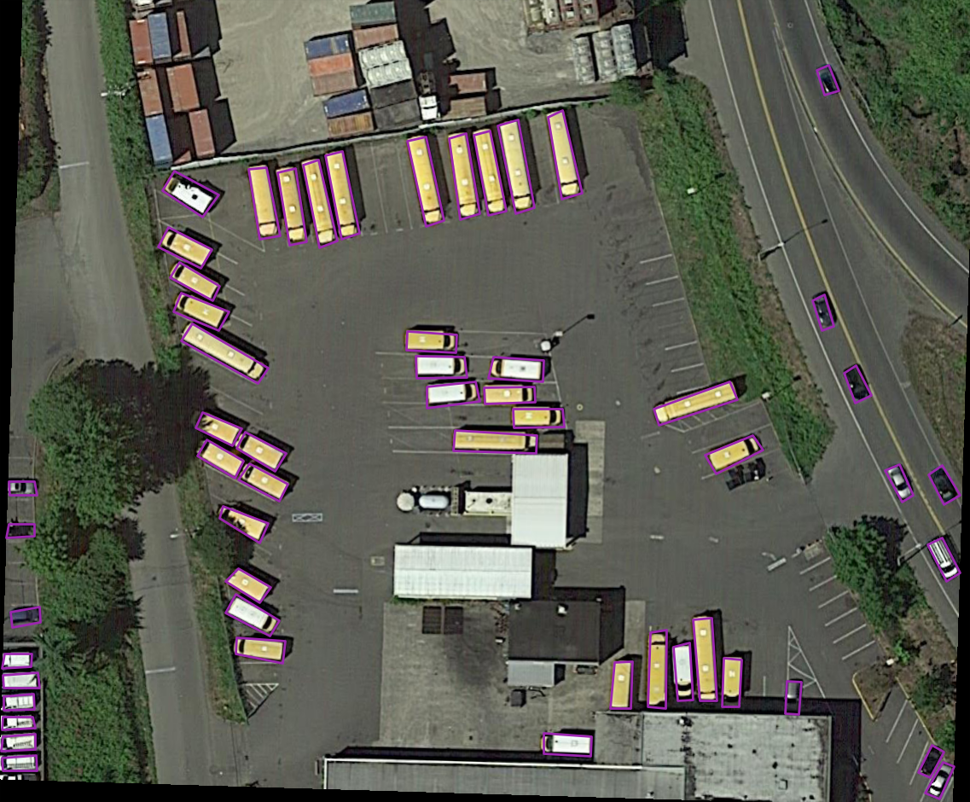
完整代码
import time import random import cv2 as cv import os import math import numpy as np from skimage import exposure import shutil # 调整亮度 def changeLight(img, inputtxt, outputiamge, outputtxt): # random.seed(int(time.time())) flag = random.uniform(0.5, 1.5) # flag>1为调暗,小于1为调亮 label = round(flag, 2) (filepath, tempfilename) = os.path.split(inputtxt) (filename, extension) = os.path.splitext(tempfilename) outputiamge = os.path.join(outputiamge + "/" + filename + "_" + str(label) + ".png") outputtxt = os.path.join(outputtxt + "/" + filename + "_" + str(label) + extension) ima_gamma = exposure.adjust_gamma(img, 0.5) shutil.copyfile(inputtxt, outputtxt) cv.imwrite(outputiamge, ima_gamma) # 添加高斯噪声 def gasuss_noise(image, inputtxt, outputiamge, outputtxt, mean=0, var=0.01): ''' mean : 均值 var : 方差 ''' image = np.array(image / 255, dtype=float) noise = np.random.normal(mean, var 0.5, image.shape) out = image + noise if out.min() < 0: low_clip = -1. else: low_clip = 0. out = np.clip(out, low_clip, 1.0) out = np.uint8(out * 255) (filepath, tempfilename) = os.path.split(inputtxt) (filename, extension) = os.path.splitext(tempfilename) outputiamge = os.path.join(outputiamge + "/" + filename + "_gasunoise_" + str(mean) + "_" + str(var) + ".png") outputtxt = os.path.join(outputtxt + "/" + filename + "_gasunoise_" + str(mean) + "_" + str(var) + extension) shutil.copyfile(inputtxt, outputtxt) cv.imwrite(outputiamge, out) # 调整对比度 def ContrastAlgorithm(rgb_img, inputtxt, outputiamge, outputtxt): img_shape = rgb_img.shape temp_imag = np.zeros(img_shape, dtype=float) for num in range(0, 3): # 通过直方图正规化增强对比度 in_image = rgb_img[:, :, num] # 求输入图片像素最大值和最小值 Imax = np.max(in_image) Imin = np.min(in_image) # 要输出的最小灰度级和最大灰度级 Omin, Omax = 0, 255 # 计算a 和 b的值 a = float(Omax - Omin) / (Imax - Imin) b = Omin - a * Imin # 矩阵的线性变化 out_image = a * in_image + b # 数据类型的转化 out_image = out_image.astype(np.uint8) temp_imag[:, :, num] = out_image (filepath, tempfilename) = os.path.split(inputtxt) (filename, extension) = os.path.splitext(tempfilename) outputiamge = os.path.join(outputiamge + "/" + filename + "_contrastAlgorithm" + ".png") outputtxt = os.path.join(outputtxt + "/" + filename + "_contrastAlgorithm" + extension) shutil.copyfile(inputtxt, outputtxt) cv.imwrite(outputiamge, temp_imag) # 旋转 def rotate_img_bbox(img, inputtxt, temp_outputiamge, temp_outputtxt, angle, scale=1): nAgree = angle size = img.shape w = size[1] h = size[0] for numAngle in range(0, len(nAgree)): dRot = nAgree[numAngle] * np.pi / 180 dSinRot = math.sin(dRot) dCosRot = math.cos(dRot) nw = (abs(np.sin(dRot) * h) + abs(np.cos(dRot) * w)) * scale nh = (abs(np.cos(dRot) * h) + abs(np.sin(dRot) * w)) * scale (filepath, tempfilename) = os.path.split(inputtxt) (filename, extension) = os.path.splitext(tempfilename) outputiamge = os.path.join(temp_outputiamge + "/" + filename + "_rotate_" + str(nAgree[numAngle]) + ".png") outputtxt = os.path.join(temp_outputtxt + "/" + filename + "_rotate_" + str(nAgree[numAngle]) + extension) rot_mat = cv.getRotationMatrix2D((nw * 0.5, nh * 0.5), nAgree[numAngle], scale) rot_move = np.dot(rot_mat, np.array([(nw - w) * 0.5, (nh - h) * 0.5, 0])) rot_mat[0, 2] += rot_move[0] rot_mat[1, 2] += rot_move[1] # 仿射变换 rotat_img = cv.warpAffine(img, rot_mat, (int(math.ceil(nw)), int(math.ceil(nh))), flags=cv.INTER_LANCZOS4) cv.imwrite(outputiamge, rotat_img) save_txt = open(outputtxt, 'w') f = open(inputtxt) for line in f.readlines(): line = line.split(" ") x1 = float(line[0]) y1 = float(line[1]) x2 = float(line[2]) y2 = float(line[3]) x3 = float(line[4]) y3 = float(line[5]) x4 = float(line[6]) y4 = float(line[7]) category = str(line[8]) dif = str(line[9]) point1 = np.dot(rot_mat, np.array([x1, y1, 1])) point2 = np.dot(rot_mat, np.array([x2, y2, 1])) point3 = np.dot(rot_mat, np.array([x3, y3, 1])) point4 = np.dot(rot_mat, np.array([x4, y4, 1])) x1 = round(point1[0], 3) y1 = round(point1[1], 3) x2 = round(point2[0], 3) y2 = round(point2[1], 3) x3 = round(point3[0], 3) y3 = round(point3[1], 3) x4 = round(point4[0], 3) y4 = round(point4[1], 3) # string = str(x1) + " " + str(y1) + " " + str(x2) + " " + str(y2) + " " + str(x3) + " " + str(y3) + " " + str(x4) + " " + str(y4) + " " + category + " " + dif string = str(int(x1)) + " " + str(int(y1)) + " " + str(int(x2)) + " " + str(int(y2)) + " " + str( int(x3)) + " " + str(int(y3)) + " " + str(int(x4)) + " " + str(int(y4)) + " " + category + " " + dif save_txt.write(string) # 翻转图像 def filp_pic_bboxes(img, inputtxt, outputiamge, outputtxt): (filepath, tempfilename) = os.path.split(inputtxt) (filename, extension) = os.path.splitext(tempfilename) output_vert_flip_img = os.path.join(outputiamge + "/" + filename + "_vert_flip" + ".png") output_vert_flip_txt = os.path.join(outputtxt + "/" + filename + "_vert_flip" + extension) output_horiz_flip_img = os.path.join(outputiamge + "/" + filename + "_horiz_flip" + ".png") output_horiz_flip_txt = os.path.join(outputtxt + "/" + filename + "_horiz_flip" + extension) h, w, _ = img.shape # 垂直翻转 vert_flip_img = cv.flip(img, 1) cv.imwrite(output_vert_flip_img, vert_flip_img) # 水平翻转 horiz_flip_img = cv.flip(img, 0) cv.imwrite(output_horiz_flip_img, horiz_flip_img) # ---------------------- 调整boundingbox ---------------------- save_vert_txt = open(output_vert_flip_txt, 'w') save_horiz_txt = open(output_horiz_flip_txt, 'w') f = open(inputtxt) for line in f.readlines(): line = line.split(" ") x1 = float(line[0]) y1 = float(line[1]) x2 = float(line[2]) y2 = float(line[3]) x3 = float(line[4]) y3 = float(line[5]) x4 = float(line[6]) y4 = float(line[7]) category = str(line[8]) dif = str(line[9]) vert_string = str(int(round(w - x1, 3))) + " " + str(int(y1)) + " " + str(int(round(w - x2, 3))) + " " + str( int(y2)) + " " + str(int(round(w - x3, 3))) + " " + str(int(y3)) + " " + str( int(round(w - x4, 3))) + " " + str(int(y4)) + " " + category + " " + dif horiz_string = str(int(x1)) + " " + str(int(round(h - y1, 3))) + " " + str(int(x2)) + " " + str( int(round(h - y2, 3))) + " " + str(int(x3)) + " " + str(int(round(h - y3, 3))) + " " + str( int(x4)) + " " + str(int(round(h - y4, 3))) + " " + category + " " + dif save_horiz_txt.write(horiz_string) save_vert_txt.write(vert_string) # 平移图像 def shift_pic_bboxes(img, inputtxt, outputiamge, outputtxt): w = img.shape[1] h = img.shape[0] x_min = w # 裁剪后的包含所有目标框的最小的框 x_max = 0 y_min = h y_max = 0 f = open(inputtxt) for line in f.readlines(): line = line.split(" ") x1 = float(line[0]) y1 = float(line[1]) x2 = float(line[2]) y2 = float(line[3]) x3 = float(line[4]) y3 = float(line[5]) x4 = float(line[6]) y4 = float(line[7]) category = str(line[8]) dif = str(line[9]) x_min = min(x_min, x1, x2, x3, x4) y_min = min(y_min, y1, y2, y3, y4) x_max = max(x_max, x1, x2, x3, x4) y_max = max(y_max, y1, y2, y3, y4) d_to_left = x_min # 包含所有目标框的最大左移动距离 d_to_right = w - x_max # 包含所有目标框的最大右移动距离 d_to_top = y_min # 包含所有目标框的最大上移动距离 d_to_bottom = h - y_max # 包含所有目标框的最大下移动距离 x = random.uniform(-(d_to_left - 1) / 3, (d_to_right - 1) / 3) y = random.uniform(-(d_to_top - 1) / 3, (d_to_bottom - 1) / 3) (filepath, tempfilename) = os.path.split(inputtxt) (filename, extension) = os.path.splitext(tempfilename) if x >= 0 and y >= 0: outputiamge = os.path.join( outputiamge + "/" + filename + "_shift_" + str(round(x, 3)) + "_" + str(round(y, 3)) + ".png") outputtxt = os.path.join( outputtxt + "/" + filename + "_shift_" + str(round(x, 3)) + "_" + str(round(y, 3)) + extension) elif x >= 0 and y < 0: outputiamge = os.path.join( outputiamge + "/" + filename + "_shift_" + str(round(x, 3)) + "__" + str(round(abs(y), 3)) + ".png") outputtxt = os.path.join( outputtxt + "/" + filename + "_shift_" + str(round(x, 3)) + "__" + str(round(abs(y), 3)) + extension) elif x < 0 and y >= 0: outputiamge = os.path.join( outputiamge + "/" + filename + "_shift__" + str(round(abs(x), 3)) + "_" + str(round(y, 3)) + ".png") outputtxt = os.path.join( outputtxt + "/" + filename + "_shift__" + str(round(abs(x), 3)) + "_" + str(round(y, 3)) + extension) elif x < 0 and y < 0: outputiamge = os.path.join( outputiamge + "/" + filename + "_shift__" + str(round(abs(x), 3)) + "__" + str(round(abs(y), 3)) + ".png") outputtxt = os.path.join( outputtxt + "/" + filename + "_shift__" + str(round(abs(x), 3)) + "__" + str(round(abs(y), 3)) + extension) M = np.float32([[1, 0, x], [0, 1, y]]) # x为向左或右移动的像素值,正为向右负为向左; y为向上或者向下移动的像素值,正为向下负为向上 shift_img = cv.warpAffine(img, M, (img.shape[1], img.shape[0])) cv.imwrite(outputiamge, shift_img) # ---------------------- 平移boundingbox ---------------------- save_txt = open(outputtxt, "w") f = open(inputtxt) for line in f.readlines(): line = line.split(" ") x1 = float(line[0]) y1 = float(line[1]) x2 = float(line[2]) y2 = float(line[3]) x3 = float(line[4]) y3 = float(line[5]) x4 = float(line[6]) y4 = float(line[7]) category = str(line[8]) dif = str(line[9]) shift_str = str(int(round(x1 + x, 3))) + " " + str(int(round(y1 + y, 3))) + " " + str(int(round(x2 + x, 3))) + " " + str(int(round(y2 + y, 3))) + " " + str(int(round(x3 + x, 3))) + " " + str(int(round(y3 + y, 3))) + " " + str(int(round(x4 + x, 3))) + " " + str(int(round(y4 + y, 3))) + " " + category + " " + dif save_txt.write(shift_str) # 裁剪图像 def crop_img_bboxes(img, inputtxt, outputiamge, outputtxt): # ---------------------- 裁剪图像 ---------------------- w = img.shape[1] h = img.shape[0] x_min = 0 # 裁剪后的包含所有目标框的最小的框 x_max = w y_min = 0 y_max = h f = open(inputtxt) for line in f.readlines(): line = line.split(" ") x1 = float(line[0]) y1 = float(line[1]) x2 = float(line[2]) y2 = float(line[3]) x3 = float(line[4]) y3 = float(line[5]) x4 = float(line[6]) y4 = float(line[7]) category = str(line[8]) dif = str(line[9]) x_min = min(x_min, x1, x2, x3, x4) y_min = min(y_min, y1, y2, y3, y4) x_max = max(x_max, x1, x2, x3, x4) y_max = max(y_max, y1, y2, y3, y4) d_to_left = x_min # 包含所有目标框的最小框到左边的距离 d_to_right = w - x_max # 包含所有目标框的最小框到右边的距离 d_to_top = y_min # 包含所有目标框的最小框到顶端的距离 d_to_bottom = h - y_max # 包含所有目标框的最小框到底部的距离 # 随机扩展这个最小框 crop_x_min = int(x_min - random.uniform(0, d_to_left)) crop_y_min = int(y_min - random.uniform(0, d_to_top)) crop_x_max = int(x_max + random.uniform(0, d_to_right)) crop_y_max = int(y_max + random.uniform(0, d_to_bottom)) # 随机扩展这个最小框 , 防止别裁的太小 # crop_x_min = int(x_min - random.uniform(d_to_left//2, d_to_left)) # crop_y_min = int(y_min - random.uniform(d_to_top//2, d_to_top)) # crop_x_max = int(x_max + random.uniform(d_to_right//2, d_to_right)) # crop_y_max = int(y_max + random.uniform(d_to_bottom//2, d_to_bottom)) # 确保不要越界 crop_x_min = max(0, crop_x_min) crop_y_min = max(0, crop_y_min) crop_x_max = min(w, crop_x_max) crop_y_max = min(h, crop_y_max) crop_img = img[crop_y_min:crop_y_max, crop_x_min:crop_x_max] (filepath, tempfilename) = os.path.split(inputtxt) (filename, extension) = os.path.splitext(tempfilename) outputiamge = os.path.join(outputiamge + "/" + filename + "_crop_" + str(crop_x_min) + "_" + str(crop_y_min) + "_" + str(crop_x_max) + "_" + str(crop_y_max) + ".png") outputtxt = os.path.join(outputtxt + "/" + filename + "_crop_" + str(crop_x_min) + "_" + str(crop_y_min) + "_" + str(crop_x_max) + "_" + str(crop_y_max) + extension) cv.imwrite(outputiamge, crop_img) # ---------------------- 裁剪boundingbox ---------------------- # 裁剪后的boundingbox坐标计算 save_txt = open(outputtxt, "w") f = open(inputtxt) for line in f.readlines(): line = line.split(" ") x1 = float(line[0]) y1 = float(line[1]) x2 = float(line[2]) y2 = float(line[3]) x3 = float(line[4]) y3 = float(line[5]) x4 = float(line[6]) y4 = float(line[7]) category = str(line[8]) dif = str(line[9]) crop_str = str(int(round(x1 - crop_x_min, 3))) + " " + str(int(round(y1 - crop_y_min, 3))) + " " + str(int(round(x2 - crop_x_min, 3))) + " " + str(int(round(y2 - crop_y_min, 3))) + " " + str(int(round(x3 - crop_x_min, 3))) + " " + str(int(round(y3 - crop_y_min, 3))) + " " + str(int(round(x4 - crop_x_min, 3))) + " " + str(int(round(y4 - crop_y_min, 3))) + " " + category + " " + dif save_txt.write(crop_str) if __name__ == '__main__': inputiamge = "dataset/ceshi/images" inputtxt = "dataset/ceshi/labelTxt" outputiamge = "dataset/ceshi_aug/images" outputtxt = "dataset/ceshi_aug/labelTxt" angle = [30, 60, 90, 120, 150, 180] tempfilename = os.listdir(inputiamge) for file in tempfilename: (filename, extension) = os.path.splitext(file) input_image = os.path.join(inputiamge + "/" + file) input_txt = os.path.join(inputtxt + "/" + filename + ".txt") img = cv.imread(input_image) # 图像亮度变化 changeLight(img,input_txt,outputiamge,outputtxt) # 加高斯噪声 gasuss_noise(img, input_txt, outputiamge, outputtxt, mean=0, var=0.001) # 改变图像对比度 ContrastAlgorithm(img, input_txt, outputiamge, outputtxt) # 图像旋转 rotate_img_bbox(img, input_txt, outputiamge, outputtxt, angle) # 图像镜像 filp_pic_bboxes(img, input_txt, outputiamge, outputtxt) # 平移 shift_pic_bboxes(img, input_txt, outputiamge, outputtxt) # 剪切 crop_img_bboxes(img, input_txt, outputiamge, outputtxt) print("finished!") 免责声明:本站所有文章内容,图片,视频等均是来源于用户投稿和互联网及文摘转载整编而成,不代表本站观点,不承担相关法律责任。其著作权各归其原作者或其出版社所有。如发现本站有涉嫌抄袭侵权/违法违规的内容,侵犯到您的权益,请在线联系站长,一经查实,本站将立刻删除。 本文来自网络,若有侵权,请联系删除,如若转载,请注明出处:https://haidsoft.com/112636.html

