
大家好,欢迎来到IT知识分享网。
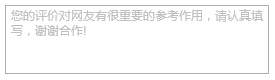
一、简单设置水印TextBox控件,废话不多说看代码:
  <TextBox TextWrapping="Wrap" Margin="10" Height="69"  Visibility="Visible">
                <TextBox.Style>
                    <Style TargetType="TextBox">
                        <Style.Triggers>
                            <MultiTrigger>
                                <MultiTrigger.Conditions>
                                    <Condition Property="IsFocused" Value="false"/>
                                    <Condition Property="Text" Value=""/>
                                </MultiTrigger.Conditions>
                                <Setter Property="Background">
                                    <Setter.Value>
                                        <VisualBrush AlignmentX="Left" AlignmentY="Top" Stretch="None">
                                            <VisualBrush.Visual>
                                                <TextBlock Padding="5 2" Background="Transparent" TextWrapping="Wrap" Height="40" Foreground="Silver">您的评价对网友有很重要的参考作用,请认真填<LineBreak/>写,谢谢合作!</TextBlock>
                                            </VisualBrush.Visual>
                                        </VisualBrush>
                                  </Setter.Value>
                              </Setter>
                         </MultiTrigger>
                    </Style.Triggers>
               </Style>
      </TextBox.Style>
</TextBox>
这里的style可以单独提出来,方便多处使用。
设置之后的效果如下:
二、扩展增强TextBox
有的时候会碰到TextBox里面需要添加按钮,或者TextBox需要设置圆角。这个时候就需要添加自定义控件,添加依赖属性来扩展功能了。
2.1 添加自定义控件TextBoxEx
代码如下:
 public class TextBoxEx : TextBox
    {
        static TextBoxEx()
        {
            DefaultStyleKeyProperty.OverrideMetadata(typeof(TextBoxEx), new FrameworkPropertyMetadata(typeof(TextBoxEx)));
        }

        public TextBoxEx()
        {
            CommandBindings.Add(new CommandBinding(SearchClickCommand, delegate
            {
                SearchClick?.Invoke(this, null);
            }));
        }

        public static RoutedUICommand SearchClickCommand = new RoutedUICommand(nameof(SearchClickCommand), nameof(SearchClickCommand), typeof(RoutedUICommand));

        public event EventHandler SearchClick;
        public string WaterMark
        {
            get { return (string)GetValue(WaterMarkProperty); }
            set { SetValue(WaterMarkProperty, value); }
        }

        public static readonly DependencyProperty WaterMarkProperty =
            DependencyProperty.Register("WaterMark", typeof(string), typeof(TextBoxEx), new PropertyMetadata(null));


        public ImageSource Icon
        {
            get { return (ImageSource)GetValue(IconProperty); }
            set { SetValue(IconProperty, value); }
        }

        public static readonly DependencyProperty IconProperty =
            DependencyProperty.Register("Icon", typeof(ImageSource), typeof(TextBoxEx), new PropertyMetadata(null));


        public new Brush BorderBrush
        {
            get { return (Brush)GetValue(BorderBrushProperty); }
            set { SetValue(BorderBrushProperty, value); }
        }

        public static readonly new DependencyProperty BorderBrushProperty =
            DependencyProperty.Register("BorderBrush", typeof(Brush), typeof(TextBoxEx), new PropertyMetadata(new SolidColorBrush(Color.FromRgb(234,234,234))));


        public Brush MouseOverBorderBrush
        {
            get { return (Brush)GetValue(MouseOverBorderBrushProperty); }
            set { SetValue(MouseOverBorderBrushProperty, value); }
        }

        public static readonly DependencyProperty MouseOverBorderBrushProperty =
            DependencyProperty.Register("MouseOverBorderBrush", typeof(Brush), typeof(TextBoxEx), new PropertyMetadata(new SolidColorBrush(Color.FromRgb(79,173,216))));


        public new Brush Background
        {
            get { return (Brush)GetValue(BackgroundProperty); }
            set { SetValue(BackgroundProperty, value); }
        }

        public static readonly new DependencyProperty BackgroundProperty =
            DependencyProperty.Register("Background", typeof(Brush), typeof(TextBoxEx), new PropertyMetadata(new SolidColorBrush(Color.FromRgb(106,103,90))));


        public Brush MouseOverBackground
        {
            get { return (Brush)GetValue(MouseOverBackgroundProperty); }
            set { SetValue(MouseOverBackgroundProperty, value); }
        }

        public static readonly DependencyProperty MouseOverBackgroundProperty =
            DependencyProperty.Register("MouseOverBackground", typeof(Brush), typeof(TextBoxEx), new PropertyMetadata(Color.FromRgb(106,103,90)));


        public CornerRadius CornerRadius
        {
            get { return (CornerRadius)GetValue(CornerRadiusProperty); }
            set { SetValue(CornerRadiusProperty, value); }
        }

        public static readonly DependencyProperty CornerRadiusProperty =
            DependencyProperty.Register("CornerRadius", typeof(CornerRadius), typeof(TextBoxEx), new PropertyMetadata(new CornerRadius(0)));


        public IconDirection IconDirection
        {
            get { return (IconDirection)GetValue(IconDirectionProperty); }
            set { SetValue(IconDirectionProperty, value); }
        }

        public static readonly DependencyProperty IconDirectionProperty =
            DependencyProperty.Register("IconDirection", typeof(IconDirection), typeof(TextBoxEx), new PropertyMetadata(IconDirection.Right));


    }

    public enum IconDirection
    {
        Left,
        Right
    }
2.2 设置TextBoxEx样式
 <Style TargetType="{x:Type local:TextBoxEx}">
        <Setter Property="Foreground" Value="#555558"/>
        <Setter Property="Background" Value="#6a675a"/>
        <Setter Property="Template">
            <Setter.Value>
                <ControlTemplate TargetType="{x:Type local:TextBoxEx}">
                    <Border x:Name="_border" CornerRadius="{TemplateBinding CornerRadius}" Padding="{TemplateBinding CornerRadius,Converter={StaticResource cornerRadiusToThickness} }" Background="{TemplateBinding Background}" BorderBrush="{TemplateBinding BorderBrush}" BorderThickness="{TemplateBinding BorderThickness}" SnapsToDevicePixels="True">
                        <Grid>
                            <Grid.ColumnDefinitions>
                                <ColumnDefinition x:Name="columleft" Width="auto"/>
                                <ColumnDefinition Width="*"/>
                                <ColumnDefinition x:Name="columright" Width="auto"/>
                            </Grid.ColumnDefinitions>
                            <Image Source="{TemplateBinding Icon}"  Cursor="Hand" Stretch="None" VerticalAlignment="Center" HorizontalAlignment="Center">
                                <i:Interaction.Triggers>
                                    <i:EventTrigger EventName="MouseLeftButtonUp">
                                        <i:InvokeCommandAction Command="local:TextBoxEx.SearchClickCommand"/>
                                    </i:EventTrigger>
                                </i:Interaction.Triggers>
                            </Image>
                            <ScrollViewer x:Name="PART_ContentHost" VerticalAlignment="Center" Foreground="{TemplateBinding Foreground}" SnapsToDevicePixels="{TemplateBinding SnapsToDevicePixels}" Grid.Column="1"/>
                            <TextBlock x:Name="_txtWater" IsHitTestVisible="False" Margin="3 0 0 0" VerticalAlignment="Center" Foreground="#9f9f9f"  Text="{TemplateBinding WaterMark}" Visibility="Hidden" Grid.Column="1"/>
                            <Image Source="{TemplateBinding Icon}" Cursor="Hand" Stretch="None" Grid.Column="2" VerticalAlignment="Center" HorizontalAlignment="Center">
                                <i:Interaction.Triggers>
                                    <i:EventTrigger EventName="MouseLeftButtonUp">
                                        <i:InvokeCommandAction Command="local:TextBoxEx.SearchClickCommand"/>
                                    </i:EventTrigger>
                                </i:Interaction.Triggers>
                            </Image>
                        </Grid>
                    </Border>
                    <ControlTemplate.Triggers>
                        <DataTrigger Binding="{Binding RelativeSource={RelativeSource Self}, Path=Text}" Value="">
                            <Setter TargetName="_txtWater" Property="Visibility" Value="Visible" />
                        </DataTrigger>
                        <Trigger Property="IsEnabled" Value="False">
                            <Setter Property="Foreground" Value="{DynamicResource {x:Static SystemColors.GrayTextBrushKey}}"/>
                        </Trigger>
                        <DataTrigger Binding="{Binding RelativeSource={RelativeSource Self}, Path=IconDirection}" Value="Left">
                            <Setter TargetName="columright" Property="Width" Value="0" />
                        </DataTrigger>
                        <DataTrigger Binding="{Binding RelativeSource={RelativeSource Self}, Path=IconDirection}" Value="Right">
                            <Setter TargetName="columleft" Property="Width" Value="0" />
                        </DataTrigger>
                        <Trigger Property="IsMouseOver" Value="True">
                            <Setter Property="BorderBrush" Value="{Binding MouseOverBorderBrush,RelativeSource={RelativeSource TemplatedParent}}"/>
                            <Setter Property="Background" Value="{Binding MouseOverBackground,RelativeSource={RelativeSource TemplatedParent}}"/>
                        </Trigger>
                    </ControlTemplate.Triggers>
                </ControlTemplate>
            </Setter.Value>
        </Setter>
    </Style>
这里面使用了一个转换器cornerRadiusToThickness,转换器的作用是当TextBox设置了圆角之后,保证TextBox里的内容不溢出圆角。WPF转换器的使用大家可以百度。
转换器的内容如下:
  public class CornerRadiusToThickness : IValueConverter
    {
        public object Convert(object value, Type targetType, object parameter, CultureInfo culture)
        {
            Thickness result = new Thickness(0);
            if (value is CornerRadius)
            {
                var tem = (CornerRadius)value;
                result = new Thickness(tem.TopLeft, 0, tem.TopRight, 0);
            }
            return result;
        }

        public object ConvertBack(object value, Type targetType, object parameter, CultureInfo culture)
        {
            throw new NotImplementedException();
        }
    }
另外为了触发TextBox按钮的单击事件,添加了这个两个dll文件引用,Microsoft.Expression.Interactions.dll和System.Windows.Interactivity.dll。
在顶部定义 xmlns:i=”clr-namespace:System.Windows.Interactivity;assembly=System.Windows.Interactivity”
2.3 引用方法
<local:TextBoxEx WaterMark="请输入搜索内容..." SearchClick="TextBoxEx_SearchClick" KeyDown="TextBoxEx_KeyDown" Background="#dfe1e3" VerticalAlignment="Center" MouseOverBackground="#dfe1e3" CornerRadius="13.5" IconDirection="Right" Icon="/Images/Title/search.png" Height="25" />

所有代码已经上传到github:https://github.com/caomfan/WpfDemo.git
免责声明:本站所有文章内容,图片,视频等均是来源于用户投稿和互联网及文摘转载整编而成,不代表本站观点,不承担相关法律责任。其著作权各归其原作者或其出版社所有。如发现本站有涉嫌抄袭侵权/违法违规的内容,侵犯到您的权益,请在线联系站长,一经查实,本站将立刻删除。 本文来自网络,若有侵权,请联系删除,如若转载,请注明出处:https://haidsoft.com/32722.html

