
大家好,欢迎来到IT知识分享网。
gnuplot使用总结
gnuplot介绍
Gnuplot是一个开源的交互式绘图工具,用于生成各种类型的二维和三维图形。它支持许多不同的数据格式,包括文本文件、二进制文件、数据库和网络数据。Gnuplot可以用于许多不同的应用程序,包括科学研究、数据可视化、教育和出版物等。它可以通过命令行或脚本进行操作,并且可以在许多不同的平台上运行,包括Windows、macOS、Linux等。
gnuplot主要特点
以下是Gnuplot的一些主要特点:
- 数据格式支持:Gnuplot支持多种数据格式,包括文本文件、二进制文件、数据库等。
- 图形类型:Gnuplot可以绘制多种类型的二维和三维图形,包括线图、散点图、柱状图、等高线图、表面图等。
- 命令行操作:Gnuplot可以通过命令行进行操作,支持多种命令和选项。
- 脚本执行:Gnuplot还支持脚本执行,可以编写脚本以自动化绘图过程。
- 交互式绘图:Gnuplot支持交互式绘图,在绘图过程中可以进行缩放、旋转和移动等操作。
.gp文件
set terminal png set output "plot.png" set xlabel "X" set ylabel "Y" set title "Plot Example" plot "data.txt" using 1:2 with linespoints lc rgb "blue" pt 7 ps 0.5 使用时只需在终端运行以下命令即可:
sudo apt-get update sudo apt-get install gnuplot gnuplot test.gp demo
该demo展示了使用gnuplot绘制 y = 3 x 2 + 6 x − 9 y=3x^2+6x-9 y=3x2+6x−9函数在区间[-5,5]上的图像。
输出函数坐标至txt文本文件
编写以下代码,将函数在[-5,5]区间内输出1000个点坐标到txt文件中。
#include <iostream> #include <fstream> #include <cmath> int main() {
    // 打开输出文件流 std::ofstream fout("data.txt"); // 生成x坐标值,计算对应的y值,并输出到文件 for (int i = 0; i < 1000; ++i) {
    double xi = -5 + i * 10 / 1000.0; double yi = 3*xi*xi+6*xi-9; fout << xi << " " << yi << std::endl; } // 关闭输出文件流 fout.close(); return 0; }
编写.gp脚本文件
编写demo.gp文件:
#设置输出为png图片格式 set terminal pngcairo size 800,600 set output 'demo.png' #设置图像名称 set title 'demo' #设置坐标轴名称 set xlabel 'x' set ylabel 'y' #输出函数图像 plot 'data.txt' with lines lt 1 lc rgb 'blue' title "y=3x^2+6x-9" plot ‘data.txt’ with lines lt 1 lc rgb ‘blue’ title “y=3x^2+6x-9″中的“lines lt 1”设置输出的函数图像为实线,“lc rgb ‘blue’”设置函数图像的颜色为蓝色,“title “y=3x^2+6x-9””设置函数图像的名称。
运行脚本
在命令行中运行:
gnuplot demo.gp 输出常规函数图像
#设置输出为png图片格式 set terminal pngcairo size 800,600 set output 'cos_demo.png' #设置图像名称 set title 'cos(x)' #设置坐标轴名称 set xlabel 'x' set ylabel 'y' # 设置布局和边距 set multiplot layout 1,1 margins 0.05, 0.95, 0.1, 0.9 spacing 0.05 #输出函数y=cos(x)图像 plot cos(x) with lines title 'cos(x)' 实际使用
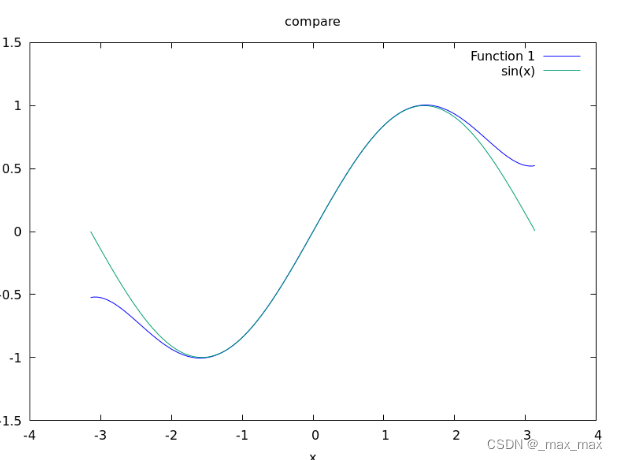
- 泰勒展开结果(5次):

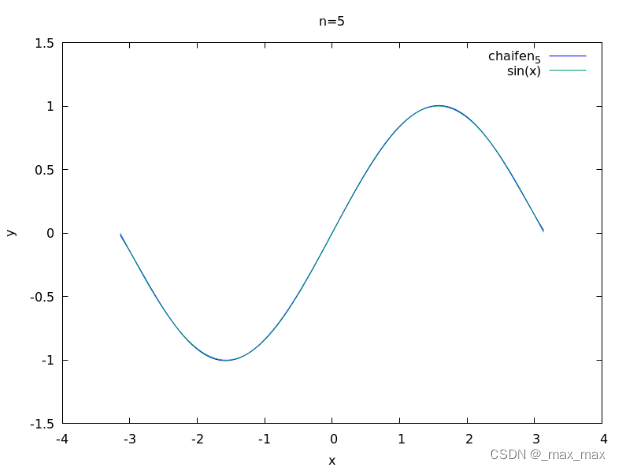
- 最佳平方逼近多项式结果(5次):
免责声明:本站所有文章内容,图片,视频等均是来源于用户投稿和互联网及文摘转载整编而成,不代表本站观点,不承担相关法律责任。其著作权各归其原作者或其出版社所有。如发现本站有涉嫌抄袭侵权/违法违规的内容,侵犯到您的权益,请在线联系站长,一经查实,本站将立刻删除。 本文来自网络,若有侵权,请联系删除,如若转载,请注明出处:https://haidsoft.com/113024.html

